Music / Guitar Effects
User Manual for Electro-Harmonix Triboro Bridge Overdrive Pedal
Quick guide for the Electro-Harmonix Triboro Bridge pedal. Learn how to use the overdrive, distortion, and fuzz modes, adjust the BASS/GATE and TREBLE/TONE controls, and enable the Input Contour EQ.
Table of contents
Quick guide from the manual
The Electro-Harmonix Triboro Bridge is a compact pedal featuring three saturation algorithms: overdrive, distortion, and fuzz. To begin, connect a 9VDC center-negative power supply, plug your instrument into the Input jack, and connect the Output jack to your amplifier. Use the footswitch to engage the effect. The pedal features buffered analog bypass.
Controls & Jacks
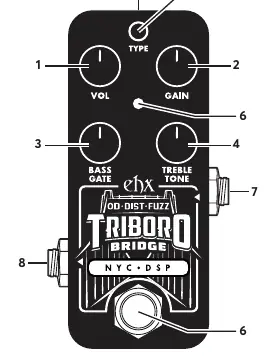
- VOL: Controls the output volume.
- GAIN: Controls the amount of saturation. If the pedal is noisy in fuzz mode, activate the Gate or reduce the Gain.
- BASS/GATE: In overdrive and distortion modes, this acts as a bass control. In fuzz mode, it controls the noise gate threshold. Note: when switching to fuzz mode, the gate is initially deactivated until you move this knob.
- TREBLE/TONE: In overdrive and distortion modes, this boosts or cuts high frequencies. In fuzz mode, it controls the cutoff frequency of a resonant low-pass filter.
- TYPE Button: Press to choose saturation mode: Green (Overdrive), Orange (Distortion), Red (Fuzz).
- Footswitch: Engages or bypasses the effect.
Input Contour Mode
This optional mode cuts bass and boosts mids on the input signal for a more modern character. To enable: press and hold the TYPE button. After two seconds, the LED will blink 8 times quickly to confirm it is enabled. Repeat the procedure to disable (4 slow blinks). This setting is saved through power cycles.
Power Requirements
The device requires a 9VDC, 100mA, center-negative power supply. The unit comes with an Electro-Harmonix 9.6DC-200 power supply. Do not exceed 10.5VDC, as this may damage the device and void the warranty.
Practical help
Common problems
Excessive noise in fuzz mode
Activate the Gate knob or dial back the Gain knob.
Noise gate not working immediately after switching to fuzz mode
The gate is initially deactivated until you move the BASS/GATE knob.
Before use
- Ensure you are using a 9VDC, 100mA, center-negative power supply.
- Connect an instrument cable from your instrument to the Input jack.
- Connect an instrument cable from the Output jack to your amplifier.
- Click the footswitch to engage the effect (LED will light up).
Specs in practice
- Input Impedance
- 2.2MΩ
- Output Impedance
- 680Ω
Images and diagrams
- The pedal features 9 numbered controls and jacks, including volume, gain, tone/gate controls, and the type selection button.
Model compatibility
- Requires 9VDC power supply with center-negative polarity.
- Do not exceed 10.5VDC on the power plug.

Manual page author
Michael Turner
Technical manual editor
Reviews PDF manuals for structure, safety notes, and practical product details so readers can find the right information quickly.