Electronics / Microphones
User Manual for Elgato Wave Panels
Quick start guide for Elgato Wave Panels. Learn how to assemble EasyClick frames, mount panels on smooth or textured walls, and apply acoustic foam.
Table of contents
Manual images
Click an image to enlargeQuick guide from the manual
This guide provides instructions for assembling and mounting Elgato Wave Panels. The system uses an EasyClick frame mechanism and offers two mounting methods depending on your wall surface: adhesive strips for smooth walls or screws for textured walls.
Package contents
- 6 x 6 EasyClick frame pieces
- 3 x Acoustic panels (pattern A)
- 3 x Acoustic panels (pattern B)
- 10 x Clips
- 12 x Screws and wall anchors
- 12 x tesa adhesive strips
Assembling EasyClick frames
Before mounting, assemble the hexagonal frames:
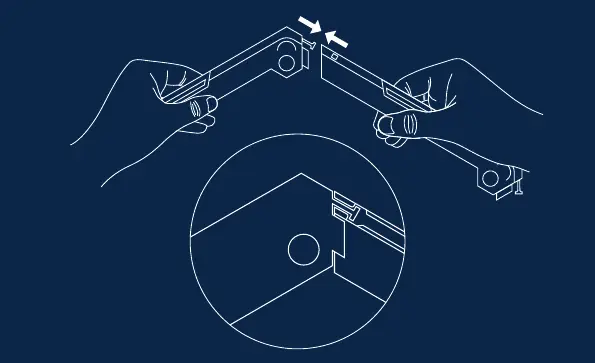
- Take the frame pieces and snap them together to form a hexagon.
- Ensure the pieces are securely locked in place.
Mounting on smooth walls
Use the provided tesa adhesive strips for smooth, non-porous surfaces:
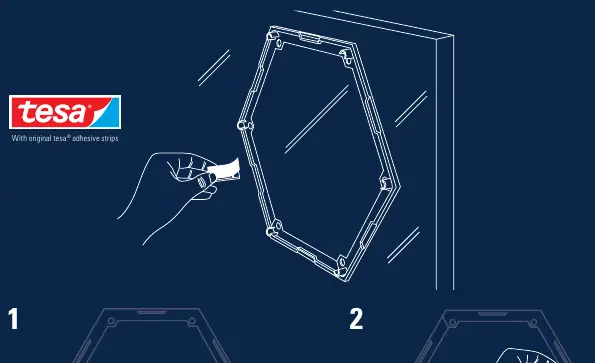
- Clean the frame surface with rubbing alcohol or a silicone-free glass cleaner.
- Clean the wall surface with a dust-free cloth.
- Attach the white side of the adhesive strips to the EasyClick frames.
- Ensure the blue side of the strips faces the wall.
- Press the frame firmly against the wall for 5 seconds.
- Note: These strips are not suitable for vinyl wallpapers, anti-stick surfaces, or porous materials like styrofoam or fabric.
- To remove, hold the frame firmly without pressing and pull the adhesive strips downwards approximately 25 cm parallel to the wall.
Mounting on textured walls
For textured surfaces, use the provided screws:
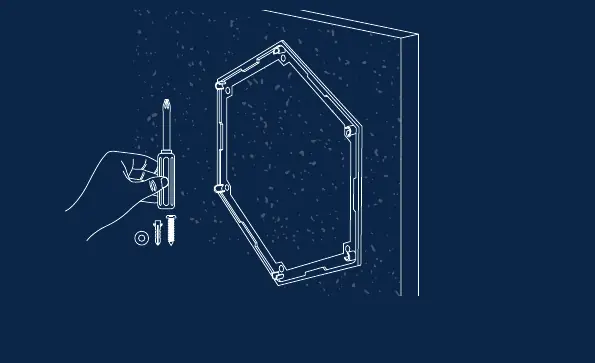
- Mount a panel with a single screw and let it hang in place.
- Use a spirit or laser level to ensure accurate orientation.
- Select appropriate mounting materials based on your specific wall condition.
- For maximum stability, use a combination of adhesive strips, clips, and screws.
Connecting frames and applying foam
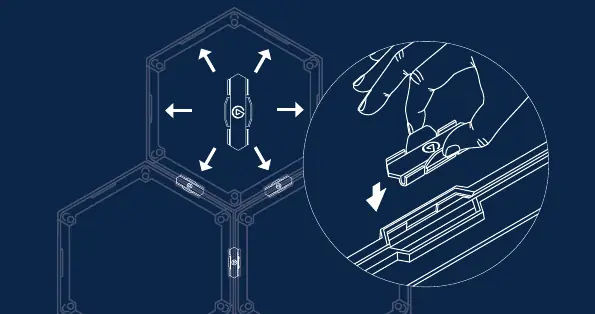
- Connecting frames: Use the provided clips to connect multiple EasyClick frames together for a stable installation.
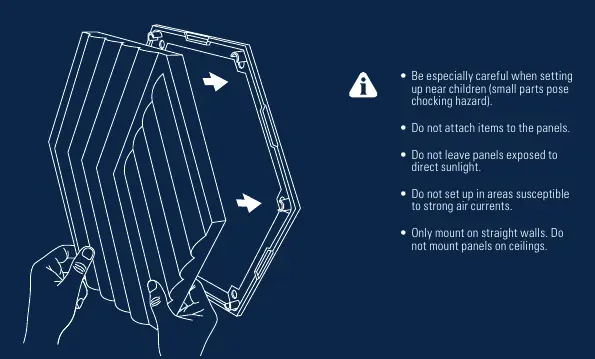
- Applying foam: Once the frames are mounted, press the acoustic foam panels into the frames.
Safety and warnings
- Be careful when setting up near children, as small parts pose a choking hazard.
- Do not attach items to the panels.
- Do not leave panels exposed to direct sunlight.
- Do not set up in areas susceptible to strong air currents.
- Only mount on straight walls; do not mount panels on ceilings.
Manufacturer information
Elgato
Practical help
Common problems
Adhesive strips not sticking
Ensure the wall surface is cleaned with a dust-free cloth and the frame surface is cleaned with rubbing alcohol or silicone-free glass cleaner before application.
Adhesive strips are not suitable
Do not use adhesive strips on vinyl wallpapers, anti-stick surfaces, or porous materials such as styrofoam or fabric.
Panel alignment issues
Use a spirit or laser level to ensure accurate orientation during the mounting process.
Before use
- Clean wall surface with a dust-free cloth.
- Clean frame surface with rubbing alcohol or silicone-free glass cleaner.
- Identify wall type (smooth vs. textured) to choose the correct mounting method.
- Have a spirit or laser level ready for alignment.
- Verify that the wall is straight and not a ceiling.
Images and diagrams
- EasyClick frame assembly: Snap frame pieces together to form a hexagon.
- Smooth wall mounting: Apply adhesive strips to the frame, ensuring the blue side faces the wall.
- Textured wall mounting: Use screws and anchors for secure attachment.
- Connecting frames: Use clips to join multiple frames together.
Model compatibility
- Do not mount panels on ceilings.
- Only mount on straight walls.
- Adhesive strips are not suitable for vinyl wallpapers, anti-stick surfaces, or porous materials.

Manual page author
Emily Carter
User documentation editor
Prepares concise manual descriptions and highlights the most useful setup, operation, and maintenance information for readers.