Electronics / Microphones
Elgato Wave Shock Mount Quick Start Guide
Quick start guide for the Elgato Wave Shock Mount. Learn how to attach the shock mount to a boom arm and install your Wave microphone with these simple steps.
Table of contents
Manual images
Click an image to enlargeQuick Start Guide
This guide provides the necessary steps to install your Elgato Wave Shock Mount and attach your Wave microphone. Ensure you have the shock mount and the included adapters ready before beginning.
Installation

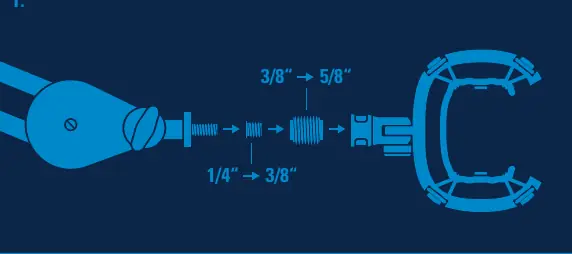
Step 1: Attach to Boom Arm
Secure the Wave Shock Mount to your boom arm. If your boom arm requires a different thread size, use one or both of the included adapters to convert between 1/4", 3/8", and 5/8" threads.
Step 2: Prepare Microphone
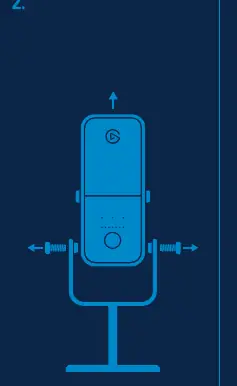
Unscrew your Wave microphone from its original stand. Keep the screws safe as they will be needed to attach the microphone to the shock mount.
Step 3: Secure Microphone
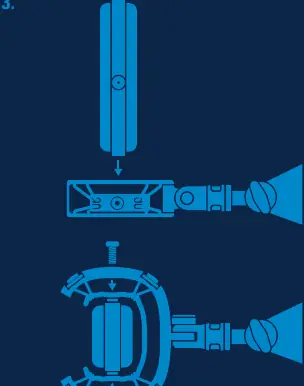
Align the screw holes on your Wave microphone with the eyelets on the Wave Shock Mount. Re-insert the screws to secure the microphone. Do not overtighten the screws to avoid damaging the threads.
Important Usage Notes
- Compatibility: The shock mount is designed specifically for Elgato Wave microphones.
- Adapters: Use the provided adapters to ensure a secure fit on various boom arm models.
- Handling: When attaching the microphone, ensure it is properly aligned before tightening the screws.
Manufacturer information
Elgato
Practical help
Common problems
Microphone does not fit the boom arm thread
Use the included adapters (1/4" to 3/8" or 3/8" to 5/8") to match the thread size of your boom arm.
Screws are difficult to tighten
Ensure the microphone screw holes are perfectly aligned with the shock mount eyelets before inserting screws. Do not force them.
Before use
- Verify you have the shock mount and both included adapters.
- Ensure your boom arm is stable and compatible.
- Remove the microphone from its original stand.
- Check that you have the screws removed from the original stand.
Specs in practice
- 1/4" to 3/8" adapter
- Allows mounting the shock mount to standard 1/4 inch threads.
- 3/8" to 5/8" adapter
- Allows mounting the shock mount to standard 5/8 inch threads.
Images and diagrams
- The diagram on page 4 illustrates the adapter sequence for different boom arm thread sizes.
- The diagrams on page 5 show the process of unscrewing the microphone and aligning it with the shock mount eyelets.
Model compatibility
- Designed for Elgato Wave microphones.
- Compatible with standard boom arm thread sizes (1/4", 3/8", 5/8") using included adapters.

Manual page author
David Miller
Documentation analyst
Organizes user manual content into clear summaries, with attention to model details, product context, and everyday usability.