Electronics / Televisions
Elgato Wave:3 Premium USB Condenser Microphone User Guide
Quick start guide for the Elgato Wave:3 USB condenser microphone, covering setup, hardware controls, and software installation.
Table of contents
Getting Started
The Elgato Wave:3 is a premium USB condenser microphone designed for streamers and content creators. To begin using the device, download and install the official Elgato Wave Link application from elgato.com/gaming/download. This software is essential for managing your audio inputs and utilizing the microphone's advanced features.
Hardware Controls
The Wave:3 features an intuitive multi-function control dial located on the front of the unit. You can push the dial to cycle through different modes and turn it to adjust the settings. The modes include:
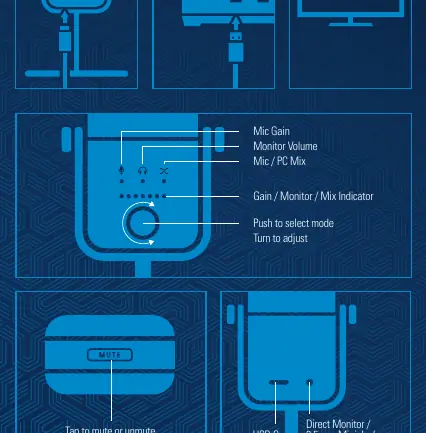
- Mic Gain: Adjusts the sensitivity of the microphone input.
- Monitor Volume: Controls the volume level of the headphones connected to the microphone.
- Mic / PC Mix: Adjusts the balance between the microphone signal and the computer audio output.
The LED indicator provides visual feedback for the currently selected mode and the adjustment level. Additionally, the top of the microphone features a capacitive touch sensor that allows you to tap to instantly mute or unmute the audio.
Connections
The rear of the microphone is equipped with a USB-C port for data and power connection to your computer. It also includes a 3.5 mm mini-jack for direct monitoring, allowing you to plug in headphones for zero-latency audio feedback.
Safety and Compliance
The device operates at a rating of 5V, 500mA. It complies with Part 15 of the FCC Rules, meaning it is designed to provide reasonable protection against harmful interference in residential installations. Users should ensure the device is connected to a stable USB port and avoid unauthorized modifications to the hardware, which could void the authority to operate the equipment.
Official resources from the manual
Manufacturer information
Elgato
Practical help
Common problems
Audio is not being captured or is too quiet.
Use the multi-function dial to select 'Mic Gain' mode and increase the gain level.
Cannot hear computer audio or microphone monitoring.
Ensure headphones are connected to the 3.5mm jack on the back and adjust the 'Monitor Volume' or 'Mic / PC Mix' using the control dial.
Before use
- Download and install the Elgato Wave Link software.
- Connect the microphone to your computer using the provided USB-C cable.
- Connect headphones to the 3.5mm jack for direct monitoring.
- Verify the LED indicator is active to confirm power.
Specs in practice
- Direct Monitor
- Allows you to hear your voice and computer audio in real-time without processing delay.
Images and diagrams
- The front dial is a push-to-select and turn-to-adjust interface.
- The top surface is a touch-sensitive area for muting.
- The rear panel houses the USB-C port and 3.5mm headphone jack.
Model compatibility
- Requires Elgato Wave Link software for full functionality.
- Designed for use with computers; ensure OS compatibility via the official website.

Manual page author
Michael Turner
Technical manual editor
Reviews PDF manuals for structure, safety notes, and practical product details so readers can find the right information quickly.