Music / Instruments
Elgato Key Light Air User Guide
Quick start guide for the Elgato Key Light Air, covering assembly, software installation, Wi-Fi pairing, and safety instructions.
Table of contents
Product Overview
The Elgato Key Light Air is a professional-grade LED lighting solution designed for content creators. It features adjustable brightness and color temperature, controlled via the Elgato Control Center app. The device is designed for indoor use and requires a stable Wi-Fi connection for initial setup.
Assembly
The Key Light Air comes with an adjustable pole and base. Secure the pole to the base using the provided screw. Attach the ball mount to the threaded socket on the back of the light panel. Insert the pole into the ball mount socket and tighten the knob to secure. The pole height is adjustable between 60 cm (24 in) and 89 cm (35 in). Connect the power supply and route the cable through the provided clip and rail for a clean setup.
Software Installation and Pairing
Download the Elgato Control Center app from the App Store or Google Play. Power on the Key Light Air; it will take approximately 10 seconds to boot up. Launch the Control Center app and click the '+' icon to pair the device. Note that the Key Light Air requires a 2.4 GHz Wi-Fi network with WPA or WPA2 encryption. Once paired, you can control the light from any device on your network.
Safety and Maintenance
The Key Light Air may become hot during prolonged use; always handle with care. Do not cover the device, especially the ventilation holes. Keep the unit away from flammable materials, direct sunlight, and strong air currents. If the surface becomes dirty, wipe it lightly with a soft cloth moistened with a little water and mild, neutral detergent. Never use benzene, thinner, or other volatile agents for cleaning.
Reset Procedure
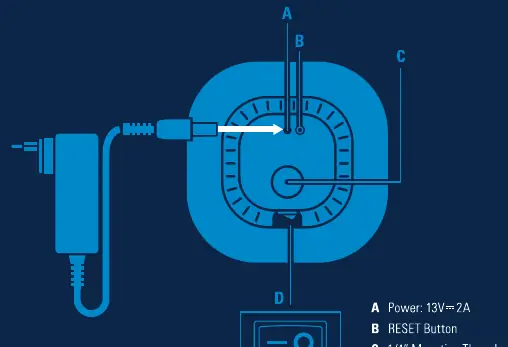
If you need to restore factory settings and erase Wi-Fi credentials, power on the device and press and hold the RESET button for at least 10 seconds until the light flashes three times.
Manufacturer information
Elgato
Practical help
Common problems
Device not connecting to Wi-Fi
Ensure your network is 2.4 GHz and uses WPA/WPA2 encryption. Ensure the device is within range of your router.
Device is hot to the touch
The light may become hot during prolonged use. Always handle with care and ensure ventilation holes are not blocked.
Need to reset Wi-Fi settings
Press and hold the RESET button for 10 seconds until the light flashes 3 times.
Before use
- Ensure you have a 2.4 GHz Wi-Fi network available.
- Download the Elgato Control Center app.
- Place the light on a flat, firm surface to prevent tipping.
- Ensure the power supply is connected and the cable is secured in the rail.
- Check that the ventilation holes are not obstructed.
Specs in practice
- Frequency Range
- 2412 - 2472 MHz (2462 MHz for FCC/ISED).
- Max RF e.i.r.p power
- < 20 dBm.
- Temperature Range
- 0°C - 45°C for safe operation.
Images and diagrams
- A: Power input (13V/2A)
- B: RESET button
- C: 1/4" mounting thread
- D: Power switch (I=ON, 0=OFF)
Model compatibility
- Requires 2.4 GHz Wi-Fi network.
- Supports WPA or WPA2 encryption.
- Compatible with iOS, Android, PC, and Mac via Control Center app.

Manual page author
Michael Turner
Technical manual editor
Reviews PDF manuals for structure, safety notes, and practical product details so readers can find the right information quickly.