HVAC / Fan Controllers
Installation Guide for Enerlites 17000-F3 3-Speed Fan Control
Quick installation and operation guide for the Enerlites 17000-F3 3-Speed Fan Control. Learn how to wire the switch, set fan speeds, and understand technical specifications.
Quick answers from the manual
Quick answer
- The Enerlites 17000-F3 is a single-pole wall switch for 3-speed ceiling fans. It requires no neutral wire and is installed by connecting the Hot, Fan, and Ground wires. p. 1
Key actions
- Turn off power at the circuit breaker before starting installation. p. 1
- Set the ceiling fan to the highest speed using the pull chain before using the wall control. p. 1
First start
- Turn off breaker, connect Hot (Black), Fan (Brown), and Ground (Green) wires, mount switch, turn on breaker, and set fan to high. p. 1
Technical specifications
| Parameter | Value | Meaning | Pages |
|---|---|---|---|
| Voltage | 120 VAC 60Hz | Operating voltage | p. 1 |
| Load rating | 2.5A | Maximum fan load | p. 1 |
Where to find it in the PDF
- Installation and Specifications p. 1
Table of contents
Quick guide from the manual
The Enerlites 17000-F3 is a single-pole wall switch designed to control the speed of a ceiling fan. Important: This device does not require a neutral wire. Before installation, ensure the ceiling fan is set to its highest speed using the pull chain control. This device is for single-pole use only and should not be used with low-voltage ballasts, drivers, receptacles, or motor-operated appliances other than the fan.
Installation
Installation should be performed by a qualified electrician in accordance with the National Electric Code and local regulations.
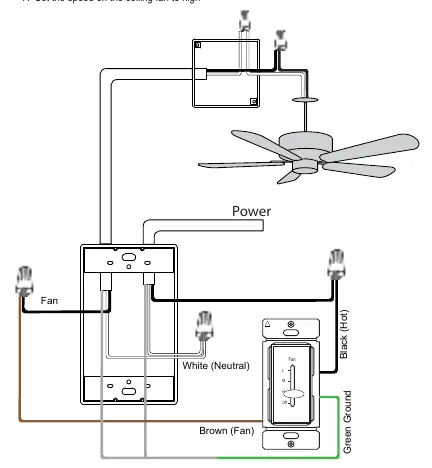
- Turn the POWER OFF at the circuit breaker.
- Connect the HOT wire to the BLACK wire on the switch.
- Connect the FAN wire to the BROWN wire on the switch.
- Connect the GROUND wire to the GREEN wire on the switch.
- Mount the Fan Speed Control to the box with the "UP" indicator pointing up.
- Turn on the Circuit Breaker.
- Set the speed on the ceiling fan to high using the pull chain.
Operation
Use the slide lever on the switch to control the fan speed. Slide the lever to any of the 3 speed settings (L, M, H) or to the "Off" position. The lever will have a noticeable stop at each selection.
Technical Specifications
- Voltage: 120 VAC 60Hz
- Load rating: 2.5A (3-Speed Fan)
- Operating Temperature: 32°F-104°F
Safety Warnings
- DO NOT connect neutral wires to this device.
- DO NOT use with low-voltage ballasts or drivers.
- DO NOT install to control a receptacle, a motor-operated appliance (other than the fan), a fluorescent light fixture, or a transformer-supplied appliance.
- Use with copper or copper-clad wire only.
Practical help
Common problems
Fan does not operate after installation
Verify that the ceiling fan pull chain was set to the highest speed before installing the wall control. Check that all wire connections (Hot, Fan, Ground) are secure.
Risk of overheating or equipment damage
Ensure the device is not used to control receptacles, fluorescent light fixtures, or motor-operated appliances other than the ceiling fan.
Before use
- Turn off power at the circuit breaker.
- Verify the installation is for a single-pole setup.
- Ensure you are using copper or copper-clad wire.
- Set the ceiling fan to its highest speed using the pull chain.
- Confirm you are not connecting a neutral wire.
Specs in practice
- Operating Temperature
- Safe operating range is 32°F to 104°F.
Images and diagrams
- The wiring diagram illustrates the connection of the Hot (Black) wire, Fan (Brown) wire, and Ground (Green) wire to the switch.
Model compatibility
- Single Pole only.
- No neutral wire required.
- Not compatible with low-voltage ballasts or drivers.

Manual page author
Emily Carter
User documentation editor
Prepares concise manual descriptions and highlights the most useful setup, operation, and maintenance information for readers.