Home Appliances / Cleaning Robots
Eufy RoboVac 15C Robot Vacuum Cleaner
Quick guide for the Eufy RoboVac 15C robot vacuum. Learn how to set up, use cleaning modes, connect to Wi-Fi, maintain filters and brushes, and troubleshoot common errors.
Table of contents
Manual images
Click an image to enlargeQuick Start Guide
To get started with your RoboVac 15C, ensure the main power switch on the bottom is turned on. Charge the device fully on the Charging Base before the first use. Remove any power cords, small objects, or fragile items from the floor. For optimal performance, use the EufyHome app to schedule cleanings and control the device remotely.
RoboVac Anatomy
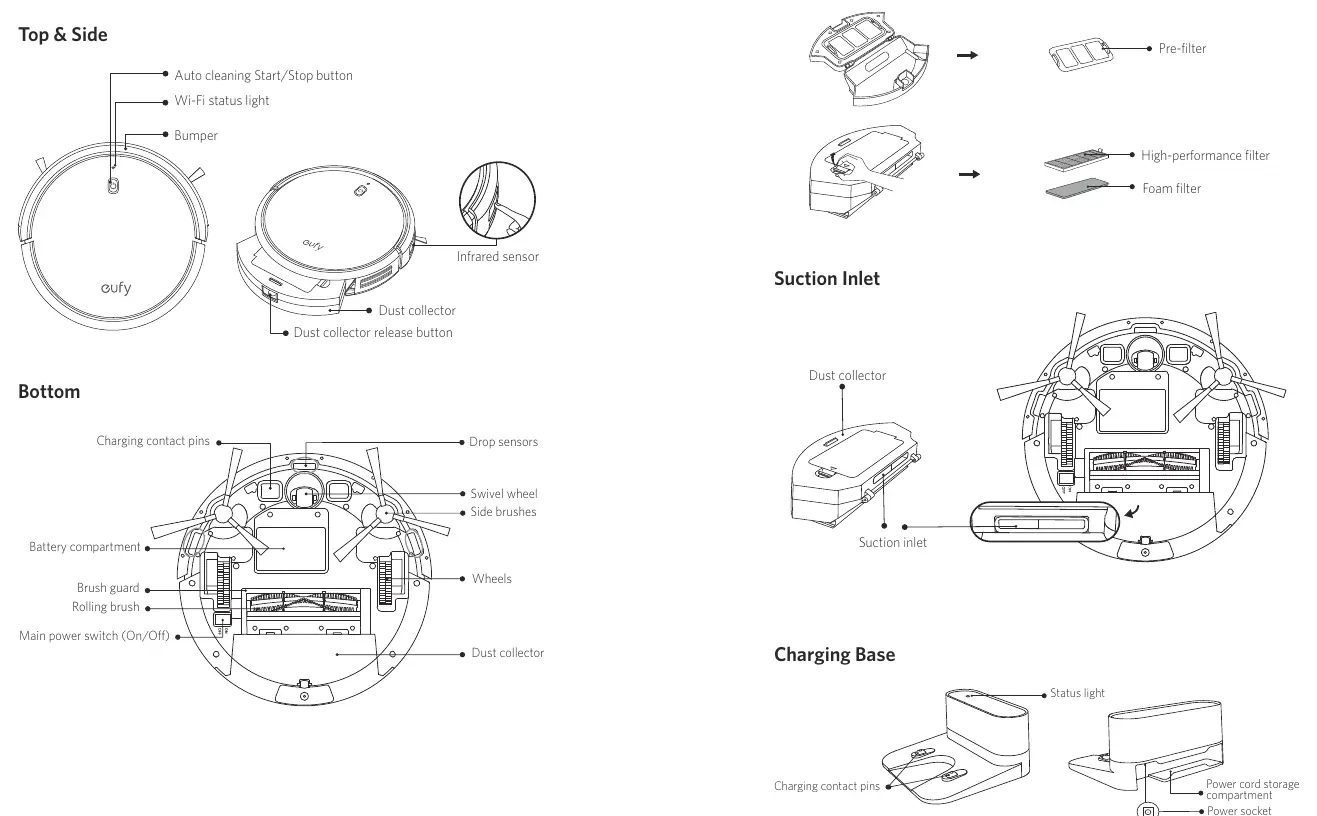
The RoboVac features an auto cleaning button, Wi-Fi status light, and bumper on the top. The bottom includes charging contact pins, drop sensors, a swivel wheel, side brushes, and a rolling brush. The dust collector is located at the rear and can be removed for cleaning.
Preparation and Setup
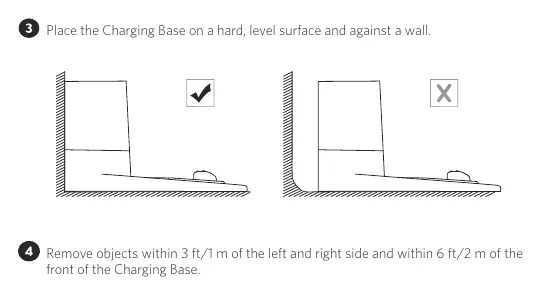
- Charging Base Placement: Place the base on a hard, level surface against a wall. Keep a clearance of 3 ft/1 m to the left and right, and 6 ft/2 m in front.
- Floor Preparation: Remove cords, loose paper, and small objects. Fold tasseled edges of rugs. Use physical barriers for balconies or fireplaces.
- Powering On: Turn on the main power switch on the bottom of the unit. Remove the foam blocks beside the bumper before use.
Using Your RoboVac
You can control the RoboVac using the included remote control or the EufyHome app. The device supports several cleaning modes:
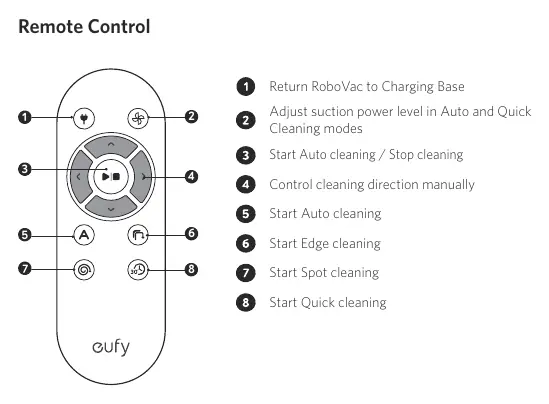
- Auto Cleaning: Optimizes the cleaning path automatically.
- Spot Cleaning: Cleans a specific area in a spiral pattern for 2 minutes.
- Edge Cleaning: Follows walls to clean edges for 20 minutes.
- Quick Cleaning: Cleans for 30 minutes to save power.
- Manual Cleaning: Use directional buttons on the remote to steer the vacuum.
The BoostIQ feature automatically increases suction power on thicker carpets. You can adjust suction levels manually using the remote control.
App and Voice Control
To use the EufyHome app, ensure your smartphone is connected to a 2.4GHz Wi-Fi network. Follow the in-app instructions to pair the device. Once connected, you can also link the RoboVac to Amazon Alexa or Google Assistant for voice control commands like starting or stopping cleaning.
Cleaning and Maintenance
Regular maintenance ensures optimal performance:
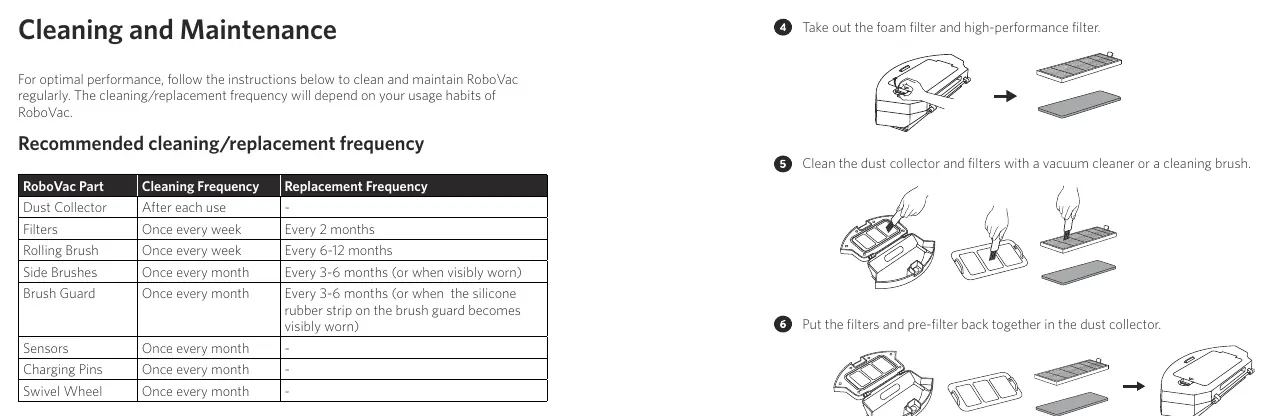
- Dust Collector: Empty after each use. Wash with water if needed (air-dry completely).
- Filters: Clean once a week; replace every 2 months. Do not wash the high-performance filter.
- Rolling Brush: Clean once a week; replace every 6-12 months.
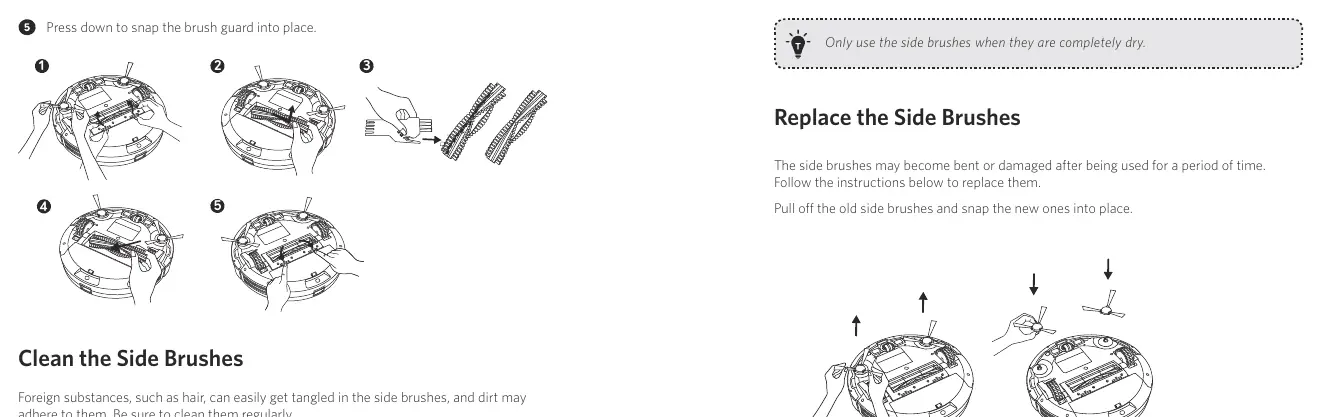
- Side Brushes: Clean once a month; replace every 3-6 months.
- Sensors and Charging Pins: Clean once a month with a dry cloth.
Troubleshooting
If the RoboVac encounters an error, it will emit beeps and the red indicator will flash or stay solid. Refer to the error tone section in the manual to identify the cause (e.g., stuck wheels, blocked suction, or dirty sensors). For Wi-Fi issues, ensure you are using a 2.4GHz network and that the device is fully charged.
Specifications
The RoboVac 15C features a 14.4V Li-ion 2600 mAh battery, a 0.6L dust collector capacity, and a maximum cleaning time of 100 minutes. Charging takes approximately 300-360 minutes.
Manufacturer information
eufy
Practical help
Common problems
RoboVac cannot be activated
Ensure the main power switch is ON, the battery is charged, and remote batteries are fresh.
Suction power is weak
Empty the dust collector, clean the filters, and check the suction inlet for blockages.
Cannot connect to Wi-Fi
Ensure you are using a 2.4GHz network. 5GHz is not supported. Check your password and reset the Wi-Fi connection if necessary.
RoboVac stops suddenly
Check if the device is trapped on an obstacle or if the battery is low.
Before use
- Remove power cords and small objects from the floor.
- Fold tasseled edges of area rugs.
- Place physical barriers in front of fireplaces or dangerous areas.
- Remove foam blocks beside the bumper.
- Ensure the main power switch on the bottom is turned on.
- Charge the device fully before first use.
Specs in practice
- Battery Type
- DC 14.4 V Li-ion 2600 mAh
- Dust Collector Capacity
- 0.6 L
- Cleaning Time
- Max. 100 mins
- Charging Time
- 300 - 360 mins
Images and diagrams
- Remote Control: Buttons for auto, spot, edge, quick, and manual cleaning modes.
- Dust Collector: Exploded view showing pre-filter, foam filter, and high-performance filter.
- Charging Base: Placement requirements: 3 ft/1 m to the left/right and 6 ft/2 m in front.
Model compatibility
- Wi-Fi: Supports 2.4GHz band only (802.11b/g/n). 5GHz is not supported.
- Flooring: Suitable for hard floors and low-pile carpets.
- Smart Home: Compatible with Amazon Alexa and Google Assistant.

Manual page author
Michael Turner
Technical manual editor
Reviews PDF manuals for structure, safety notes, and practical product details so readers can find the right information quickly.