Home Appliances / Cleaning Robots
User Manual for eufy RoboVac 11S Robot Vacuum
Quick guide for the eufy RoboVac 11S robot vacuum. Learn how to set up, charge, schedule cleaning, maintain the filter and brushes, and troubleshoot common errors.
Table of contents
Manual images
Click an image to enlargeQuick Guide from the Manual
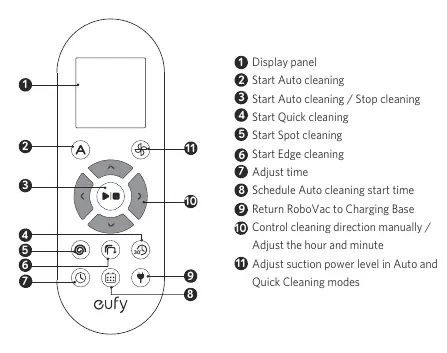
The eufy RoboVac 11S is an automated vacuum cleaner designed for indoor use on hard floors and low-pile carpets. Before first use, ensure the main power switch on the bottom is turned on, install the side brushes, and fully charge the device. The vacuum can be controlled via the included remote control to select cleaning modes, set schedules, and adjust suction power.
RoboVac Anatomy
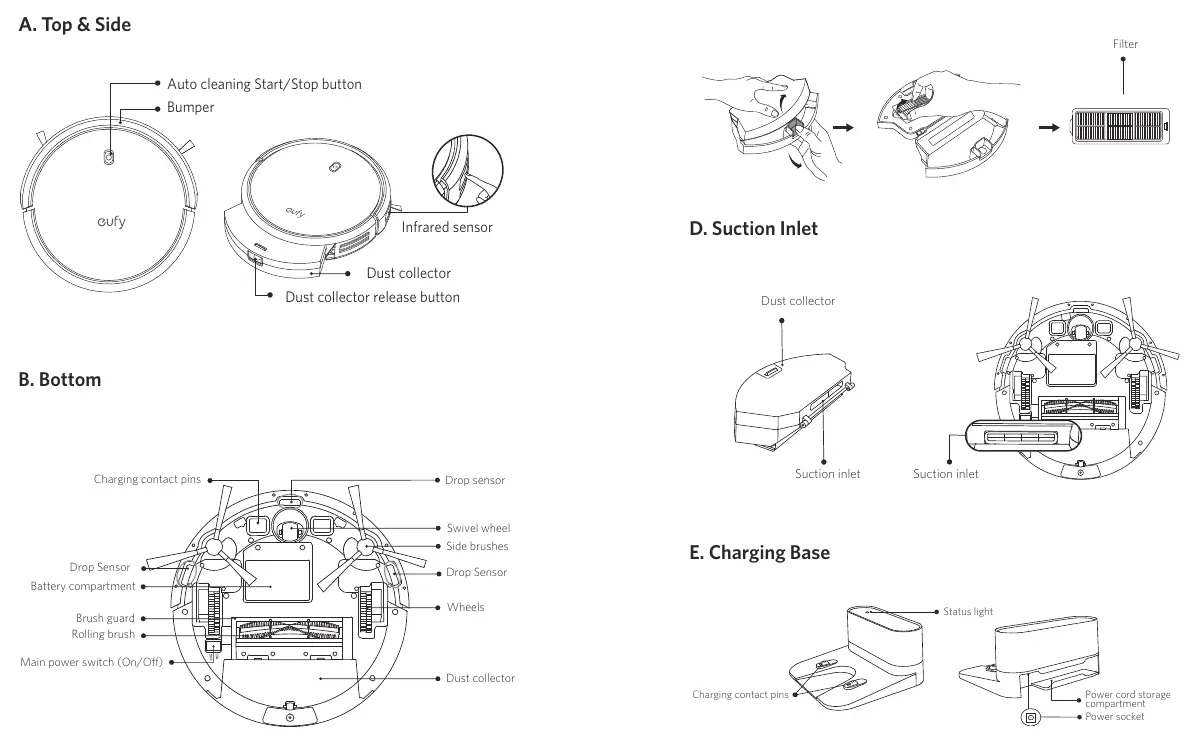
The device features an auto cleaning start/stop button, bumper, and infrared sensor on the top. The bottom includes charging contact pins, drop sensors, wheels, a rolling brush, and the main power switch. The dust collector is located at the rear and contains the filter.
Preparation and Setup
- Clear the floor: Remove power cords, small objects, and fragile items. Fold tasseled edges of area rugs.
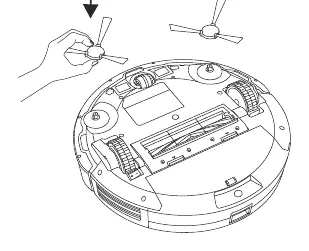
- Side Brushes: Install the side brushes before the first use.
- Power Switch: Ensure the main power switch on the bottom is in the ON position.
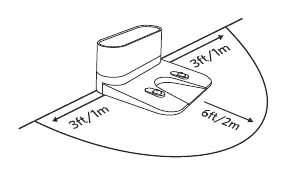
- Charging Base: Place the base on a level surface against a wall. Keep a clearance of 3 ft/1 m on the left and right sides, and 6 ft/2 m in front.
Charging
RoboVac returns to the charging base automatically when the battery is low or cleaning is finished. You can also manually return it by pressing the home button on the remote control. Always keep the charging base plugged in for the auto-return feature to work.
Cleaning Modes
- Auto Cleaning: Optimizes the cleaning path automatically. This is the default mode.
- Spot Cleaning: Cleans a specific area in a spiral pattern for 2 minutes.
- Edge Cleaning: Follows walls to clean edges for 20 minutes.
- Quick Cleaning: Cleans for 30 minutes to save power.
- Manual Cleaning: Use the directional buttons on the remote to control the vacuum manually.
BoostIQ Feature: Automatically increases suction power on thicker carpets. This can be adjusted or disabled in Auto or Quick cleaning modes.
Cleaning and Maintenance
Regular maintenance ensures optimal performance:
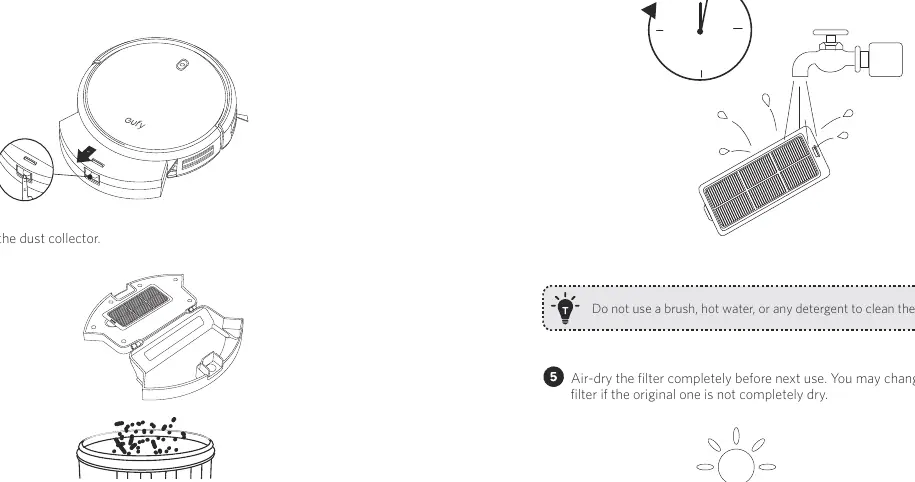
- Dust Collector & Filter: Empty after each use. Rinse the filter with water once a week (twice if you have pets). Air-dry for 24 hours before re-installing. Do not use detergent or hot water.
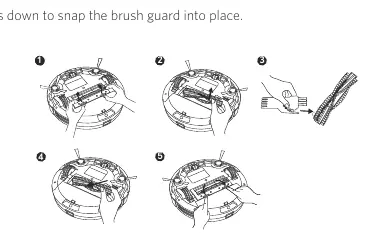
- Rolling Brush: Clean once a week. Remove hair and debris.
- Side Brushes: Clean once a month. Replace every 3-6 months.
- Sensors & Charging Pins: Dust off once a month with a dry cloth.
- Swivel Wheel: Clean once a month.
Troubleshooting
If the RoboVac encounters an issue, it will emit beeps and the red indicator will flash or stay solid. Common solutions include:
- Cannot activate: Check power switch, charge battery, or replace remote batteries.
- Weak suction: Check for obstructions in the inlet, empty the dust collector, or dry the filter.
- Cannot return to base: Clear obstacles around the base and clean charging pins.
- Abnormal movement: Clean sensors with a dry cloth and restart the device.
Specifications
- Input: 19V 0.6A
- Battery Voltage: DC 14.4V
- Dust Collector Capacity: 0.6 L
- Cleaning Time: Max 100 mins
- Charging Time: 300 - 360 mins
Manufacturer information
eufy
Practical help
Common problems
RoboVac cannot be activated
Ensure the main power switch is ON, the battery is fully charged, and remote batteries are fresh.
Suction power is weak
Check for obstructions in the suction inlet, empty the dust collector, and ensure the filter is completely dry.
RoboVac cannot return to the Charging Base
Remove objects within 3 ft/1 m to the left/right and 6 ft/2 m in front of the base. Clean the charging contact pins.
Rolling brush does not rotate
Clean the rolling brush and ensure it and the brush guard are installed properly.
Before use
- Remove power cords and small objects from the floor.
- Fold tasseled edges of area rugs.
- Install the side brushes.
- Turn on the main power switch on the bottom of the unit.
- Place the Charging Base against a wall on a hard, level surface.
Specs in practice
- Battery Voltage
- DC 14.4V Li-ion 2600 mAh battery.
- Dust Collector Capacity
- 0.6 Liters.
- Cleaning Time
- Maximum of 100 minutes per charge.
Images and diagrams
- RoboVac Anatomy: Identifies the bumper, sensors, dust collector, and charging pins.
- Remote Control: Shows buttons for cleaning modes, scheduling, and manual control.
- Charging Base: Illustrates the required clearance for proper docking.
Model compatibility
- Use only on hard floor surfaces or low-pile carpet.
- Do not use on unfinished, unsealed, waxed, or rough floors.
- Keep away from wet areas.

Manual page author
David Miller
Documentation analyst
Organizes user manual content into clear summaries, with attention to model details, product context, and everyday usability.