Home Appliances / Vacuum Cleaners
Bissell SpotBot 1200/7887/12U9 Series User Guide
Quick guide for the Bissell SpotBot 1200/7887/12U9 series. Learn how to operate the handsfree and manual cleaning modes, perform maintenance, and troubleshoot common issues.
Table of contents
Manual images
Click an image to enlargeQuick guide from the manual
The Bissell SpotBot is designed for spot and stain cleaning on carpets and upholstery. It features an Automatic Smart System with pre-programmed cycles for handsfree cleaning, as well as a manual hose mode for targeted cleaning. Always use genuine Bissell cleaning formulas to maintain the machine and warranty.
Product overview
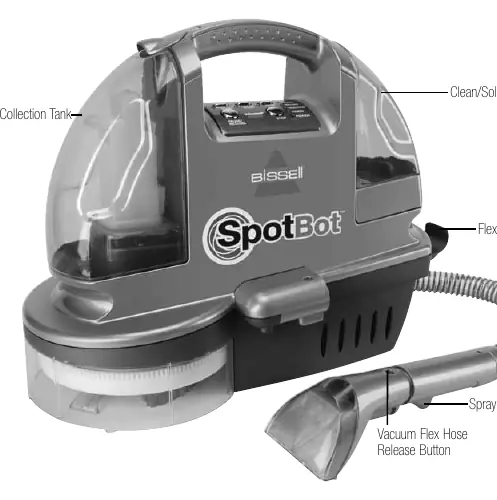
The unit consists of a clean/solution tank, a dirty/collection tank, a vacuum flex hose, and a control panel. The control panel allows you to select between Surface Stain and Set-In Stain cycles, as well as manual/hose mode. Some models include a built-in heater for improved cleaning performance.
Getting ready
To prepare the unit for use:
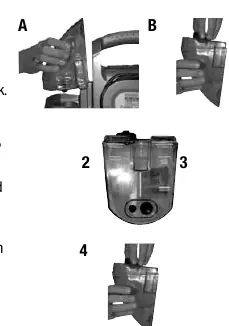
- Remove the clean tank by lifting it straight up.
- Unscrew the cap at the bottom of the tank.
- Fill with water and the appropriate Bissell formula based on the stain type (use the fill lines on the tank).
- Replace and tighten the cap, then place the tank back onto the unit.
- Unwrap the power cord completely before operation.
Handsfree cleaning
For automatic cleaning:
- Place the unit directly over the stain, ensuring it is in the center of the cleaning area.
- Select the desired cleaning cycle (Surface Stain or Set-In Stain) on the control panel.
- If your model has a heater, press the heater button to activate it.
- The unit will automatically spray, brush, and suction.
- When the cycle is complete, the unit will beep. Press the Stop button to end the cycle.
Manual and hose cleaning
For upholstery, stairs, or car interiors:
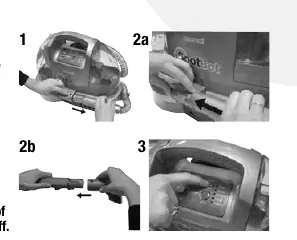
- Remove the hose from the unit by pressing the release button.
- Attach the Tough Stain Brush to the grip of the flex hose.
- Select the Manual/Hose button on the control panel.
- Hold the tool no more than six inches above the soiled surface.
- Depress the spray trigger for about 5 seconds to apply solution, then scrub the area with the brush.
- Apply downward pressure and pull the suction nozzle toward you to remove the dirt and solution.
Maintenance and care
Regular maintenance ensures optimal performance:
- Hose cleaning: Suction clean water through the hose before turning off the unit to rinse it out.
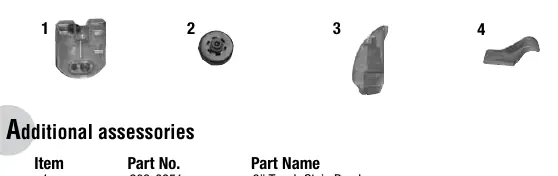
- Tank maintenance: Empty and rinse the dirty/collection tank after each use. Periodically clean the black valve inside the dirty tank.
- Storage: Wrap the power cord and hose around the unit. Store indoors at room temperature (40° to 110°F).
Troubleshooting
If you encounter issues:
- Cleaner will not run: Check the power cord, fuse/breaker, ensure the unit is sitting flat on the carpet, and verify the hose is snapped into place.
- No spray: Clean the spray tip, fill the clean tank, or reseat the tank until bubbles appear.
- No suction: Empty the dirty tank, ensure the latch is secure, or check if the black valve is missing.
Manufacturer information
Bissell Inc.
Practical help
Common problems
Cleaner will not run
Check power cord, fuse/breaker, ensure unit is flat on carpet, and hose is snapped into place.
Reduced or no spray
Clean the spray tip, fill the clean tank, or reseat the tank until bubbles appear at the base.
No suction
Empty the dirty tank, ensure the tank latch is down, or check if the black valve is missing.
Unusual noise
Check if the clean/solution tank is out of fluid and refill if necessary.
Before use
- Unwrap the power cord completely.
- Fill the clean tank with water and appropriate Bissell formula.
- Ensure the dirty tank is empty and latched securely.
- Dry vacuum the area before using the handsfree feature.
- Check upholstery stuffing for colorfastness before cleaning.
Specs in practice
- Surface Stain Cycle
- Approx. 3-minute cycle for stains on the surface of carpeting.
- Set-In Stain Cycle
- Approx. 6-minute cycle for deep-set stains.
Images and diagrams
- Product View: Identifies tanks, hose, spray trigger, and brush storage.
- Manual/Hose Cleaning: Shows how to remove the hose and attach the Tough Stain Brush.
Model compatibility
- Use only genuine Bissell cleaning formulas.
- Do not use with non-Bissell solutions to avoid voiding the warranty.

Manual page author
Emily Carter
User documentation editor
Prepares concise manual descriptions and highlights the most useful setup, operation, and maintenance information for readers.