Smart Home / Smart Plugs & Strips
User Manual for Eve Energy Strip
Quick guide for the Eve Energy Strip. Learn how to set up your smart power strip, use the Eve app, manage surge protection, and troubleshoot common issues.
Table of contents
Manual images
Click an image to enlargeQuick guide from the manual
To set up your Eve Energy Strip, follow these steps:
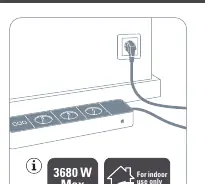
- Plug the Eve Energy Strip into a wall outlet.
- Download the Eve app from the App Store.
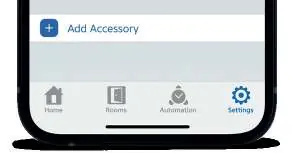
- Open the Eve app and tap Add Accessory. Follow the on-screen instructions to complete the setup.
If you have already set up another accessory, go to Settings in the Eve app to add the Eve Energy Strip to your home.
Safety Instructions
Please adhere to the following safety guidelines:
- Do not connect appliances that prohibit remote control (e.g., grills, toasters, portable heaters, or appliances with heating elements).
- Do not connect appliances that radiate heat and may cause ignition (e.g., radiation heaters, portable floodlights).
- Do not connect appliances with hazardous moving parts (e.g., drills, table saws, blenders).
- Ensure the device is installed in a suitable area that is easily accessible for disconnection.
- Do not cover the device while in use.
- Do not connect in series.
- The device is for indoor use only.
Surge Protection
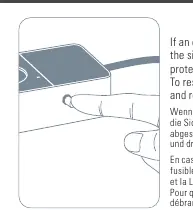
The white LED on the device remains illuminated to indicate that surge protection is fully functional. If an electrical surge is detected, the fuse on the side of the Eve Energy Strip will eject, and the protection indicator LED will turn off. To resume operation, unplug the device and reinsert the fuse.
Operation
You can control devices connected to the Eve Energy Strip using the Eve app or Siri. Additionally, you can use the onboard buttons on the strip to manually toggle connected devices.
Mounting
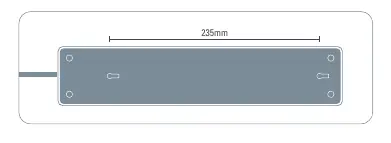
The Eve Energy Strip can be mounted using the holes on the back. Use only M4x25 mm screws for mounting. The distance between the mounting holes is 235 mm.
Reset
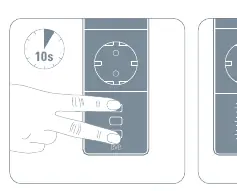
To reset the device, hold the buttons for 10 seconds until the LED flashes 3 times.
Specifications
- Total current rating: 16 A, 230 V (3680 W)
- Operating temperature: 0 °C to 35 °C
- Operating humidity: 5 % to 95 % (non-condensed)
- Frequency Range: 2412 - 2472 MHz
- Max. RF Power (EIRP):< 18.11 dBm
- Standby Power Consumption:< 2 W
- Cable length: 188 - 196 cm
Manufacturer information
Eve Systems
Practical help
Common problems
Surge protection triggered (LED off)
Unplug the device from the wall, then reinsert the fuse located on the side of the unit.
Device not responding or setup issues
Perform a factory reset by holding the onboard buttons for 10 seconds until the LED flashes 3 times.
Before use
- Ensure the device is used indoors only.
- Verify that the total load of connected appliances does not exceed 3680 W.
- Confirm that connected appliances are safe for remote control (avoid heaters, toasters, or tools with moving parts).
- Ensure the power outlet is easily accessible for disconnection.
Specs in practice
- Total current rating
- Maximum load capacity is 16 A or 3680 W.
- Frequency Range
- Operates on 2.4 GHz Wi-Fi (2412 - 2472 MHz).
- Operating temperature
- Must be used in environments between 0 °C and 35 °C.
Images and diagrams
- The fuse is located on the side of the strip and ejects when a surge is detected.
- Mounting holes are located on the back, spaced 235 mm apart.
Model compatibility
- Requires the Eve app for setup and control.
- Compatible with Siri voice control.

Manual page author
Emily Carter
User documentation editor
Prepares concise manual descriptions and highlights the most useful setup, operation, and maintenance information for readers.