Smart Home / Smart Plugs & Strips
Eve Energy Smart Plug User Guide
Quick start guide for the Eve Energy smart plug. Learn how to set up, control, monitor energy consumption, and reset your device.
Table of contents
Manual images
Click an image to enlargeQuick Start Guide
The Eve Energy smart plug allows you to control your appliances, monitor energy consumption, and set schedules. To get started, plug the device into a wall socket. Ensure the connected load does not exceed 1800W. This device is intended for indoor use only.
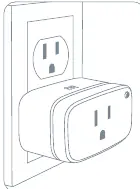
Setup Process
Download the Eve app from the App Store. Open the app and tap Add Accessory to begin the setup process. If you have already set up another accessory, navigate to the Eve settings menu to add Eve Energy to your home.
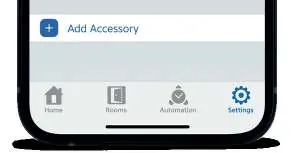
Features and Control
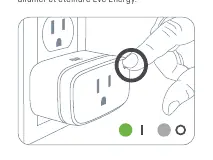
Eve Energy can be controlled using the Eve app, the Home app, and Siri. You can also manually switch the device on and off using the button on the side of the plug. Additional features include:
- Child lock: Enable to prevent accidental operation.
- Status LED: Adjust the brightness or behavior of the status light.
- Firmware updates: Install updates to keep the device current.
Schedules and Automation
You can set schedules that control connected devices automatically, independently of your iPhone or home hub. Use the Eve app to configure schedules that match your daily routine. For remote access and advanced automations, an Apple TV HD, Apple TV 4K, or HomePod using the same iCloud account is required.
Energy Monitoring
Eve Energy tracks your power consumption. You can view projected costs based on the last minute, day, or week. To calculate costs accurately, go to Settings > General > Energy Cost and enter your local electricity rate.
Privacy
Eve Energy is designed to protect your personal data. All data is fully encrypted and transferred directly between the device and your iPhone, iPad, or home hub. There is no Eve cloud, no registration required, and no profiling.
Resetting the Device
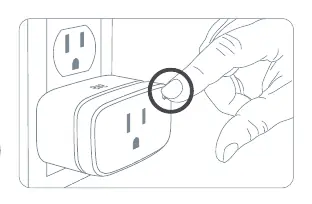
If you need to reset the device, hold the button on the side of the plug for 10 seconds.
Safety and Specifications
This device is for indoor use only. It supports a maximum load of 1800W. Operating frequency range is 2402 – 2480 MHz (BLE) and 2405 – 2480 MHz (Thread). The operating temperature range is 32 °F – 104 °F. Keep your HomeKit Setup Code in a safe place as it is required to add the device to your home.
Manufacturer information
Eve Systems
Practical help
Common problems
Device not connecting or responding
Ensure the device is plugged into a power socket. Try resetting the device by holding the button on the side for 10 seconds.
Cannot add device to home
If you have already set up another accessory, go to the Eve settings menu within the app to add the new device.
Before use
- Ensure the device is for indoor use only.
- Check that the connected appliance does not exceed 1800W.
- Download the Eve app from the App Store.
- Keep your HomeKit Setup Code in a safe place.
Specs in practice
- Frequency range
- 2402 – 2480 MHz (BLE) / 2405 – 2480 MHz (Thread) for wireless communication.
- Temperature range
- The device operates safely between 32 °F and 104 °F.
Images and diagrams
- Reset procedure: Hold the button on the side of the plug for 10 seconds.
- Manual control: Press the button on the side of the plug to toggle power on and off.
Model compatibility
- Requires Apple TV HD, Apple TV 4K, or HomePod for remote access and automations.

Manual page author
Michael Turner
Technical manual editor
Reviews PDF manuals for structure, safety notes, and practical product details so readers can find the right information quickly.