Smart Home / Smart Relays
User Manual for SwitchBot Plug Mini
Quick guide for the SwitchBot Plug Mini. Learn how to set up, use the power button functions, understand LED indicators, and troubleshoot your smart plug.
Table of contents
Manual images
Click an image to enlargeQuick guide from the manual
To begin using your SwitchBot Plug Mini, ensure you have a smartphone or tablet with Bluetooth 4.2 or later. Download the SwitchBot app from the App Store or Google Play Store. Create an account or sign in to proceed with the setup. Ensure your Wi-Fi network is 2.4 GHz, as 5 GHz networks are not supported.
Product overview
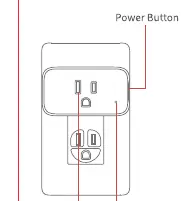
The device consists of a power socket, a power button located on the side, and an LED indicator light. The package includes the Plug Mini and this user manual.
Setup and operation
The power button allows for manual control and device configuration:
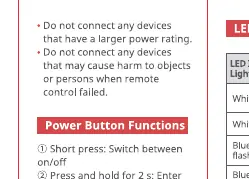
- Short press: Switch the plug on or off.
- Press and hold for 2 seconds: Enter adding mode to pair with the app.
- Press and hold for 15 seconds: Reset the device to factory settings.
LED indicator light
The LED light provides status updates:
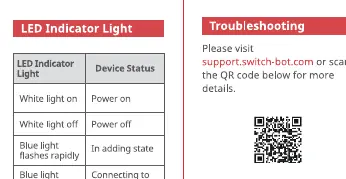
- White light on: Power is on.
- White light off: Power is off.
- Blue light flashes rapidly: In adding mode.
- Blue light flashes slowly: Connecting to the internet.
- Blue light turns off: Connected to the internet.
- Blue light lights up then turns off: Reset to factory settings successfully.
Safety information
For indoor use only. Keep the device dry and away from humid or extreme environments to prevent fire, burns, or electric shock. Do not attempt to disassemble or modify the device. Do not connect appliances that may cause danger if left unattended, such as electric stoves or heaters.
Specifications
- Model: W1901400
- Input Voltage: 100 - 125 V AC
- Rated Power: 1875 W
- Operating Current: 15 A (resistive load)
- Connectivity: Wi-Fi 802.11 b/g/n (2.4 GHz), Bluetooth Low Energy
- Operating Temperature: -15 °C to 40 °C (5 °F to 104 °F)
Troubleshooting
If you encounter issues, please visit support.switch-bot.com for more details. Ensure the device is not being used with appliances that exceed the rated power or that could cause hazards if left unattended.
Official resources from the manual
Practical help
Common problems
Device not connecting to the internet
Ensure your Wi-Fi network is 2.4 GHz and that your smartphone has Bluetooth enabled during the setup process.
Device unresponsive or acting unexpectedly
Perform a factory reset by pressing and holding the power button for 15 seconds until the blue light flashes.
Before use
- Ensure your smartphone or tablet supports Bluetooth 4.2 or later.
- Download the SwitchBot app.
- Verify your Wi-Fi network is 2.4 GHz.
- Keep the device indoors and away from moisture.
- Do not plug in heaters or stoves that require supervision.
Specs in practice
- 2.4 GHz Wi-Fi
- Required frequency for internet connectivity; 5 GHz is not supported.
Images and diagrams
- The Power Button is located on the side of the unit for manual toggling and pairing.
- The LED Indicator Light changes color and flash pattern to indicate power and connection status.
Model compatibility
- Requires Bluetooth 4.2 or later for initial setup.
- Only compatible with 2.4 GHz Wi-Fi networks.

Manual page author
Michael Turner
Technical manual editor
Reviews PDF manuals for structure, safety notes, and practical product details so readers can find the right information quickly.