Tools / Impact Wrenches
User Manual for Extol Premium 8891806 Cordless Impact Drill
Comprehensive user guide for the Extol Premium 8891806 series cordless impact drill. Includes setup, operation, battery charging, safety instructions, and technical specifications.
Quick answers from the manual
Quick answer
- The Extol Premium 8891806 is a cordless impact drill powered by the SHARE 20V battery system. It features a brushless motor, Spinlock chuck, and three operating modes: drilling, impact drilling, and screwdriving. p. 28
Key actions
- Insert battery p. 30
- Select mode p. 30
First start
- Charge battery p. 30
Problems and fixes
Drill bit slips
Tighten the chuck securely.
p. 30Technical specifications
| Parameter | Value | Meaning | Pages |
|---|---|---|---|
| Max. Torque | 50 Nm | Hard torque setting | p. 29 |
Where to find it in the PDF
- Technical Specifications p. 29
Table of contents
Quick guide from the manual
The Extol Premium 8891806 is a compact, powerful cordless impact drill featuring a brushless motor and the SHARE 20V battery system. Before first use, ensure the battery is fully charged. To operate, insert the battery into the handle until it clicks, select the desired mode (drilling, impact drilling, or screwdriving) using the mode ring, and set the speed range (1 for high torque/screwdriving, 2 for high speed/drilling).
Description and components
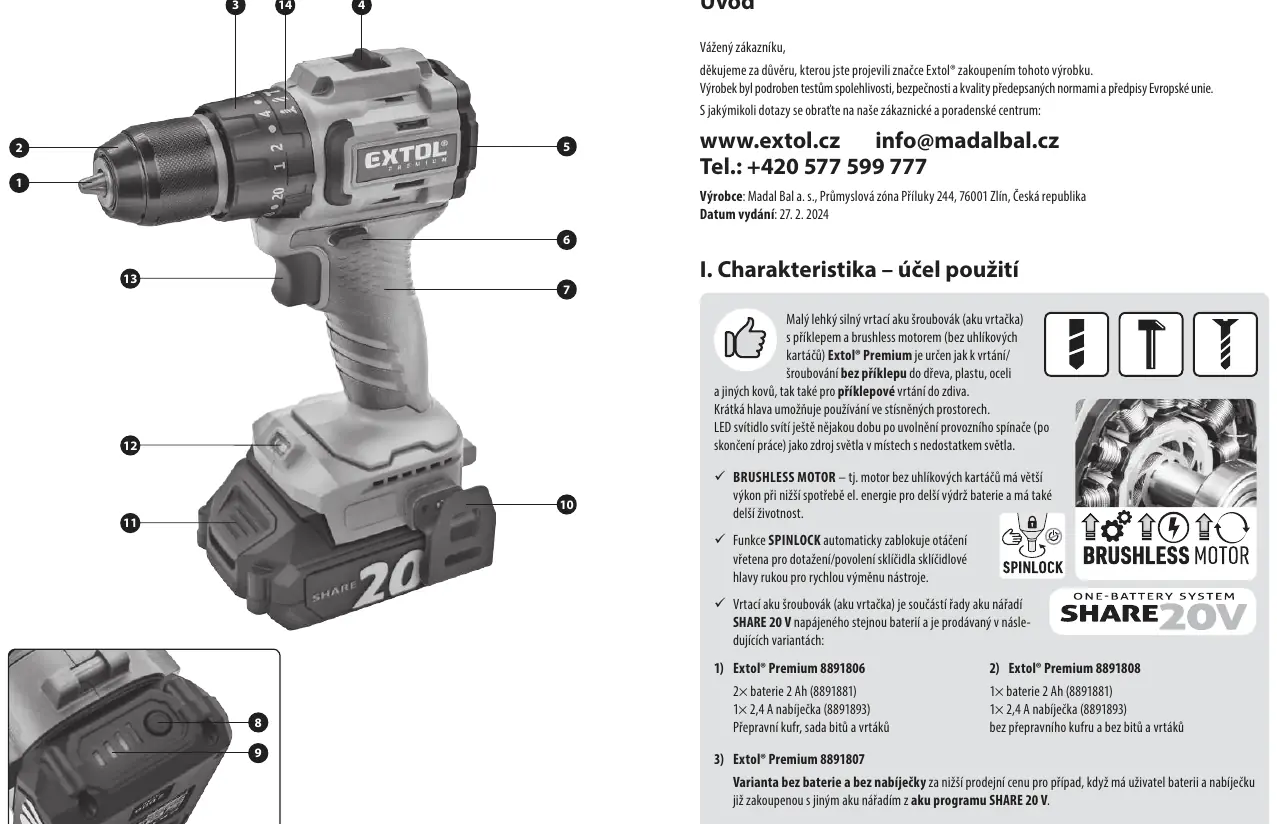
The drill features a keyless chuck with a SPINLOCK function for easy tool changes. The LED light illuminates the work area and remains on briefly after the trigger is released. The drill is part of the SHARE 20V system, meaning it is compatible with other tools in this series.
Battery charging
Charge the battery at an ambient temperature between 10°C and 40°C. Insert the battery into the charger. The charging process is indicated by LED lights on the charger. Once fully charged, the charger automatically stops to prevent overcharging. Always disconnect the charger from the power source after charging.
Operation
- Inserting/Exchanging tools: Hold the chuck head and turn the spindle to open/close the chuck. The SPINLOCK function holds the spindle steady during this process.
- Rotation direction: Use the toggle switch to set the rotation direction. The middle position locks the trigger.
- Setting torque: Use the torque ring to adjust the tightening force. Start with a low setting and increase gradually to avoid damaging the screw or material.
- Speed settings: Use the speed switch (1 or 2) to match the speed to the task.
Safety instructions
Always wear eye, hearing, and respiratory protection when working, especially when generating dust. Ensure the work area is clean and well-lit. Be aware that the tool generates an electromagnetic field that may affect medical implants. Do not use the tool in explosive environments.
Maintenance and storage
Store the tool in a safe, dry place out of reach of children. Remove the battery before storage. Protect the battery from moisture, frost, and high temperatures. Keep the tool clean and check for any damaged parts before use.
Manufacturer information
Extol
Practical help
Common problems
Drill bit slips in the chuck
Ensure the chuck is tightened securely using the SPINLOCK function to hold the spindle steady.
Battery not charging
Check if the battery is properly inserted and the charger is connected to a 220-240V power source.
Tool stops during operation
The battery may be depleted or the overload protection may have triggered. Check the battery charge level.
Before use
- Check battery charge level
- Ensure the correct bit is inserted
- Select the appropriate mode (drill/impact/screw)
- Set the correct speed range (1 or 2)
- Verify the rotation direction switch is set correctly
Specs in practice
- Speed settings
- I (0-500 rpm) for high torque, II (0-1800 rpm) for high speed.
Images and diagrams
- Figure 1 shows the main components: chuck, torque ring, speed switch, and battery release.
Model compatibility
- Compatible with all SHARE 20 V batteries and chargers.

Manual page author
David Miller
Documentation analyst
Organizes user manual content into clear summaries, with attention to model details, product context, and everyday usability.