General / Other Manuals
Falmec Tab Range Hood Installation and User Guide
Quick guide for the Falmec Tab range hood, covering installation, electrical connection, operation, maintenance, and safety instructions.
Table of contents
Manual images
Jump to the sectionQuick guide from the manual
This document provides essential instructions for the installation, operation, and maintenance of the Falmec Tab range hood. It is intended for qualified personnel for installation and for the end-user for daily operation and maintenance. Always ensure the hood is disconnected from the power supply before performing any maintenance.
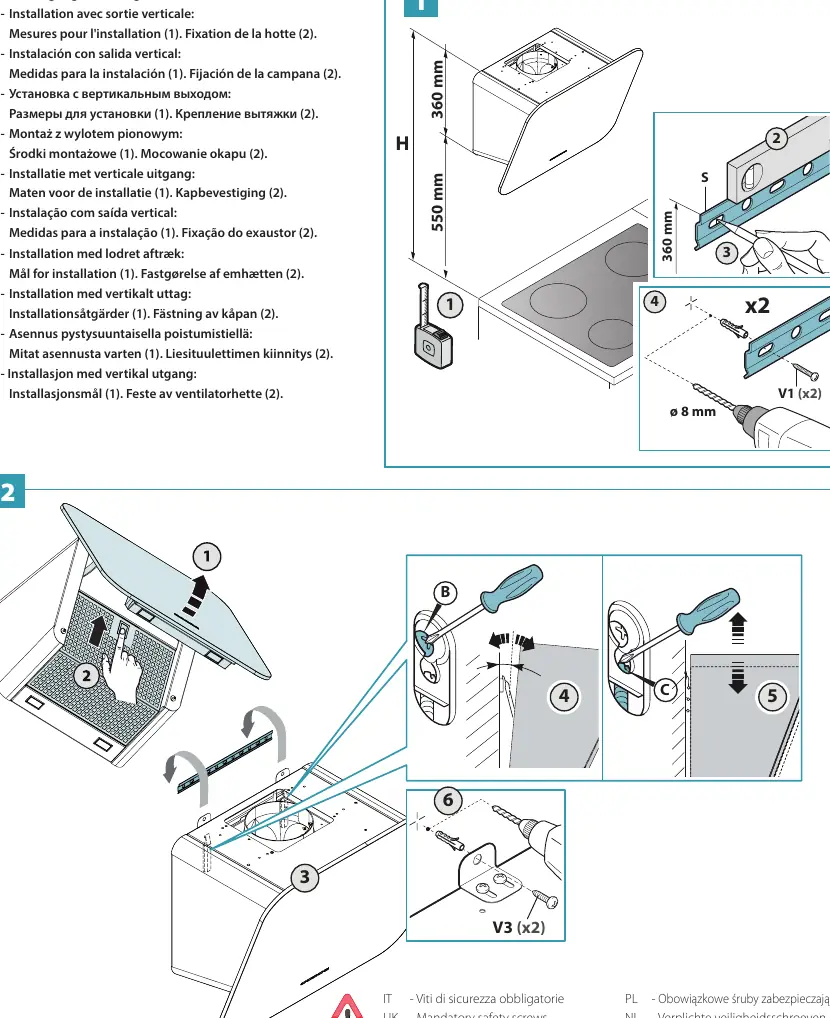
Installation
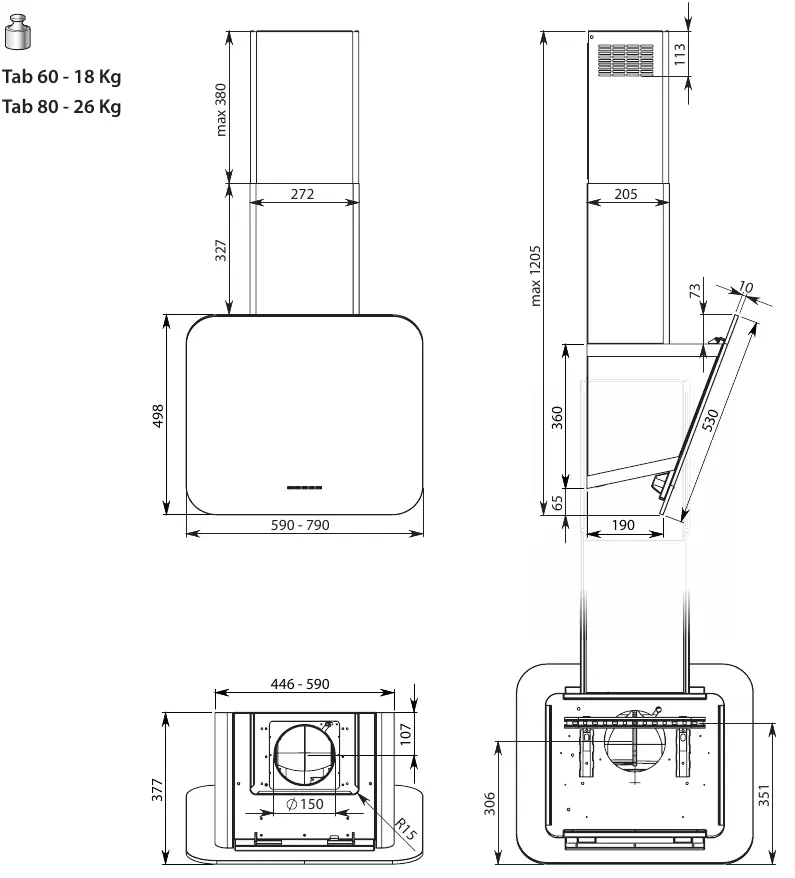
Installation must be performed by qualified personnel in compliance with local regulations. The hood is designed for masonry walls; for other wall types, assess alternative fastening systems based on wall strength and hood weight (Tab 60: 18 kg, Tab 80: 26 kg). Ensure the electrical system is earthed and compliant with local standards. The minimum distance between the cooking surface and the hood should be at least 65 cm for gas cookers, though this may be reduced as per specific installation instructions.
Operation
The hood features an electronic control panel:
- Motor ON/OFF: Starts at the speed stored during the previous shutdown.
- Speed Control: Increase or decrease speed from 1 to 4. Speed 4 is temporary and reverts to speed 3 after a few minutes.
- Light: Toggle lighting on/off.
- Timer: Activates auto-switch-off after 15 minutes.
- Filter Alarm: Indicates when metal grease filters require maintenance (after approx. 30 hours of use). Press the timer button for 3 seconds to reset.
Maintenance
Regular maintenance is crucial for performance and safety:
- External Surfaces: Clean at least every 15 days using mild detergent or specific stainless steel wipes (e.g., Magic Steel). Avoid excessive water near controls.
- Metal Grease Filters: Wash at least monthly in hot water with neutral detergent. Dishwasher use is permitted at low temperatures (max 55°C).
- Active Carbon Filters: Replace every 3-4 months under normal usage conditions.
Safety
Do not connect the hood to combustion exhaust pipes (boilers, fireplaces, etc.). Ensure adequate room ventilation when using the hood simultaneously with gas-powered appliances. Do not use the hood without metal grease filters installed.
Manufacturer information
Falmec S.p.a.
Practical help
Common problems
Hood does not turn on
Check if the power supply is connected and if the main switch is on. If the cable or components are damaged, contact an authorized service center.
Reduced suction performance
Check if the grease filters are saturated and need cleaning, or if the carbon filters need replacement. Ensure the exhaust pipe is not obstructed or too long.
Filter alarm LED is on
This indicates the grease filters need cleaning (after ~30 hours of use). Clean the filters and reset the alarm by pressing the timer button for 3 seconds.
Before use
- Ensure the hood is properly installed and secured to the wall.
- Verify that the electrical connection is earthed and compliant.
- Check that the grease filters are correctly installed.
- Ensure the exhaust pipe (if applicable) is correctly connected and not obstructed.
- Check that the voltage matches the data plate inside the hood.
Images and diagrams
- Page 2: Dimensions and weight specifications for Tab 60 and Tab 80 models.
- Page 4: Vertical outlet installation steps and mandatory safety screws.
- Page 6: Rear outlet installation and motor repositioning steps.
- Page 10: Installation of factory-fitted and optional filters.
Model compatibility
- The provided fixing kit is for masonry walls only.
- For gas cookers, the minimum distance is generally 65 cm, unless otherwise specified in installation instructions.
- Not for outdoor use; do not expose to atmospheric elements.

Manual page author
David Miller
Documentation analyst
Organizes user manual content into clear summaries, with attention to model details, product context, and everyday usability.