HVAC / Thermostats & Controls
User Manual for Finder Bliss2 Smart Thermostat 1C.B1.9.005.0007
Quick guide for the Finder Bliss2 smart thermostat. Learn how to install, configure, pair with the gateway, and operate your heating/cooling system.
Quick answers from the manual
Quick answer
- The Finder Bliss2 is a smart thermostat controlled via the Finder Bliss app. It requires a 2nd generation gateway (1Y.GU.005.1) for smart features and 2.4GHz Wi-Fi connectivity. p. 1, 4, 12
Key actions
- Pairing the thermostat with the gateway p. 8, 10, 17
- Wiring the thermostat p. 3
First start
- Download the Finder Bliss app and follow the in-app tutorial to configure the Gateway and associate the thermostat. p. 4, 12
Problems and fixes
Signal transmission test shows poor connection
Bring the two devices closer.
p. 5, 9Maintenance and reset
- Press the button on the gateway for > 10 seconds to restore factory settings. p. 4
Technical specifications
| Parameter | Value | Meaning | Pages |
|---|---|---|---|
| Power supply | 3x 1.5V AAA | Alkaline batteries type AAA - LR03 | p. 3 |
| Output | 5A 250V AC | Changeover volt-free contact | p. 3 |
Where to find it in the PDF
- Installation p. 3
- Gateway Setup p. 4, 12
- Operation p. 4, 5, 6
Table of contents
Manual images
Click an image to enlargeQuick guide from the manual
The Finder Bliss2 is a smart thermostat designed for home climate control. To use its smart features, it must be paired with the 2nd generation Gateway (Type 1Y.GU.005.1). The system is configured via the Finder Bliss app. Key operations include manual temperature adjustment, automatic scheduling, and humidity monitoring.
Technical specifications
- Power supply: 3x 1.5V AAA alkaline batteries (LR03).
- Temperature adjustment: +5 to +37°C.
- Resolution: 0.1°C.
- Output: 5A 250V AC changeover volt-free contact.
- Degree of protection: IP20.
- Mounting: Wall.
Installation
Safety Requirements: Installation must be performed by experienced personnel. Ensure the heating system (pump, valve, boiler) is powered off before connecting.

Positioning: Install the thermostat away from heat sources (radiators, direct sunlight, kitchens) and away from doors or windows. Mount approximately 1.5 meters above floor level.
Fixing to wall: Detach the thermostat from its base by inserting two fingers into the central rear hole and pulling the front towards you. Secure the base to the wall using the provided screws. Do not over-tighten.
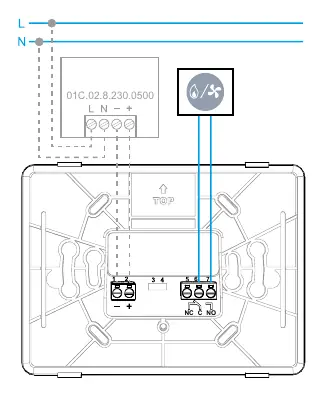
Electrical connections: Refer to your heating system instructions. Connect wires to terminals 6 (COM) and 7 (NO) of the thermostat.
Gateway setup
The Bliss2 thermostat requires the 2nd generation Gateway (Type 1Y.GU.005.1) for connectivity. The gateway works only with 2.4GHz Wi-Fi networks.
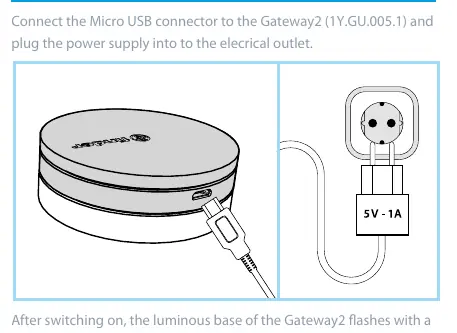
- Connect the Micro USB power supply to the Gateway and plug it into an electrical outlet.
- Download the Finder Bliss app from the Google Play Store or Apple Store.
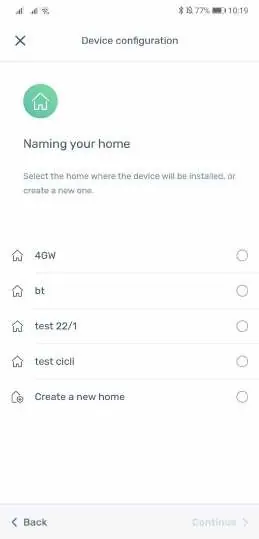
- Follow the in-app tutorial to configure the Gateway and associate the thermostat.
Operation
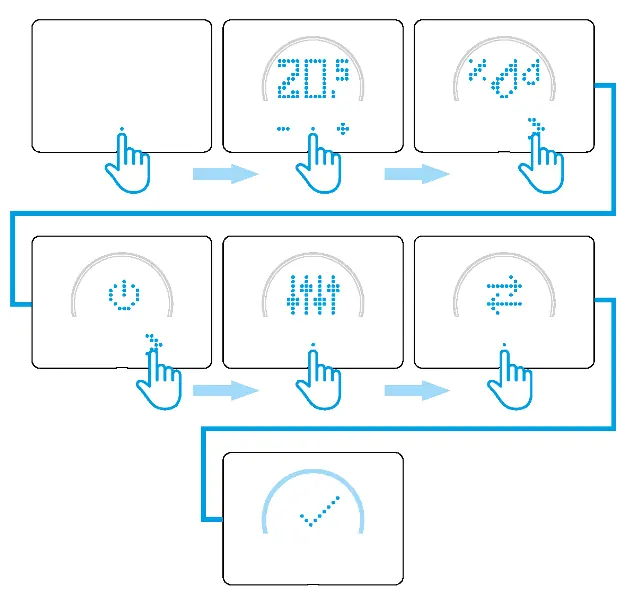
Manual Mode: Press the center point to wake the display. Use + or - to set the target temperature. You can set the duration for manual mode (h01 to h∞). Confirm by pressing the center point.
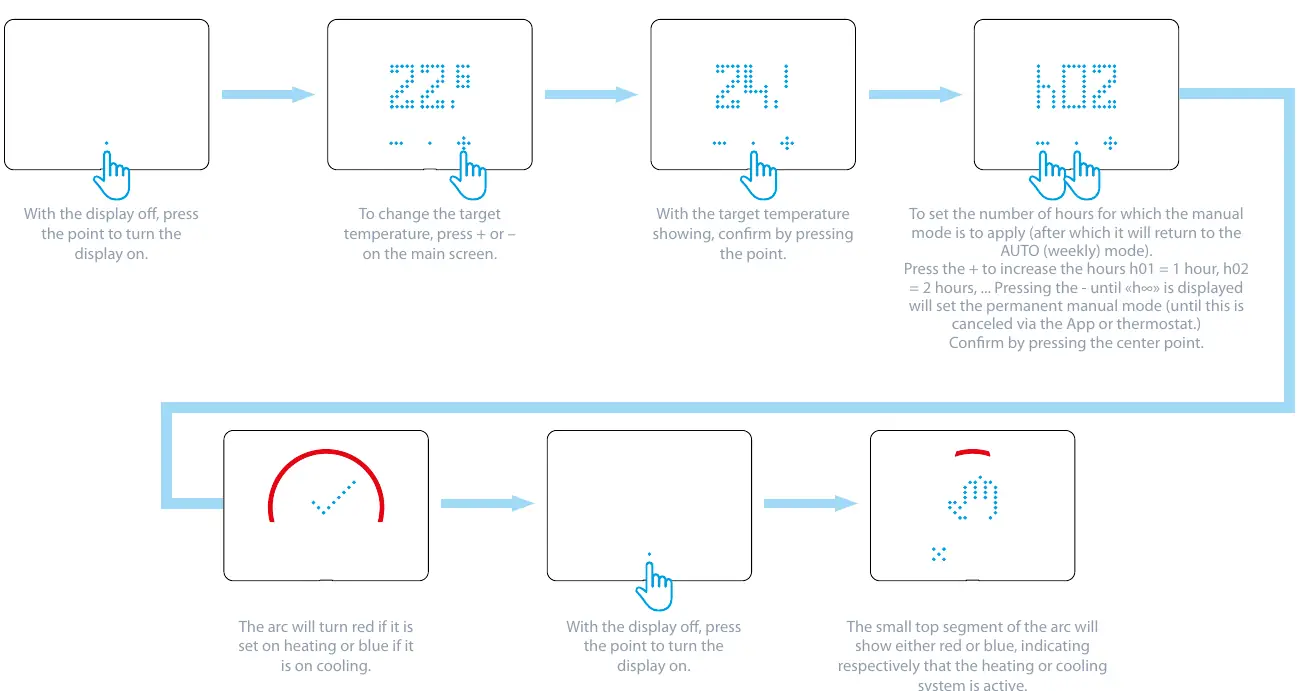
Automatic Mode: The thermostat follows the schedule programmed via the App. The display shows the current room temperature.
On/Off Mode: Allows turning the thermostat off while maintaining a frost protection setting of +5°C.
Troubleshooting
Transmission Test: You can perform a signal test between the gateway and the thermostat via the settings menu. Results range from 0 (Signal Absent) to 10 (Very Good). If the signal is poor, move the devices closer.
Gateway LED status:
- White (Fading): Waiting for configuration.
- White (Fixed): Wi-Fi and Cloud connected.
- White (2 Flashes): Wi-Fi connected, no Cloud.
- White (3 Flashes): No Wi-Fi, no Cloud.
- Blue (Flashing): Sending Bluetooth commands.
- Red (Flashing): Sending commands to thermostat.
Manufacturer information
Finder S.p.A.
Practical help
Common problems
Gateway unreachable (Signal 0)
Ensure the gateway is powered and within range. Bring the gateway and thermostat closer.
No connection to Cloud (2 or 3 flashes)
Check your home Wi-Fi network and internet connection. Ensure you are using a 2.4GHz network.
Thermostat not responding
Check battery levels and polarity. Ensure the thermostat is properly mounted on the base.
Before use
- Ensure heating system is powered off.
- Verify 2.4GHz Wi-Fi network availability.
- Download Finder Bliss app.
- Check load compatibility (5A 250V AC).
- Insert 3x AAA batteries with correct polarity.
Images and diagrams
- Wiring diagram shows connection to terminals 6 (COM) and 7 (NO).
- Gateway LED status indicates Wi-Fi and Cloud connection status.
Model compatibility
- Compatible only with 2nd generation gateway Type 1Y.GU.005.1.
- Requires 2.4GHz Wi-Fi network.

Manual page author
Emily Carter
User documentation editor
Prepares concise manual descriptions and highlights the most useful setup, operation, and maintenance information for readers.