HVAC / Thermostats & Controls
User Guide for NodOn Pilot Wire Heating Module SIN-2-FP-21
Comprehensive user guide for the NodOn Pilot Wire Heating Module SIN-2-FP-21. Includes installation instructions, wiring diagrams, pairing procedures with controllers and gateways, and heating mode management.
Quick answers from the manual
Quick answer
- The NodOn Pilot Wire Heating Module (SIN-2-FP-21) is an EnOcean-compatible device that allows remote control of pilot wire heaters. It supports 6 heating modes and can be paired with up to 18 controllers. p. 1, 2
Key actions
- Pairing: Press the module button 3 times consecutively. p. 1, 2
- Reset: Press and hold the button for >5 seconds, then press once briefly. p. 1, 2
First start
- Upon first power-up, the module defaults to 'Comfort' mode with the LED green. p. 1, 2
Problems and fixes
LED blinks orange during pairing
More than 18 controllers are already paired; remove one to add a new one.
p. 1, 2Maintenance and reset
- Reset procedure: Hold button >5s (LED blinks orange), then press once briefly. p. 1, 2
Technical specifications
| Parameter | Value | Meaning | Pages |
|---|---|---|---|
| Max Power | 3680 W | Maximum power of the connected heater. | p. 1, 2 |
| Power Supply | 230V AC ~ 50Hz | Required electrical input. | p. 1, 2 |
Where to find it in the PDF
- Installation and Wiring p. 1, 2
- Usage and Pairing p. 1, 2
Table of contents
Manual images
Click an image to enlargeQuick Guide from the Manual
The NodOn Pilot Wire Heating Module allows you to control pilot wire heaters via an EnOcean network. Key operations include:
- Pairing: Press the module button 3 times consecutively (less than 2 seconds). The LED will blink red.
- Reset: Press and hold the module button for more than 5 seconds until the LED blinks orange, then press once briefly to confirm.
- Mode Switching: Press the button briefly to cycle through heating modes.
Safety Warnings
Danger of Electrocution: Always cut the power supply from the breaker box before performing any installation or maintenance. Improper installation can cause fire or electric shock. If you are not confident with electrical installations, consult a professional. The device must be installed inside a compliant connecting box and is for indoor use only.
Installation
The module is designed to be installed behind the grommet of the pilot wire heater. Ensure the power is disconnected before starting.
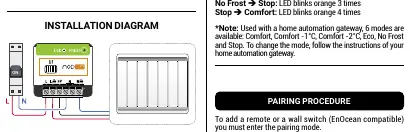
- Cut the power supply.
- Dismantle the grommet connecting your pilot wire heater.
- Connect the wires according to the wiring diagram:
- L: Line
- L (heater): Heater Line
- FP: Pilot Wire
- N: Neutral
- N (heater): Heater Neutral
- Ensure the pilot wire is correctly connected to the FP terminal.
- Reinstall the grommet and turn the power back on.
Usage and Modes
Upon first power-up, the module defaults to "Comfort" mode (LED green). Press the button briefly to change modes. The LED will blink orange to confirm the new mode:
- Comfort to Eco: 1 blink
- Eco to No Frost: 2 blinks
- No Frost to Stop: 3 blinks
- Stop to Comfort: 4 blinks
Note: When used with a home automation gateway, 6 modes are available: Comfort, Comfort -1°C, Comfort -2°C, Eco, No Frost, and Stop.
Pairing
To add a remote or wall switch (EnOcean compatible):
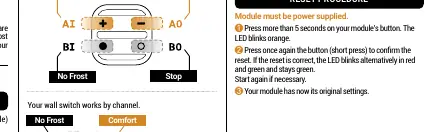
- Ensure the module is powered.
- Launch pairing mode by pressing the module button 3 times consecutively. The LED blinks red.
- You have 30 seconds to pair your controller by pressing the button on the controller.
- The module LED will blink green twice to confirm pairing.
Note: If the LED blinks orange during pairing, the maximum limit of 18 controllers has been reached. You must remove an existing controller to add a new one.
Technical Specifications
- Reference: SIN-2-FP-21
- Power Supply: 230V AC ~ 50Hz
- Max Heater Power: 3680 W
- Protocol: EnOcean (Profile D2-01-0C)
- Range: Up to 30m indoor
- Operating Temperature: -20°C to 40°C (varies by installation type)
- Protection Rating: IP 20
Practical help
Common problems
LED blinks orange during pairing
The maximum limit of 18 controllers has been reached. You must remove an existing controller to add a new one.
Module not responding or needs factory reset
Perform the reset procedure: Press and hold the button for >5 seconds (LED blinks orange), then press once briefly to confirm.
Before use
- Ensure power is cut at the breaker box before installation.
- Verify the pilot wire is connected to the FP terminal.
- Ensure the module is installed in a compliant connecting box.
- Confirm the heater is a pilot wire type compatible with EnOcean.
Images and diagrams
- Figure 1 illustrates the wiring connections for Line (L), Neutral (N), and Pilot Wire (FP) terminals.
Model compatibility
- Compatible with EnOcean protocol (Profile D2-01-0C).
- Supports up to 18 controllers simultaneously.

Manual page author
Emily Carter
User documentation editor
Prepares concise manual descriptions and highlights the most useful setup, operation, and maintenance information for readers.