Home Appliances / Dehumidifiers
User Manual for Flama 1319FL 12LT Digital Dehumidifier
Quick guide for the Flama 1319FL 12LT Digital Dehumidifier. Learn about setup, operation modes, maintenance, troubleshooting, and safety precautions.
Table of contents
Important Information
Before using the Flama 1319FL 12LT Digital Dehumidifier, please note the following critical requirements:
- Rest Period: After transport, cleaning, or maintenance, leave the unit in an upright position for at least 12 hours before connecting it to the power supply.
- Clearance: Maintain a surrounding space of approximately 50 cm to ensure proper air circulation.
- Safety: Do not install, operate, or store the appliance in a space smaller than 4 m².
- Refrigerant: This appliance contains R290 propane gas, which is flammable. Keep away from heat sources and open flames.
Description
The dehumidifier features a control panel, water tank, air filter, and drainage port. The control panel includes buttons for Power, Mode, Humidity control, Timer, Fan Speed, and Child Lock.
Operation
Power: Press the POWER button to turn the unit on or off. Upon first use, ensure the water tank is correctly positioned.
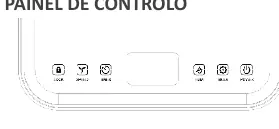
Modes: Press the MODE button to cycle through:
- Automatic Mode: The fan and compressor operate based on the set humidity. Speed and humidity can be adjusted.
- Continuous Drying Mode: The unit runs continuously; humidity cannot be adjusted.
- Rest Mode: Indicators dim after 10 seconds, and fan speed switches to low. Humidity is adjustable in this mode.
Settings:
- Humidity Control (HUM): Adjusts target humidity between 30% and 80% in 5% increments. Long press to view current ambient temperature.
- Timer (TIMER): Set operation time from 0 to 24 hours in 1-hour intervals.
- Fan Speed (SPEED): Toggle between high and low speeds (only in automatic mode).
- Child Lock (LOCK): Long press to lock buttons.
Water Tank and Drainage
When the tank is full, the unit will buzz and the "full tank" light will turn on. Power off the unit, slide out the tank, empty it, and clean it before replacing. For continuous operation, connect a drain hose to the drainage port, ensuring it is placed below the drainage orifice and not bent.
Cleaning and Maintenance
Air Filter: Clean the air filter every two weeks. Remove the filter, use a vacuum cleaner to remove dust, or wash with water and mild detergent if very dirty. Ensure it is completely dry before replacing. Do not operate the unit without the filter.
Troubleshooting
If the unit fails to operate, check the power connection, water tank position, and ambient temperature (must be between 5°C and 35°C). Error codes like E2, LO, Oi, CI, or Ch indicate specific sensor or protection issues; contact technical assistance if problems persist.
Manufacturer information
FLAMA, SA
Practical help
Common problems
Appliance does not turn on
Check power connection, ensure water tank is not full and is correctly placed, and verify ambient temperature is between 5°C and 35°C.
Poor performance
Clean the air filter and ensure intake/outlet ducts are not obstructed.
Excessive noise
Ensure the appliance is on a stable, level surface and the air filter is clean.
Before use
- Place the unit in an upright position for 12 hours before first use.
- Ensure at least 50 cm of clearance around the unit.
- Check that the water tank is correctly inserted.
- Verify the power supply voltage matches the rating plate.
Specs in practice
- Dehumidification capacity
- 10L/day (at 30°C/80% RH).
- Tank capacity
- 2.0 L.
- Operating temperature
- 5°C - 35°C.
Images and diagrams
- Control panel: Includes Power, Mode, Humidity, Timer, Speed, and Lock buttons.
- Indicator lights: Blue (65%).
Model compatibility
- Do not use in spaces smaller than 4m².

Manual page author
Michael Turner
Technical manual editor
Reviews PDF manuals for structure, safety notes, and practical product details so readers can find the right information quickly.