Music / Guitar Effects
User Manual for Flamma FC06 Distortion Pedal
Quick guide for the Flamma FC06 Distortion Pedal. Learn about power requirements, control settings, HP/LP modes, and technical specifications.
Table of contents
Quick Start Guide
To begin using your Flamma FC06 Distortion Pedal, ensure you have a compatible 9V DC power supply. Connect your guitar to the INPUT jack and your amplifier to the OUTPUT jack using standard 1/4 inch mono cables. Engage the effect using the footswitch; the LED will light up when the effect is active.
Top Panel Controls
The FC06 features several controls to shape your sound:
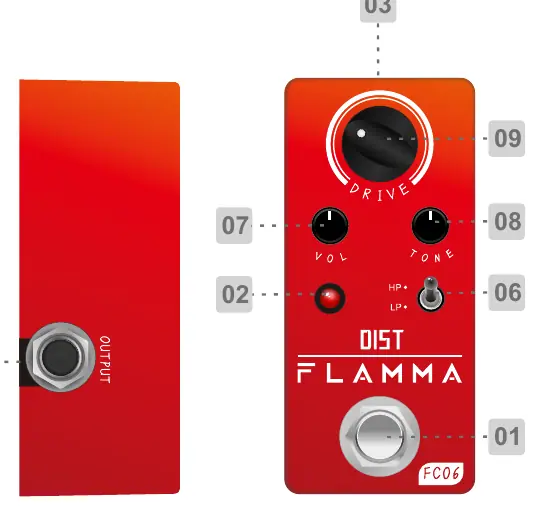
- TRUE BYPASS Footswitch: Toggles the effect on and off.
- ON/OFF LED: Indicates the current status of the pedal.
- Mode Switch: Selects between HP (High Peak) and LP (Low Peak) modes.
- VOLUME Knob: Adjusts the overall output volume of the drive sound.
- TONE Knob: Adjusts the tonal character of the drive sound.
- DRIVE Knob: Adjusts the gain level of the distortion.
Effects Modes
The pedal offers two distinct modes:
- HP (High Peak): Boosts the bottom-end frequencies. Increasing the distortion with the Drive knob provides more volume and a slight boost in the high-mid range (around 3.5KHz).
- LP (Low Peak): Provides minimal coloration to the original sound, making it ideal for clean boosting.
Specifications
- Effects Modes: 2 (HP, LP)
- Input: 1/4 inch monaural jack (Impedance: 470k Ohms)
- Output: 1/4 inch monaural jack (Impedance: 1k Ohms)
- Power Requirements: 9V DC regulated AC adapter (Center negative)
- Current Draw: 6 mA
- Dimensions: 47mm (D) x 83mm (W) x 52mm (H)
- Weight: 153g
Safety Precautions
Please observe the following to ensure safe operation:
- Use only a 9V DC power supply with at least 210mA current capacity. Incorrect power supplies may cause short-circuits or damage.
- Turn off the power supply if the device will not be used for an extended period.
- Do not install the device near heat sources (radiators, stoves, amplifiers) or ventilation openings.
- Clean the unit only with a dry cloth.
- Protect the power cord from being walked on or pinched.
Practical help
Common problems
No sound or effect not working
Check if the 9V power supply is connected and the LED is lit. Ensure the footswitch is engaged and cables are securely connected.
Potential for short-circuit or damage
Ensure the power supply is 9V DC and provides at least 210mA. Using an incorrect power supply can damage the unit.
Before use
- Use a 9V DC regulated power adapter (center negative).
- Ensure the power supply provides at least 210mA.
- Connect your guitar to the Input jack using a 1/4 inch mono cable.
- Connect the Output jack to your amplifier.
Specs in practice
- Power Requirements
- 9V DC, center negative. Using the wrong polarity or voltage can damage the pedal.
- Current Draw
- 6mA. Ensure your power supply can handle at least 210mA.
- Input Impedance
- 470k Ohms, standard for guitar signals to maintain tone quality.
Images and diagrams
- The top panel features a footswitch for toggling the effect, a mode switch for selecting HP or LP, and three knobs: Volume, Tone, and Drive.
Model compatibility
- Requires a 9V DC power supply (not included).
- Uses standard 1/4 inch mono audio jacks.

Manual page author
David Miller
Documentation analyst
Organizes user manual content into clear summaries, with attention to model details, product context, and everyday usability.