Music / Guitar Effects
Owner's Manual for Flamma FC11 Envelope Filter Pedal
Quick guide for the Flamma FC11 Envelope Filter Pedal. Learn how to connect, adjust sensitivity, tone, decay, and Q settings, and find recommended pedal configurations.
Table of contents
Manual images
Click an image to enlargeQuick guide from the manual
The Flamma FC11 is a compact envelope filter and dynamic auto-wah pedal designed for guitar and bass. To get started, connect a 9V DC 20mA center-negative power supply to the DC IN jack. Connect your instrument to the INPUT jack on the right and your amplifier or next pedal to the OUTPUT jack on the left. For optimal performance, it is recommended to place the Envelope pedal before any overdrive or distortion pedals in your signal chain.
Product overview
The FC11 features a pure analog circuit to provide a lush, warm sound. It is housed in a pocket-sized chassis, making it suitable for pedalboards with limited space.
Controls and layout
The pedal features four main control knobs to shape your sound:
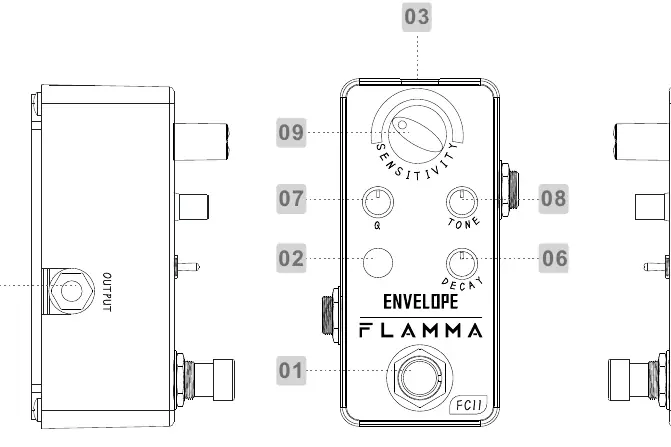
- SENSITIVITY: Adjusts the dynamic response of the filter relative to your input signal. Clockwise increases sensitivity, making it easier to trigger the filter.
- TONE: Adjusts the overall frequency range. Clockwise creates a brighter tone; counterclockwise creates a rounder tone, which is ideal for bass guitar. When SENSITIVITY is set to 0, this acts as a static frequency filter.
- DECAY: Controls the release and closing speed of the filter. Clockwise results in a longer decay, while counterclockwise results in a shorter decay.
- Q: Changes the width of the wah effect. Clockwise creates a narrower frequency band with a higher peak for an exaggerated wah sound. Counterclockwise creates a wider band with a lower peak for a more subtle effect.
Suggested settings
The manual provides starting points for different sounds:
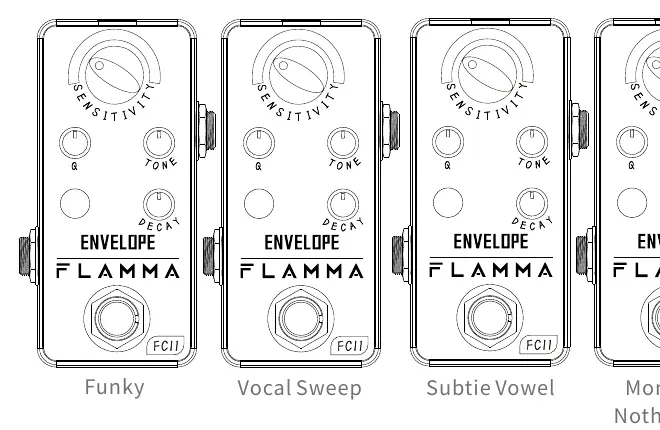
- Funky: Set knobs to create a rhythmic, percussive filter effect.
- Vocal Sweep: Adjust for a smooth, vowel-like filter sweep.
- Subtle Vowel: A milder setting for gentle filter modulation.
- Money For Nothin Filter: A specific configuration to emulate classic filter tones.
Note: Sensitivity settings may need adjustment depending on the output of your specific guitar pickups.
Technical specifications
- Input: 1/4" mono audio jack (Impedance: 1Meg Ohms)
- Output: 1/4" mono audio jack (Impedance: 1k Ohms)
- Power Supply: 9V DC, 20mA, center negative
- Dimensions: 47mm (D) x 83mm (W) x 52mm (H)
- Weight: 153g
Safety and precautions
Always use a regulated 9V DC power supply with a center-negative polarity. It is recommended to use an isolated or individual power supply to avoid unexpected noise caused by sharing power with other pedals. Unplug the adapter when not in use or during electrical storms.
Practical help
Common problems
Unexpected noise in the signal
Use an isolated or individual power supply. Sharing power with other pedals can introduce noise.
Pedal not responding to pick attack
Adjust the SENSITIVITY knob. Sensitivity requirements vary based on the output level of your guitar pickups.
Before use
- Ensure power supply is 9V DC, 20mA, center negative.
- Connect instrument to the right-side INPUT jack.
- Connect amplifier or next pedal to the left-side OUTPUT jack.
- Place the Envelope pedal before overdrive/distortion pedals in the signal chain.
- Start with the SENSITIVITY knob at 12 o'clock and adjust as needed.
Specs in practice
- Input Impedance
- 1Meg Ohms, standard for instrument inputs to maintain signal integrity.
- Output Impedance
- 1k Ohms, suitable for connection to amplifiers or other pedals.
- Current Draw
- 20mA, ensure your power supply can provide at least this amount of current.
Images and diagrams
- 01: True bypass footswitch to engage/disengage the effect.
- 03: DC IN Power Jack for 9V power supply.
- 04: INPUT Jack for instrument connection.
- 05: OUTPUT Jack for amplifier connection.
- 06-09: Control knobs for Decay, Q, Tone, and Sensitivity.
Model compatibility
- Suitable for both electric guitar and bass.
- Compatible with standard 1/4 inch instrument cables.

Manual page author
Michael Turner
Technical manual editor
Reviews PDF manuals for structure, safety notes, and practical product details so readers can find the right information quickly.