General / Other Manuals
Owner's Manual for Flamma FF03 Loop and Drum Pedal
Quick guide for the Flamma FF03 Loop and Drum pedal, covering looper and drum machine operation, sync modes, data management via USB, and technical specifications.
Table of contents
Manual images
Jump to the sectionQuick guide from the manual
The Flamma FF03 is a compact pedal combining a looper and a drum machine. It features 40 memory slots, 160 minutes of total recording time, and USB connectivity for audio file management. Ensure you use a 9V 200mA center-negative power supply to avoid noise or damage.
Panel Overview
The pedal features a screen for status, a LOOPER knob for looper settings, and a DRUMMER knob for drum machine settings. Two footswitches control recording, playback, and tap tempo. Input and output jacks support mono or stereo connections.
Looper Operation
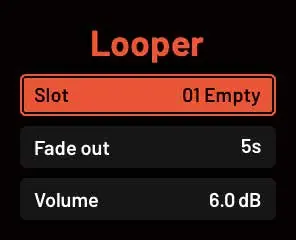
- Recording: Select an empty slot and press the Left Footswitch.
- Overdub & Playback: Press the Left Footswitch during recording to start playback and overdub. Press the Right Footswitch to play back without overdubbing.
- Undo/Redo: Press and hold the Right Footswitch for 1 second during playback.
- Stop: Press the Right Footswitch once. Double-press to stop immediately without fade-out.
- Delete: Press and hold the Right Footswitch for 1 second while stopped.
Drum Machine & Looper Sync Mode
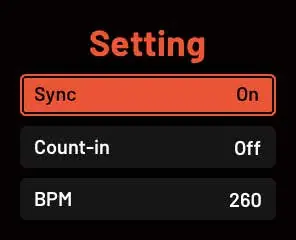
In Sync Mode, the looper and drum machine are quantized to align track length with drum patterns. Enable this in the Settings interface. When enabled, recording or playback triggers the drum machine to start from the beginning.
Computer Data Management
Connect the FF03 to a computer via USB to manage audio files. The device appears as a removable disk named FF03. Inside the WAVE folder, subfolders W01-W40 correspond to the 40 storage slots. Only 44.1kHz/16-bit WAV stereo files are supported. Rename files to RECXX (e.g., REC01 for slot W01) for proper import.
Technical Specifications
- Storage: 40 slots, 4 minutes max per slot.
- Audio: 44.1kHz / 16-bit.
- Drum Patterns: 121 rhythms + 11 metronome patterns.
- Power: 9V DC, 200mA.
- Dimensions: 78.6 x 125 x 49mm.
- Weight: 215g.
Practical help
Common problems
Unexpected noise during operation.
Use an isolated power supply. Daisy-chaining or non-isolated supplies may introduce ground loop noise.
Imported audio file not playing or truncated.
Ensure files are 44.1kHz/16-bit WAV stereo. Files longer than 4 minutes will be truncated.
Undo/Redo function unavailable.
This function is disabled after saving data unless new overdubs are recorded.
Before use
- Use a 9V 200mA center-negative power adapter.
- Connect mono input to the L (MONO) jack.
- Ensure the device is placed away from radios or TVs to avoid interference.
- Check that the power supply is isolated to prevent noise.
Specs in practice
- Operating Voltage
- 9V DC center-negative; do not exceed 9V or reverse polarity.
- Input Impedance
- 2 MΩ, suitable for guitar and bass instruments.
Images and diagrams
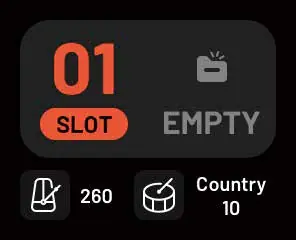
- The main interface displays the current slot, looper status, drum tempo, and drum pattern.
- The Looper setup menu allows configuration of slot, fade-out duration, and volume.
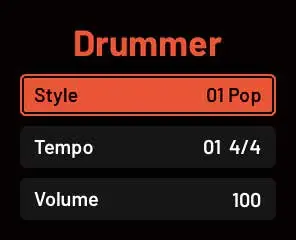
- The Drummer setup menu allows selection of style, rhythm pattern, and volume.
- The Setting interface controls Sync, Count-in, and BPM.
Model compatibility
- Supports 40 storage slots.
- Requires 44.1kHz/16-bit WAV stereo files for import.
- USB connection is for data management only.

Manual page author
Michael Turner
Technical manual editor
Reviews PDF manuals for structure, safety notes, and practical product details so readers can find the right information quickly.