Music / Guitar Effects
User Manual for Flamma FS21 Drum Machine & Looper Pedal
Quick guide for the Flamma FS21 Drum Machine & Looper Pedal. Learn how to record loops, use drum rhythms, connect to a computer, and manage your settings.
Table of contents
Manual images
Click an image to enlargeQuick guide from the manual
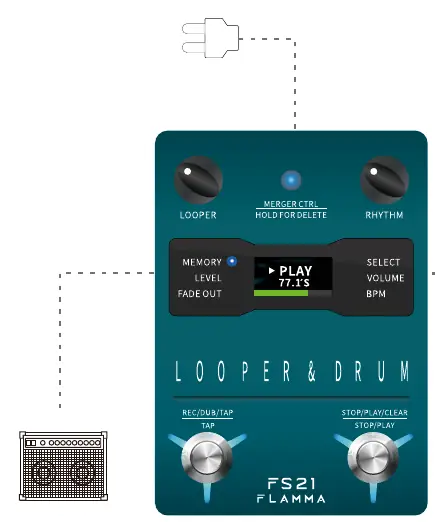
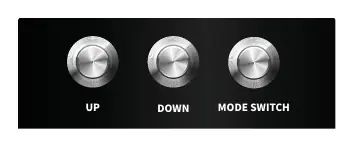
The Flamma FS21 is a combined drum machine and looper pedal. To get started, connect a 9V 300mA power supply to the DC IN jack. Connect your guitar to the LEFT INPUT using an instrument cable. Connect the output of the FS21 to your amplifier or stompbox. The device features two main modules: LOOPER and RHYTHM, which can be switched by pressing both footswitches simultaneously.
Device Layout
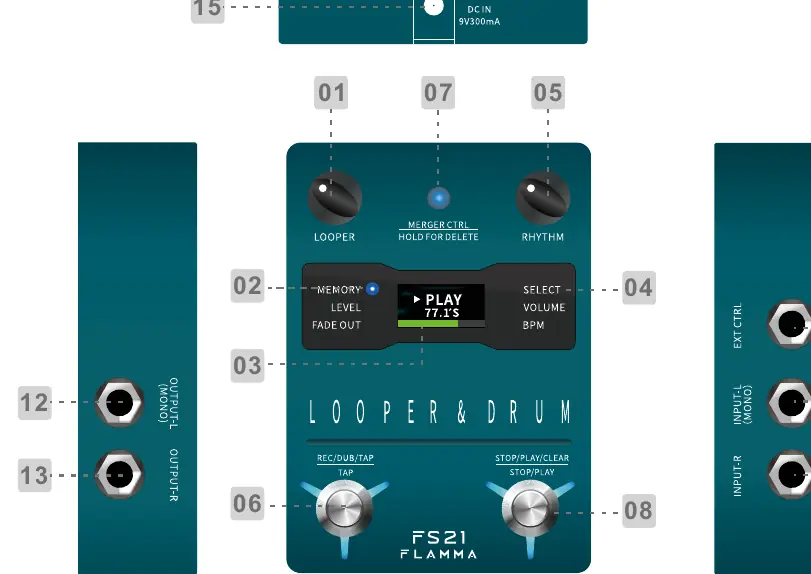
The device features a display screen, two main control knobs (LOOPER and RHYTHM), and two footswitches. The LOOPER knob manages recording and playback settings, while the RHYTHM knob controls drum patterns and tempo. The MERGER CTRL button allows you to toggle between independent or simultaneous operation of the looper and drum machine.
Looper Operation
- REC: Press the LOOPER knob to select MEMORY, rotate to an empty slot, and press the left footswitch to start recording.
- Playback: Press the right footswitch after recording to stop and begin playback.
- Dub: Press the left footswitch after recording to enter Dub mode, allowing you to record over existing tracks.
- UNDO/REDO: During playback, press and hold the right footswitch for 2 seconds to undo the last track. Repeat to redo.
- CLEAR: In STOP mode, press and hold the right footswitch for 2 seconds to clear all tracks in the current slot.
Rhythm Operation
- SELECT: Rotate the RHYTHM knob to choose from 100 drum grooves across 10 music styles and 10 metronome settings.
- TAP TEMPO: In RHYTHM mode, press the left footswitch two or more times at the desired tempo to set the BPM.
- On/Off: Press the right footswitch once to turn the rhythm on or off.
Merger Control
The MERGER CTRL button allows you to play or stop both the looper and drum machine simultaneously. When activated (LED turns green), you can set your rhythm, switch to the looper module, and start recording. A count-in bar will play before recording begins.
Editor Software
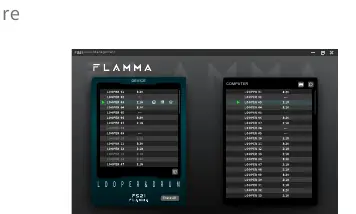
The FS21 supports import/export of looper files and factory resets via computer. Connect the device via USB to access the editor software. Note that when connected to a computer, the device buttons and footswitches will not respond; control is handled via the software interface.
Specifications
- Recording: 4 minutes per track, 40 preset slots.
- Audio: 44.1kHz, 24-bit.
- Input/Output: 1/4 inch unbalanced mono audio jacks.
- Power: DC 9V, 300mA (negative inside).
- Dimensions: 85mm x 120mm x 33mm.
- Weight: 0.367kg.
Practical help
Common problems
Output Clipping
Turn down the playback volume level.
Input Clipping
Turn down the input level or the output level of your instrument.
Looper and Rhythm sync issues
Ensure both are set to the same time signature; switching rhythm types while a loop is recorded may cause sync issues.
Device unresponsive
If connected to a computer via USB, the device is controlled by software only; buttons and footswitches will not respond.
Before use
- Use a 9V, 300mA power supply (negative inside).
- Connect guitar to LEFT INPUT for mono operation.
- Connect both LEFT and RIGHT inputs for stereo operation.
- Ensure the device is on a stable surface.
- Check that the power supply is turned off if the device is not used for a long period.
Specs in practice
- Sampling Rate
- 44.1kHz provides standard CD-quality audio.
- Sampling Accuracy
- 24-bit provides high-resolution audio depth.
- Input Impedance
- 1Meg ohm is optimized for standard guitar pickups.
- Recording Capacity
- Up to 4 minutes per track with 40 slots available.
Images and diagrams
- The layout diagram identifies 15 controls and ports, including the LOOPER and RHYTHM knobs, footswitches, and input/output jacks.
- The start diagram illustrates the connection path from the guitar to the LEFT INPUT and from the output to an amplifier.
Model compatibility
- Supports external footswitch (purchased separately) via EXT CTRL port.
- Requires editor software for file management and factory resets.

Manual page author
Emily Carter
User documentation editor
Prepares concise manual descriptions and highlights the most useful setup, operation, and maintenance information for readers.