Music / Guitar Effects
Owner's Manual for Flamma FF20 Looper & Drum Pedal
Get the most out of your Flamma FF20 Looper & Drum Pedal with this comprehensive owner's manual. Learn about connections, loop operations, drum machine settings, and management software.
Table of contents
Manual images
Click an image to enlargeQuick guide from the manual
The Flamma FF20 is a dual-pedal looper and drum machine. To get started, ensure you use a 9V 300mA center-negative power adapter. Connect your instrument to the Left Input Jack for mono setups. You can record, play, and overdub loops using the footswitches. The device features 100 storage locations and supports 300 minutes of stereo recording. For advanced features like Auto Rec, Time Stretch, and Position Jump, refer to the specific sections below.
Precautions
Always use the correct power supply to avoid equipment damage. Disconnect all cables before moving the device. Avoid placing the unit in direct sunlight, near heat sources, or in high humidity environments. Keep the device away from radio and television equipment to prevent electrical interference.
Panel Description
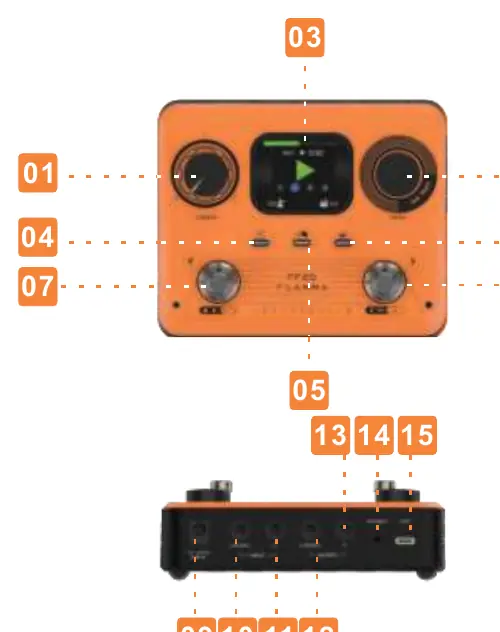
The top panel features a 2-inch screen, a MENU encoder for navigation, and dedicated buttons for Auto Rec, Tap Tempo, and Drum machine control. The rear panel houses the power input, Left/Right Input/Output jacks, a headphone jack, and a USB-C interface for computer connection.
Device Connections
The FF20 supports various connection scenarios:
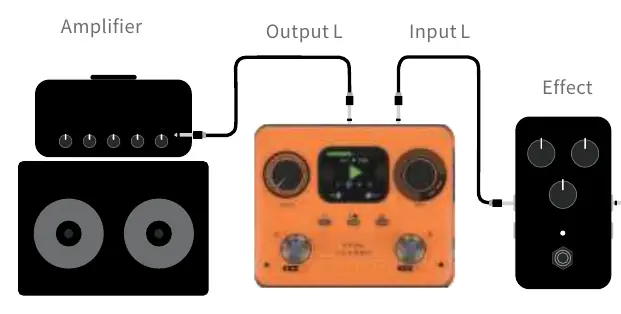
- Mono Connection: Connect your instrument to the Left Input and the output to your amplifier. If using headphones, set the Input Setting to Mixed in the Menu.
- Stereo/Balanced Connection: Use both Left and Right inputs/outputs. Ensure the Input Setting is set to Stereo.
- Single Output for Drum Machine and Instrument: Allows routing the guitar and drum machine to different amplification platforms. Set DrumOut to Split in the Menu.
Basic Operations
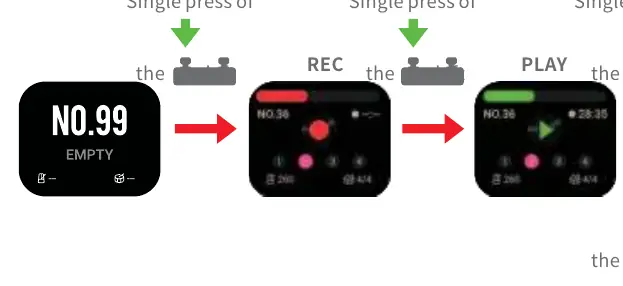
Select a storage location by rotating the MENU knob or using the footswitches. To record, press the left footswitch. Press again to play, and again to overdub. Long press the left footswitch to cancel unwanted content. Use the right footswitch to stop playback or clear data.
Drum Machine
Long press the DRUM button to enter the drum machine interface. You can select from 11 drum styles with 20 rhythm patterns each. Use the right footswitch to play or stop the drum machine. You can adjust the volume by holding the DRUM button and rotating the MENU knob.
Advanced Features
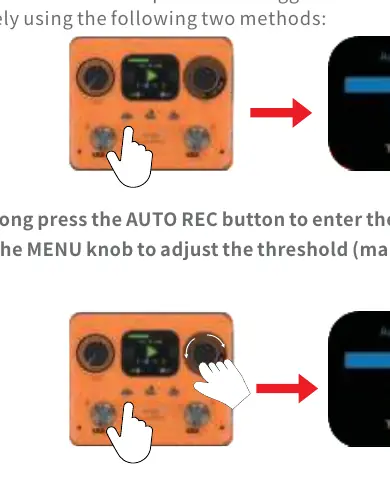
Auto Rec: Automatically starts recording when a signal is detected. You can adjust the trigger threshold in the Auto Rec settings menu.
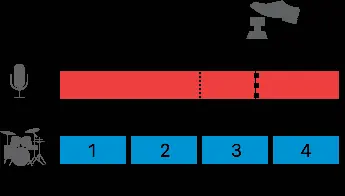
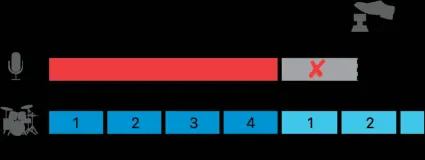
Time Stretch: Allows changing the speed of recorded audio without altering its pitch. Press the TAP button while rotating the MENU knob to adjust speed.
Position Jump: Enables switching between storage locations during performance. Press both footswitches simultaneously to enter storage switch mode.
Management Software
The dedicated computer software allows for audio import/export, firmware updates, and data management. Connect the device via the included USB cable. The software supports various audio formats including wav, flac, ape, mp3, m4a, aac, ogg, mp4, mov, wma, avi, and mpeg.
Technical Specifications
The device features 100 storage locations with 300 minutes of total recording duration. It operates at 44.1kHz/24bit sampling rate. Dimensions are 135.5mm x 109.6mm x 46.2mm, with a weight of 250g.
Practical help
Common problems
Sound is only coming out of one channel
Go to the Menu, select 'Input Setting', and change it to 'Mixed'.
Recording does not trigger automatically
The trigger threshold may be too high. Adjust the threshold in the Auto Rec settings.
Drum machine and loop are out of sync
Ensure the tempo is set correctly or use the pre-beat recording method.
Before use
- Use a 9V 300mA center-negative power adapter.
- Ensure all cables are disconnected before moving the device.
- Check that the device is away from radio or TV interference.
- Verify the device is placed in a dry, stable environment.
Specs in practice
- Total Recording Duration
- 300 minutes of stereo audio storage capacity.
- Sampling Rate
- 44.1kHz/24bit for high-quality audio processing.
- Input Impedance
- 2.2 Mohm, suitable for standard guitar pickups.
Images and diagrams
- The panel layout includes 15 numbered controls for volume, menu navigation, and footswitch operation.
- Connection diagrams illustrate how to route signals for mono, stereo, and split-output configurations.
Model compatibility
- Requires Windows 10 or higher, or macOS 10.15 or higher for management software.
- Supports import of wav, flac, ape, mp3, m4a, aac, ogg, mp4, mov, wma, avi, and mpeg files.

Manual page author
Emily Carter
User documentation editor
Prepares concise manual descriptions and highlights the most useful setup, operation, and maintenance information for readers.