Music / Guitar Effects
User Manual for Flamma FB200 Intelligent Combined Effects Pedal
Quick guide for the Flamma FB200 Intelligent Combined Effects Pedal. Learn how to connect your instrument, use effect modules, switch between Live and Preset modes, and utilize the drum machine and tuner.
Table of contents
Manual images
Click an image to enlargeImportant Information
The Flamma FB200 is an intelligent combined effects pedal for bass. Before use, ensure the device is charged using a 5V/2A power adapter. Do not use the device in damp environments or store it in extreme temperatures. If the battery emits odors or abnormal sounds, stop charging immediately. The device supports firmware updates and IR file management via the FLAMMA mobile app and computer software.
Panel Overview
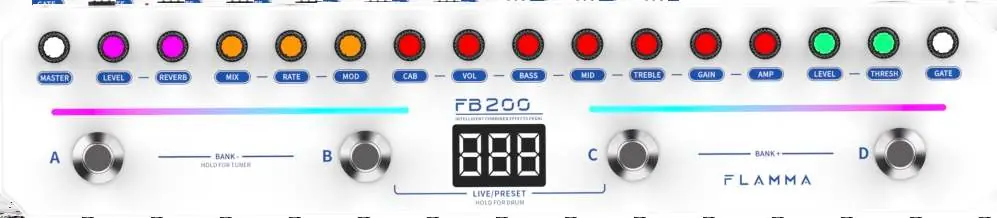
The top panel features a series of knobs for adjusting effect parameters (Master, Level, Reverb, Mix, Rate, Mod, Cab, Vol, Bass, Mid, Treble, Gain, Amp, Level, Thresh, Gate) and a three-character digital display. Four footswitches (A, B, C, D) are used for mode switching and control. The rear panel includes the 1/4 inch INPUT jack, 1/4 inch OUTPUT jack, 1/8 inch PHONES jack, USB-C port for charging and OTG recording, and the power switch.

Device Connections
For a standard setup, connect your bass instrument to the INPUT jack. Connect your amplifier, audio interface, or other pedals to the OUTPUT jack. For silent practice, connect headphones to the PHONES jack. For OTG recording, connect the device to a smartphone or tablet using a USB cable (an OTG adapter may be required depending on your device).

Effect Modules
The FB200 includes several effect modules that can be adjusted using the top knobs:
- GATE Module: Controls the noise gate threshold.
- COMP Module: Compression effect with threshold and level controls.
- AMP Module: Bass amp simulation with gain, EQ (Treble, Mid, Bass), and volume controls.
- CAB Module: Bass cabinet simulation with selectable cabinet models or third-party IR slots.
- MOD Module: Modulation effects with rate and mix controls.
- REVERB Knob: Adjusts reverb effect level.
- MASTER Module: Controls overall output volume.
Operation Modes
The device features two primary operation modes:
- PRESET Mode: The default mode upon startup. The screen displays 'P' and the preset number. Use footswitches A/B/C/D to switch presets. Use BANK +/- to navigate preset groups.
- LIVE Mode: Each footswitch independently controls a specific module. The screen displays 'L' and the preset number.
To switch between modes, press footswitches B and C simultaneously.
Additional Functions
- Drum Machine: Press and hold footswitches B + C to enter drum machine mode. Use A and B to switch drum types, C to set BPM, and D to toggle on/off.
- Tuner: Press and hold footswitches A + B to activate the tuner.
- Bluetooth Playback: Use the FLAMMA app to enable Bluetooth for audio playback from your smartphone or tablet.
Technical Specifications
- Input: 6.35mm, 2MΩ
- Output: 6.35mm, 100Ω
- Headphone Output: 3.5mm, 32Ω
- Battery: 2000mAh, up to 6 hours of life
- Charging: DC 5V/2A, approx. 2.5 hours
- Dimensions: 311mm x 67.5mm x 49.7mm
- Weight: 578g
Practical help
Common problems
Battery not charging
Ensure you are using a 5V/2A power source and a USB-C to USB-A cable.
No sound output
Check that the instrument is connected to the INPUT jack and the amplifier/headphones are connected to the correct OUTPUT or PHONES jack. Ensure the device is powered on.
Bluetooth pairing issues
Use the FLAMMA app to enable Bluetooth playback on the FB200.
Before use
- Charge the device fully using a 5V/2A power adapter.
- Connect your instrument to the INPUT jack.
- Connect your amplifier or headphones to the OUTPUT or PHONES jack.
- Ensure the power switch is set to ON.
- Download the FLAMMA app for full functionality.
Specs in practice
- Input Impedance
- 2MΩ, suitable for standard bass instrument pickups.
- Battery Life
- Up to 6 hours of continuous portable use.
- Charging Time
- Approximately 2.5 hours for a full charge.
Images and diagrams
- The top panel contains the module knobs for adjusting effects and the footswitches (A, B, C, D) for mode switching and control.
- The rear panel contains the INPUT, OUTPUT, PHONES, USB-C port, and power switch.
Model compatibility
- Supports third-party IR loading (9 slots).
- Compatible with FLAMMA mobile app and computer software for editing and firmware updates.

Manual page author
David Miller
Documentation analyst
Organizes user manual content into clear summaries, with attention to model details, product context, and everyday usability.