Music / Guitar Effects
User Manual for Flamma FC05 Modulation Pedal
Quick guide for the Flamma FC05 Modulation Pedal. Learn about controls, 11 modulation effects, power requirements, and technical specifications.
Table of contents
Manual images
Click an image to enlargeQuick Guide
The Flamma FC05 is a compact modulation pedal featuring 11 classic effects. To begin using the device, ensure you have a 9V DC center-negative power supply with at least 150mA of current. Connect your instrument to the INPUT jack and your amplifier or next pedal to the OUTPUT jack using 1/4 inch mono audio cables. Use the footswitch to toggle the effect on and off.
Precautions and Power Supply
To ensure safe operation and prevent damage to the unit:
- Use only a 9V DC power supply with at least 150mA current.
- It is highly recommended to use an isolated or individual power supply. Sharing a power supply with other pedals may introduce unexpected noise.
- Turn off the power supply if the device will not be used for a long period.
- Do not use the apparatus near water.
- Clean the device only with a dry cloth.
- Do not install near heat sources such as radiators, stoves, or amplifiers.
Top Panel Controls
The top panel allows you to shape your sound using the following controls:
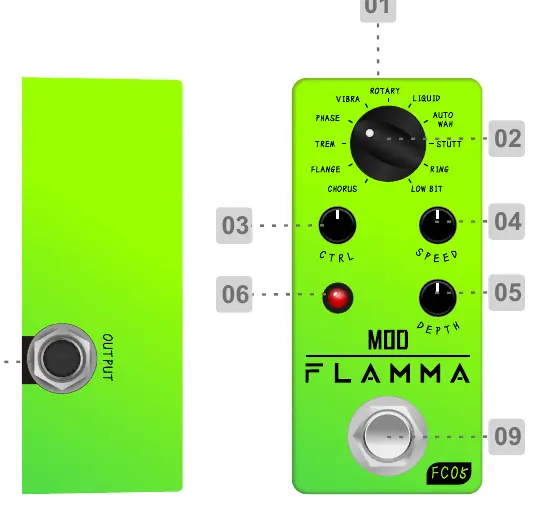
- MOD knob: Selects one of the 11 available modulation effects.
- CTRL knob: Adjusts specific parameters depending on the selected effect (see CTRL List).
- SPEED knob: Adjusts the speed of the effect or sampling rate.
- DEPTH knob: Adjusts the strength of the effect or mix rate.
- LED Indicator: Shows the current operative mode of the effect.
- Footswitch: Toggles the effect on or off.
- INPUT/OUTPUT Jacks: 1/4 inch mono audio connections.
Modulation Effects List
The CTRL knob function changes based on the effect selected via the MOD knob:
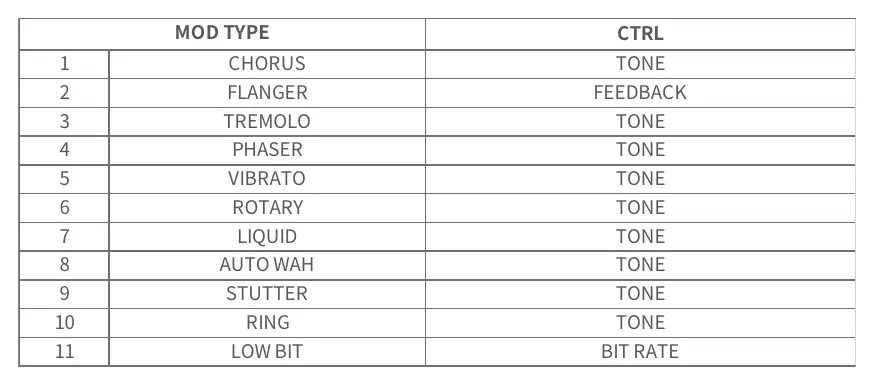
- Chorus: CTRL adjusts Tone.
- Flanger: CTRL adjusts Feedback.
- Tremolo: CTRL adjusts Tone.
- Phaser: CTRL adjusts Tone.
- Vibrato: CTRL adjusts Tone.
- Rotary: CTRL adjusts Tone.
- Liquid: CTRL adjusts Tone.
- Auto Wah: CTRL adjusts Tone.
- Stutter: CTRL adjusts Tone.
- Ring: CTRL adjusts Tone.
- Low Bit: CTRL adjusts Bit Rate.
Specifications
- Input: 1/4 inch mono audio jack (impedance 470K ohms).
- Output: 1/4 inch mono audio jack (impedance 100 ohms).
- Power Requirement: 9V DC transformer (center negative).
- Current Draw: 150mA.
- Dimensions: 93.5mm (D) x 42mm (W) x 52mm (H).
- Weight: 160g.
Practical help
Common problems
Unexpected noise in the signal
Use an isolated or individual power supply. Sharing power with other pedals often causes noise.
Device does not power on or function
Verify the power supply is 9V DC, center negative, and provides at least 150mA.
Before use
- Ensure power supply is 9V DC center negative.
- Verify power supply provides at least 150mA.
- Use 1/4 inch mono audio cables for input and output.
- Place the pedal away from heat sources and water.
Specs in practice
- Input Impedance
- 470K ohms, suitable for standard guitar pickups.
- Power Requirement
- 9V DC center negative is the standard polarity for most guitar pedals.
- Current Draw
- 150mA; ensure your power supply can handle this load.
Images and diagrams
- The top panel contains the MOD knob for effect selection, CTRL knob for parameter adjustment, SPEED for rate, and DEPTH for intensity.
- The INPUT and OUTPUT jacks are located on the sides of the pedal.
Model compatibility
- Requires 9V DC power supply with at least 150mA current.
- Designed for 1/4 inch mono audio connections.

Manual page author
Michael Turner
Technical manual editor
Reviews PDF manuals for structure, safety notes, and practical product details so readers can find the right information quickly.