Garden / Hedge Trimmers
Operator's Manual for Flymo 18V EasiCut 450 and UltraCut 500 Hedge Trimmer
Get started with your Flymo 18V EasiCut 450 or UltraCut 500 hedge trimmer. This guide covers assembly, safe operation, battery charging, maintenance, and troubleshooting.
Table of contents
Manual images
Click an image to enlargeQuick guide from the manual
This hedge trimmer is designed for cutting hedges, shrubs, and grass in private gardens. Before use, ensure the battery is fully charged and the blade cover is removed. Always wear eye and ear protection and keep both hands on the handles during operation. The product features a two-handed safety start system to prevent accidental activation.
Assembly
To assemble the front handle:
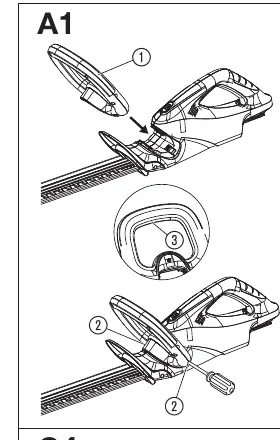
- Push the front handle into the slot in the hedge trimmer until it is completely in place.
- Tighten both screws securely.
- Ensure the start button can be fully depressed.
Operation
Charging the battery:
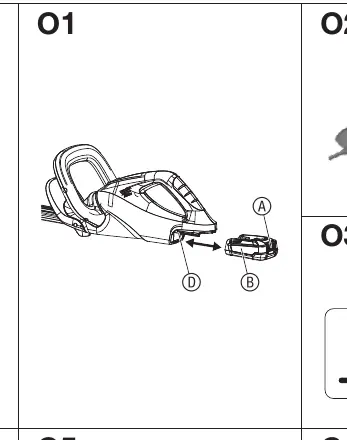
- Remove the battery from the holder.
- Connect the charger to a mains socket.
- Slide the charger onto the battery. A flashing green light indicates charging; a solid green light indicates the battery is fully charged.
Starting and stopping:
- To start, hold the front handle and pull the front start lever, then hold the main handle and pull the rear start lever.
- To stop, release both start levers.
Work positions:
- The trimmer can be used for side trimming, high trimming, and low trimming.
Maintenance
Always remove the battery and slide the protective cover over the blade before performing maintenance.
- Clean the hedge trimmer with a damp cloth.
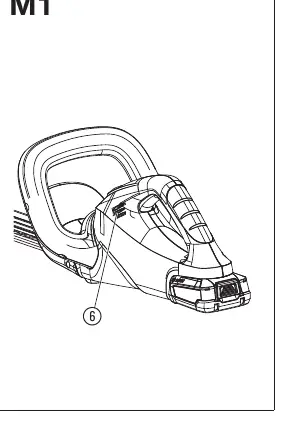
- Clean airflow slots with a soft brush; do not use a screwdriver.
- Lubricate the blade with low-viscosity oil.
- Do not clean with water or high-pressure jets.
Troubleshooting
If the trimmer does not start, check that the battery is fully inserted and charged. If the error LED is illuminated, check for battery temperature issues or moisture on the contacts. If the blade is damaged or the trimmer vibrates severely, contact Flymo service for replacement.
Technical Data
The trimmer operates on an 18V battery system. The EasiCut 450 has a 45 cm blade, while the UltraCut 500 has a 50 cm blade. Both models weigh 2.2 kg without the battery.
Practical help
Common problems
Hedge trimmer does not start or stops
Check if the battery is fully inserted, charged, or if the start levers are engaged correctly. Ensure the battery temperature is within the permissible range (0 °C – +45 °C).
Hedge is not cleanly cut
The blade may be blunt or damaged. Contact Flymo service for replacement.
Hedge trimmer vibrates severely
The blade may be damaged. Switch off the product immediately and have the blade replaced.
Before use
- Ensure the battery is fully charged.
- Check that the blade cover is removed.
- Verify the front handle is securely installed.
- Wear eye and ear protection.
- Inspect the area for hidden wires, fences, or foreign objects.
- Ensure the ventilation slots are not obstructed.
Specs in practice
- Battery Voltage
- 18V DC operating voltage.
- Blade Length
- 45 cm for EasiCut 450; 50 cm for UltraCut 500.
- Charging Temperature
- Must be between 0 °C and +45 °C.
Images and diagrams
- A1: Front handle assembly.
- O1-O3: Battery charging procedure.
- O4: Battery charge status indication.
- O5-O7: Work positions (side, high, low trimming).
- M1: Cleaning the airflow slots.
Model compatibility
- Compatible with POWER FOR ALL system batteries (PBA 18V).
- Not intended for long-term use.
- Do not use to cut lawns or chop up compost material.

Manual page author
David Miller
Documentation analyst
Organizes user manual content into clear summaries, with attention to model details, product context, and everyday usability.