Tools / Power Tools
Certa PowerPlus 20V Hedge Trimmer User Guide
A comprehensive user guide for the Certa PowerPlus 20V Hedge Trimmer (CTPHEDGELLA). Includes instructions for battery installation, charging, safe operation, maintenance, and technical specifications.
Quick answers from the manual
Quick answer
- The Certa PowerPlus 20V Hedge Trimmer (CTPHEDGELLA) is a cordless tool requiring a separate 20V battery and charger. To operate, press both the front and back switch-handles simultaneously. p. 1, 11
Key actions
- Insert the battery by sliding it into the body until it latches. p. 8
- Charge the battery using the dedicated Certa charger. p. 9
First start
- Charge the battery fully before the first use. p. 9
Problems and fixes
Sparks or burning smell during operation
This is a normal phenomenon due to the electrical brake and will not damage the trimmer.
p. 11Maintenance and reset
- Regularly inspect the blade and replace it if damaged. Blade replacement must be performed by a qualified professional. p. 11
Technical specifications
| Parameter | Value | Meaning | Pages |
|---|---|---|---|
| Voltage | 20V | Operating voltage | p. 12 |
| Blade length | 510mm | Cutting length | p. 12 |
| Cutting capacity | 14mm | Max branch diameter | p. 12 |
Where to find it in the PDF
- Safety & Warnings p. 3, 4, 5, 6
- Overview p. 7
- Assembly p. 8
- Operation p. 9, 10, 11
- Specifications p. 12
Table of contents
Manual images
Click an image to enlargeQuick Guide from the Manual
The Certa PowerPlus 20V Hedge Trimmer (CTPHEDGELLA) is a cordless power tool designed for trimming hedges. Important: This product is sold as a skin only; the battery and charger are sold separately. Always wear appropriate safety gear, including goggles, protective gloves, and ear protection, before operating the tool.
Overview
The trimmer consists of the following main components:
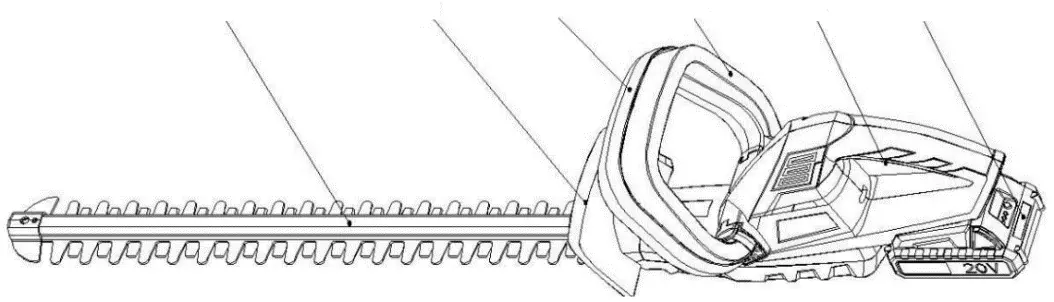
- Blade: The cutting element.
- Protector: Safety guard.
- Locked front handle: Fixed handle for stability.
- Front switch-handle: Safety trigger.
- Back switch-handle: Safety trigger.
- Battery pack: Power source (sold separately).
Assembly
Fitting and Removing the Battery:
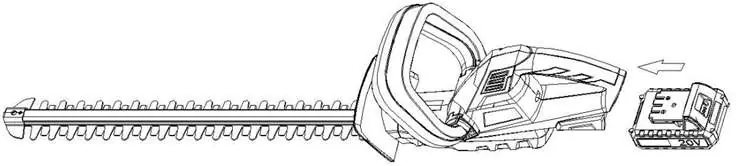
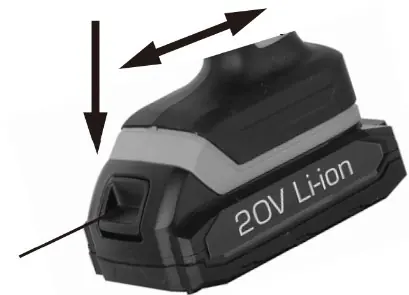
- Insert: Slide the battery into the trimmer body until it latches securely into place.
- Remove: Press and hold the buttons on both sides of the battery pack and slide it away from the tool.
Always remove the battery when the tool is not in use, during transport, or before performing any maintenance to prevent accidental operation.
Operation
Charging the Battery:
- Remove the battery from the tool.
- Connect the charger to a power outlet.
- Place the battery onto the charger. A red LED indicates charging.
- Once fully charged, the red LED turns off and the green LED remains illuminated. A full charge typically takes about 1 hour.
Using the Trimmer:
To turn on the trimmer, you must simultaneously press down on both the Front switch-handle and the Back switch-handle. Releasing either handle will cause the trimmer to stop immediately. You may notice sparks or a burning smell during operation; this is normal due to the electrical brake.
Maintenance
- Blade Care: Regularly inspect the blade for damage. If damaged, it must be replaced by a qualified service professional.
- Storage: Always store the trimmer with the blade covered after use.
- General Tips: Use pruning shears for thicker branches before using the hedge trimmer to prevent blade damage. Avoid using the tool on native hardwoods.
Safety
Do not expose the tool or charger to rain or damp environments. Keep the tool away from children. Ensure the work area is well-lit and free of flammable liquids or gases. If battery contents contact skin, wash immediately with soap and water.
Practical help
Common problems
Trimmer will not start
Ensure the battery is fully charged and correctly inserted. Both the front and back switch-handles must be pressed simultaneously to operate.
Battery not charging
Verify the power outlet is working. Ensure the ambient temperature is between 4.5°C and 40.5°C. Check that the charger is not controlled by a switch.
Before use
- Wear safety goggles, protective gloves, and ear protection.
- Ensure the work area is clear of people and animals.
- Check that the blade is sharp and free of damage.
- Ensure the battery is fully charged.
- Verify the blade cover is removed.
Specs in practice
- Blade length
- 510mm - The effective cutting length of the blade.
- Cutting capacity
- 14mm - The maximum diameter of branches the tool can cut.
- No load speed
- 1400min-1 - The speed of the blade when not cutting.
Images and diagrams
- The overview diagram identifies the blade, protector, handles, and battery slot.
- The battery charging diagram shows the correct orientation for placing the battery on the charger.
Model compatibility
- Designed for use with Certa PowerPlus 20V 2.0Ah Lithium Battery (CT20VBAT20A).
- Requires Certa PowerPlus 20V Rapid Charger (CT20VHTLBCHB).

Manual page author
David Miller
Documentation analyst
Organizes user manual content into clear summaries, with attention to model details, product context, and everyday usability.