Tools / Measuring Tools
Operating Manual for FNIRSI SG-003A Multi-Functional Signal Generator
A comprehensive operating guide for the FNIRSI SG-003A Multi-Functional Signal Generator. Includes instructions on interface setup, wiring diagrams for PLC and pneumatic valves, signal modes, and firmware updates.
Table of contents
Manual images
Click an image to enlargeQuick Guide
The FNIRSI SG-003A is a multi-functional signal generator designed for industrial testing and debugging. Before use, ensure the device is charged via the Type-C port. The device features a 3000mA lithium battery and a color-coded interface for various signal types. Always verify that your input voltage does not exceed 30Vpp to prevent equipment damage.
Interface Terminal
The top surface features four 4mm wiring ports identified by color rings:
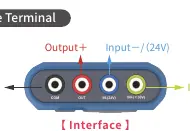
- COM (Black): Common ground.
- OUT (Red): Output port.
- IN- (Blue): Input negative / 24V power supply.
- IN+ (Yellow): Input positive.
The IN- port can be switched to an independent 24V power supply for testing two-wire transmitters.
Button Panel
The control panel is divided into a 3-key area and a 5-key area. Buttons use LED backlighting to indicate status:
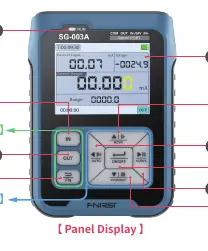
- White: Manual setting mode.
- Green: Preset output mode.
- Blue: Programming mode.
- No light: Conversion mode.
The FN button acts as a shift key to toggle between modes and access settings. Use RUN to start/stop output, and ON/OFF to confirm selections.
Signal Modes
The device supports multiple signal types:
- mA Current Signal: Active (0-24mA) and Passive (XMT) output. Supports open circuit detection.
- V Voltage Signal: 0-24V output. Includes overcurrent protection.
- Hz Pulse Signal: Supports frequency, PWM, speed, and quantitative/counting modes.
- 24V Loop Detection: Used for testing pneumatic valves or two-wire transmitters.
Wiring Instructions
The device supports various wiring configurations depending on the application:
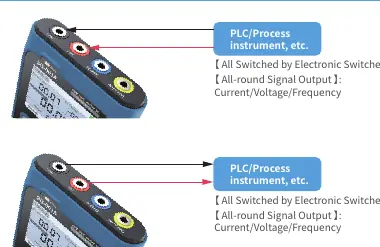
- PLC/Process Instruments: Connect via OUT and COM ports for current/voltage/frequency output.
- Pneumatic Valves: Use the IN- port as a 24V power supply for valve feedback. The device can perform input and output simultaneously.
Maintenance and Firmware
To maintain the device, avoid high humidity, dust, and unstable environments. The device is not waterproof. Firmware upgrades are performed via a USB emulated U disk:
- Connect the device to a PC and turn it on.
- Wait for the PC to recognize the drive named "Bootloader".
- Copy the firmware file to the drive.
- The device will restart automatically upon successful upgrade.
Note: Firmware upgrades are only supported on Windows 10.
Manufacturer information
Shenzhen FNIRSI Technology Co., Ltd.
Practical help
Common problems
No response when turned on
Check if the battery has power and verify the charging indicator light.
Abnormal output or measured value
Check signal lines, verify interface signal selection, and ensure target parameters are within technical specifications.
System crash
Often caused by firmware upgrade errors; shut down the device and restart.
Output open circuit
If the interface flashes 'open circuit', the output signal is not connected or the output is near zero.
Before use
- Charge the device using the Type-C port.
- Verify the signal type (Input/Output) matches your application.
- Ensure wiring connections match the specific diagram for your device (PLC or valve).
- Check that the input voltage does not exceed 30Vpp.
- Confirm the FN button state (White/Red) for the desired mode.
Specs in practice
- Active current (mA) output
- 0-24mA range, 750Ω max load.
- Passive current (XMT) output
- 0-24mA range, requires 0-30V external power.
- Voltage (V) output
- 0-24V range, 0.01V resolution.
- Frequency (Hz) output
- 0-9999Hz range, 5 digits resolution.
Images and diagrams
- Interface Ports: 4 ports (COM, OUT, IN-, IN+) with color rings for specific connections.
- Wiring Diagrams: Specific setups for PLC/Process instruments and Pneumatic valves.
Model compatibility
- Firmware upgrade only supports Windows 10.
- Input terminal safety limit is 30Vpp.
- The device is not waterproof.

Manual page author
Michael Turner
Technical manual editor
Reviews PDF manuals for structure, safety notes, and practical product details so readers can find the right information quickly.