Wearables / Fitness Trackers
User Manual for Fontastic 165CH Fitness Tracker
Comprehensive user guide for the Fontastic 165CH Fitness Tracker. Learn how to charge, pair with the FontaFit plus app, navigate the menu, and use features like heart rate monitoring, sleep tracking, and notifications.
Table of contents
Manual images
Click an image to enlargeQuick Start Guide
To begin using your Fontastic 165CH Fitness Tracker, ensure the device is fully charged. Download the FontaFit plus app on your smartphone, enable Bluetooth, and pair the device through the app settings. Do not pair the device directly through your phone's Bluetooth settings.
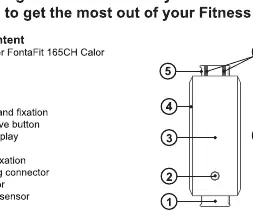
Charging and Assembly
The device is equipped with a rechargeable Li-Polymer battery. To charge, connect the USB charging connector to a standard USB power source. A battery icon will appear on the display. Charging typically takes 1-2 hours. To attach the bracelet, slide both ends of the strap into the fixings on the housing until they click into place.
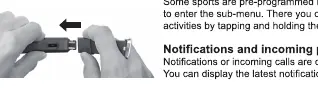
Navigation and Controls
The device features a touch-sensitive button (2) for navigation:
- Switching On/Off: Press and hold the button for 6-8 seconds to turn the device on. To turn off, navigate to the 'More' menu, select the power icon, and hold the button for 3 seconds.
- Menu Navigation: Tap the button to scroll through the main menu. Press and hold the button for 3 seconds to enter a sub-menu or confirm a selection.
Features and Functions
The fitness tracker includes several monitoring modes:
- Steps: Displays the number of steps taken.
- Sleep: Tracks sleep quality. Note that sleep analysis is only active between 20:00 and 10:00.
- Pulse/Blood Pressure: Accessed via the 'BPM' menu. Ensure the bracelet is worn snugly, about 1cm above the wrist bone, for accurate readings.
- Temperature: Accessed via the 'Temp' menu.
- Training: Pre-programmed sports modes. Hold the button for 3 seconds to enter the sub-menu and select your activity.
- Notifications: Incoming calls and messages are displayed directly on the screen.
Safety and Maintenance
The device is water-resistant (IPX7) but not suitable for swimming or diving. Do not open the device or attempt to repair it yourself. Keep the sensors clean and free from dirt, tattoos, or hair, as these can interfere with heart rate and blood pressure measurements.
Technical Data
- Transmission: BT 4.2
- Display: 0.96 inch TFT
- Battery: Li-Polymer 90 mAh
- Operating Time: 4-6 days
- Standby Time: 15 days
- Water Protection: IPX7
- Weight: 23 g
Manufacturer information
Fontastic
Practical help
Common problems
Device will not pair with smartphone
Ensure Bluetooth is enabled on your phone. Remove any old pairing from your phone's Bluetooth settings and pair exclusively through the FontaFit plus app.
Inaccurate pulse or blood pressure readings
Ensure the bracelet is worn snugly, approximately 1cm above the wrist bone. Tattoos, body hair, or a dirty sensor can negatively impact measurement accuracy.
Sleep analysis is not recording
The sleep analysis function is only active between 20:00 and 10:00. Ensure you are wearing the device during these hours.
Before use
- Charge the device fully before the first use.
- Download the FontaFit plus app from the app store.
- Ensure your smartphone has Bluetooth enabled.
- Attach the bracelet securely to the tracker housing.
- Ensure the device is worn snugly on the wrist.
Specs in practice
- Li-Polymer 90 mAh
- Battery type and capacity, providing 4-6 days of typical operation.
- 0.96 inch TFT
- The size and technology of the color display screen.
Images and diagrams
- 1: Wristband fixation
- 2: Touch sensitive button
- 3: 0.96 inch TFT display
- 5: Upper wrist fixation
- 6: USB charging connector
Model compatibility
- Requires Android 4.4 or higher.
- Requires iOS 9 or higher.
- Only one fitness tracker can be connected to a smartphone at a time.

Manual page author
David Miller
Documentation analyst
Organizes user manual content into clear summaries, with attention to model details, product context, and everyday usability.