Computers / Tablets
User Manual for UMAX U-Band 120HR Fitness Tracker
Quick guide for the UMAX U-Band 120HR fitness tracker. Learn how to charge, pair with the VeryFitPro app, use touch controls, monitor heart rate, and troubleshoot common issues.
Table of contents
Manual images
Click an image to enlargeQuick Start Guide
To begin using your UMAX U-Band 120HR, ensure your smartphone meets the minimum requirements: Android 4.4 or higher, or iOS 7.1 or higher. The device connects via Bluetooth 4.0.
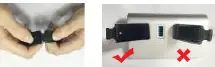
Charging the device: Before the first use, it is recommended to charge the tracker. Carefully remove the main module from the strap and connect it to a USB charger or computer port (5V/0.5A). A full charge takes approximately 60 minutes.
App Setup: Download and install the VeryFitPro application from the Apple Store or Google Play Store to connect and configure your device.
Device Operation
The device is operated using a touch button located on the screen area:
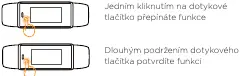
- Switching modes: Single click the touch button to cycle through different screens (time, steps, calories, distance, heart rate, alarm, running mode).
- Confirming selection: Long press the touch button to confirm a function or selection.
- Wearing: Wear the wristband horizontally on your wrist, similar to a regular watch.
Features and Modes
Heart Rate Monitoring: The device features automatic heart rate monitoring. For accurate readings, wear the band on the top of your wrist and tighten the strap slightly during exercise. You can disable automatic monitoring in the settings.
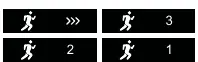
Running Mode: To start the running mode, hold the touch button for 2 seconds. A 3-2-1 countdown will initiate the measurement. To end the mode, hold the button again for 2 seconds.
Notifications: The device supports notifications for incoming calls, text messages, and app alerts. You can also receive alerts for long periods of inactivity and when you reach your daily step goal.
Troubleshooting
If you encounter issues with your device, try the following steps:

- Pairing issues: Ensure Bluetooth is enabled on your phone and the device is within 0.5 meters during pairing. If pairing fails, restart your smartphone or the Bluetooth service.
- Hardware errors: If a hardware error occurs, the screen will display a warning with an error number (e.g., -01).
- Factory Reset: To restore factory settings, ensure the device is connected to your phone via Bluetooth. In the VeryFitPro app, navigate to Device > System Settings > Reboot Device.
Technical Support
For further assistance, you can contact technical support:
Phone: +420 800 118 629Email: [email protected] Center: Umax Czech a.s., Kolbenova 962/27e, 198 00 Praha 9, Czech Republic
Practical help
Common problems
Pairing fails
Restart your smartphone or restart the Bluetooth service.
Hardware error displayed
The screen will show a warning with an error number (e.g., -01) indicating a specific hardware fault.
Before use
- Charge the device before first use.
- Ensure smartphone has Bluetooth enabled.
- Verify OS compatibility (Android 4.4+ or iOS 7.1+).
- Download the VeryFitPro app from the app store.
Specs in practice
- Battery life
- Approximately 8 days on a single charge.
- Charging input
- 5V/0.5A via USB port.
Images and diagrams
- Charging: Remove the main module from the strap and plug it directly into a USB port.
- Touch button: Single click to switch modes, long press to confirm.
Model compatibility
- Requires Android 4.4 or higher.
- Requires iOS 7.1 or higher.

Manual page author
David Miller
Documentation analyst
Organizes user manual content into clear summaries, with attention to model details, product context, and everyday usability.