Wearables / Fitness Trackers
User Manual for Tunturi 14TUSRU150 Chest Belt
Quick guide for the Tunturi 14TUSRU150 chest belt. Learn how to wear the strap, replace the CR2032 battery, and maintain the device for accurate heart rate monitoring.
Table of contents
Manual images
Click an image to enlargeQuick guide from the manual
The Tunturi 14TUSRU150 is a 5 kHz chest belt designed for heart rate monitoring. This guide covers the essential steps for wearing the device, replacing the battery, and proper maintenance to ensure accurate readings and device longevity.
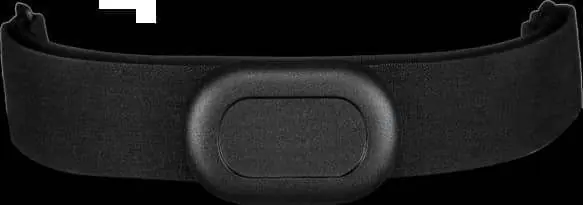
How to wear the chest strap
- Adjust the strap length to a comfortable, snug fit that stays in place during your workout.
- Attach the sensor to the strap.
- Moisten both electrode areas on the back of the strap with water to ensure good contact.
- Place the strap around your chest, just below the pectoral muscles.
- Ensure the logo is in an upright position to allow the device to detect the signal effectively.
- Attach the hook to the other end of the strap.
Replacing the battery
If the device stops working, the battery may need replacement. Use a CR2032 battery.
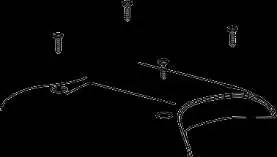
- Use a small cross-head screwdriver to release the screws from the back cover.
- Lift the waterproof gasket and remove the old battery.
- Insert a new CR2032 battery with the positive (+) side facing up.
- Replace the back cover and the four screws, ensuring the gasket is correctly positioned. Tighten the screws securely.
Care and maintenance
- Storage: Store the strap and sensor separately in a cool, dry place. Keep the strap lying flat or hanging loosely; do not fold it in the electrode area for extended periods.
- After use: Detach the heart rate sensor from the strap and dry it with a soft towel.
- Cleaning: Hand wash the strap every 3-4 uses. Do not use detergents with optical brighteners, moisturizing soaps, or fabric softeners. Do not soak, iron, dry clean, or bleach the strap. Do not twist, stretch, or bend the electrode areas.
- Drying: Dry the strap with a soft towel after washing and hang it to dry in a cool place. Do not expose it to direct sunlight.
Important notes
- Before each use, ensure both electrode areas are well moistened.
- Maintain a transmission distance between the 14TUSRU150 and your receiving device within 120 cm.
- Check the battery if the device fails to connect.
- Dispose of used batteries according to local regulations.
Practical help
Common problems
Device not detecting signal
Ensure both electrode areas on the back of the strap are moistened and the logo is in an upright position.
Connection issues
Keep the transmission distance between the chest belt and your receiving device within 120 cm.
Device not working
Check the battery level and replace it with a new CR2032 battery if necessary.
Before use
- Adjust strap length for a snug fit.
- Attach the sensor to the strap.
- Moisten both electrode areas on the back of the strap.
- Ensure the logo is in an upright position.
- Verify the receiving device is within 120 cm range.
Specs in practice
- Battery Type
- CR2032
- Transmission Range
- Maximum 120 cm
Images and diagrams
- Steps 1-5 illustrate the correct way to attach the sensor, moisten electrodes, and position the strap on the chest.
- Battery replacement diagrams show the location of the screws, the waterproof gasket, and the correct orientation of the CR2032 battery.
Model compatibility
- Compatible with devices supporting 5 kHz heart rate transmission.

Manual page author
Emily Carter
User documentation editor
Prepares concise manual descriptions and highlights the most useful setup, operation, and maintenance information for readers.