Electronics / Networking
Quick Start Guide for FortiAP 221E and 223E Wireless Access Points
A comprehensive quick start guide for the FortiAP 221E and 223E wireless access points. Includes hardware installation, connection instructions, LED status indicators, and initial configuration steps.
Quick answers from the manual
Quick answer
- The FortiAP 221E/223E is a wireless access point. Connect it to a PoE-enabled network or use a 12V DC power adapter. Configure it via a FortiGate controller or directly via CLI (IP: 192.168.1.2, user: admin, no password). p. 10, 11, 12
Key actions
- Mounting the device p. 8, 9
- Connecting to network p. 10
First start
- Initial setup via FortiGate p. 11
- Initial setup via CLI p. 12
Show 2 more answers Show less
Technical specifications
| Parameter | Value | Meaning | Pages |
|---|---|---|---|
| Power | 12V DC, 2A or 54V PoE | Power requirements | p. 13 |
| Default IP | 192.168.1.2 | Default management IP | p. 12 |
Where to find it in the PDF
- Box Contents p. 3
- Installation p. 8, 9
- Basic Connection p. 10
Table of contents
Manual images
Click an image to enlargeQuick guide from the manual
This document provides essential instructions for setting up and installing the FortiAP 221E and 223E wireless access points. It covers physical installation, basic network connections, and initial configuration via a FortiGate controller or CLI.
Box contents
Ensure your package includes the following items:
- FortiAP Device
- QuickStart Guide
- Wall Mounting Hardware and Screw Set
- 4x Antennas (for 223E model)
Device overview
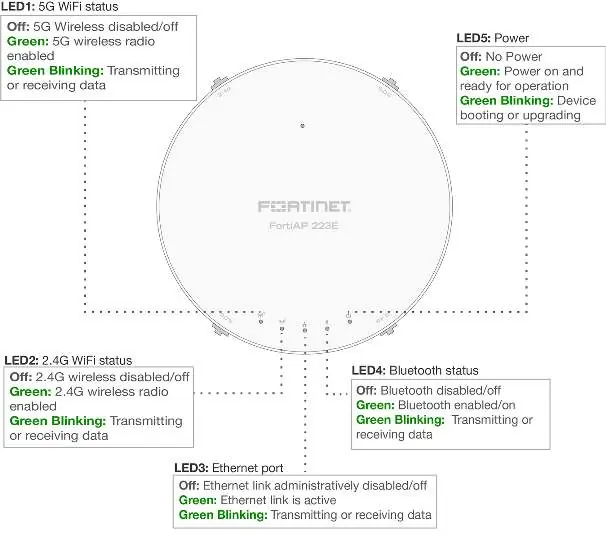
The device features several LED indicators on the front panel to help you monitor its status:
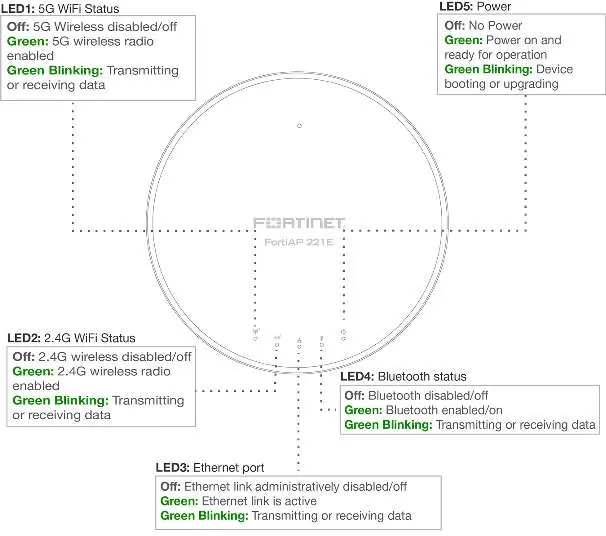
- LED1 (5G WiFi Status): Indicates 5G wireless radio status.
- LED2 (2.4G WiFi Status): Indicates 2.4G wireless radio status.
- LED3 (Ethernet port): Shows Ethernet link activity.
- LED4 (Bluetooth status): Indicates Bluetooth status.
- LED5 (Power): Shows power status and boot/upgrade progress.
The rear panel contains the LAN/PoE port and a power connection for an optional 12V DC adapter.
Installation
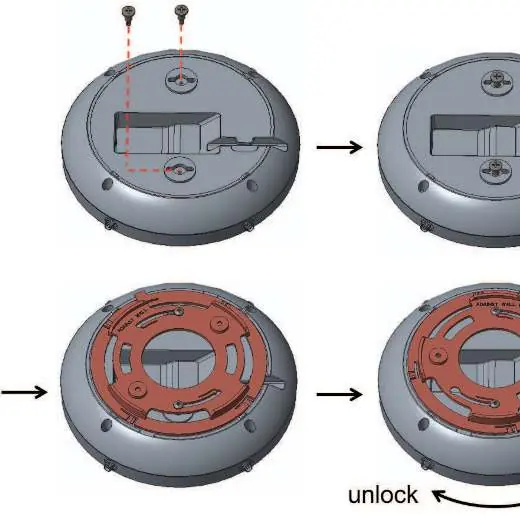
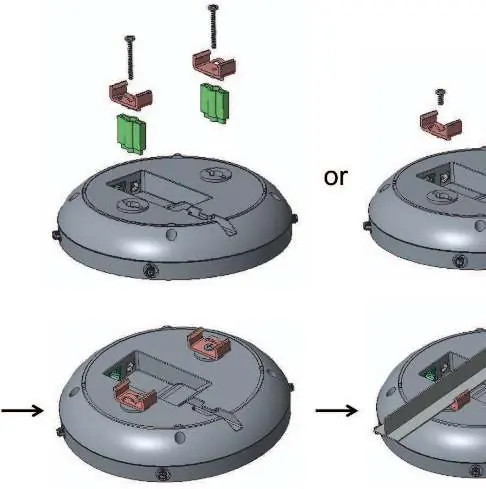
The unit can be mounted on a wall or ceiling. Ensure the electrical wall box is pre-installed before mounting. Use the provided screws and mounting hardware to secure the device to the wall or ceiling bracket.
Basic connection
Connect the FortiAP device to a FortiGate controller or an Internet connection using the LAN/PoE port. Ensure the Power over Ethernet (PoE) cable is connected to an IEEE 802.3af compliant port on your FortiGate device or PoE injector.
FortiAP setup
Deployment through a FortiGate:
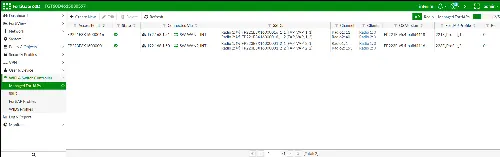
- Ensure you are running the recommended version of software.
- If the FortiGate is on the same network, you can preauthorize the device or authorize it after connection via the Managed FortiAP page in the Web-based Manager.
If FortiGate is not on the same network:
- Log into the FortiAP directly (IP address: 192.168.1.2) with username admin and no password.
- Connect via CLI and specify the IP address of the controlling FortiGate using the command: cfg -a AC_IPADDR_1=0.0.0.0 followed by cfg -c.
Safety and environment
- Operating Temperature: 0°C to 40°C.
- Power Requirements: 12V DC, 2A or 54V PoE (IEEE 802.3af).
- Grounding: Adequate grounding must be provided in compliance with local electrical codes.
- Battery Warning: Risk of explosion if the battery is replaced by an incorrect type. Dispose of used batteries according to local regulations.
Manufacturer information
Fortinet, Inc.
Practical help
Common problems
Device does not power on
Verify the PoE connection or ensure the optional 12V DC power adapter is correctly connected.
Cannot connect to FortiGate controller
Ensure the FortiAP is authorized on the FortiGate controller or configure the controller IP address via CLI.
Forgotten login credentials
The default login is 'admin' with no password.
Before use
- Verify you have a PoE injector or 12V DC power supply.
- Obtain network IP details (Static IP or DHCP) from your network administrator.
- Ensure the FortiGate controller is on the same network or have its IP address ready for CLI configuration.
- Check that the electrical wall box is pre-installed for mounting.
Show more Show less
Specs in practice
- Operating Temperature
- 0°C to 40°C
- Antenna Impedance
- 50 ohms
Images and diagrams
- LED indicators on the front panel show status for WiFi, Ethernet, Bluetooth, and Power.
- Rear panel diagram shows the location of the LAN/PoE port and power adapter input.
Model compatibility
- Requires IEEE 802.3af compliant PoE injector.
- Indoor use only.

Manual page author
Emily Carter
User documentation editor