HVAC / Air Conditioners
User Manual for Frigidaire Room Air Conditioner
Comprehensive user guide for your Frigidaire room air conditioner. Learn how to operate cooling modes, use the remote control, clean filters, troubleshoot common issues, and understand safety instructions.
Table of contents
Manual images
Click an image to enlargeQuick guide from the manual
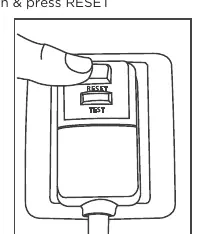
This air conditioner requires specific setup and safety precautions before use. Ensure the unit has been standing upright for at least one hour before operating. Always test the power cord's current detection device by pressing the TEST button (the RESET button should pop out) and then pressing the RESET button again to engage power. Do not use extension cords or adapter plugs.
Control panel and remote
The unit can be controlled via the touch pad or the remote control. Key functions include:
- Mode: Select between Cool, Fan Only, Dry, and Eco modes.
- Fan: Adjust fan speeds or select Auto.
- Sleep: Activates sleep mode, which adjusts temperature and fan speed for comfort.
- Timer: Set delay start or stop times.
- Child Lock: Press and hold the Mode button for 3 seconds to lock the control panel.
Operating modes
Cool Mode: The unit cools the room. You can adjust the temperature between 60°F and 90°F.
Eco (Energy Saver) Mode: The unit is factory-set to this mode. The fan continues to run for 3 minutes after the compressor shuts off, then cycles on periodically to sample the air.
Fan Only Mode: Use for air circulation without cooling. You can choose any fan speed except Auto.
Dry Mode: Acts as a dehumidifier while cooling the room. Temperature is adjustable, but fan speed is fixed to Auto.
Maintenance and cleaning
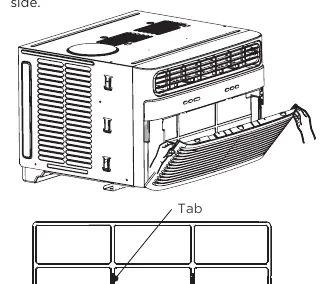
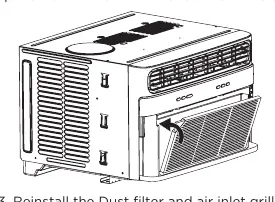
Dust Filter: Check at least once a month. To clean, open the front panel, pull the filter out, and wash with warm water and dishwashing detergent or vacuum it. Ensure it is completely dry before reinstalling.
PureAir Filter: This unit has space for an optional PureAir filter (sold separately). If installed, the indicator will glow white. After 1440 hours, it will turn red, indicating it needs replacement. To reset, hold the Sleep button for 3 seconds.
Troubleshooting
If the unit does not operate, check the wall plug, the power cord's current device, and your home circuit breaker. If the unit is cooling but the room is too warm, ensure the filter is clean, the unit is not blocked by furniture or curtains, and that the temperature is set correctly. If water is dripping inside, the unit may be improperly installed; ensure it is tilted slightly toward the outside.
Manufacturer information
Frigidaire
Practical help
Common problems
Air conditioner will not operate
Check if the wall plug is disconnected, the power cord current device has tripped (press RESET), or the circuit breaker has blown.
Air from unit does not feel cold enough
Ensure room temperature is above 60°F (16°C). Check if the temperature sensing element is touching the cold coil and straighten it if necessary.
Water dripping inside
The unit is likely improperly installed. Tilt the air conditioner slightly toward the outside to allow proper water drainage.
Remote sensing deactivating prematurely
Ensure the remote is within 20 feet and a 120-degree radius of the unit. Remove any obstructions between the remote and the unit.
Before use
- Ensure the unit has been upright for at least one hour before operating.
- Verify the electrical service is adequate for the model.
- Remove all packaging inserts from the side louvers.
- Test the power cord current device by pressing TEST then RESET.
- Ensure the window is clean and the screen is removed if necessary.
Show more Show less
Specs in practice
- Cooling Temperature Range
- 60°F - 90°F (16°C - 32°C) for indoor operation.
- Outdoor Operating Range
- 64°F - 109°F (18°C - 43°C).
- Filter Maintenance
- Clean the dust filter at least once a month to prevent frost accumulation.
Images and diagrams
- The control panel features buttons for Mode, Fan, Sleep, Timer, and indicators for Eco, Cool, Fan Only, Dry, and Filter status.
- The power cord includes a test/reset button for safety.
Model compatibility
- PureAir Filter is sold separately.
- Compatible with the Frigidaire app for smart features.

Manual page author
David Miller
Documentation analyst