HVAC / Air Conditioners
User Manual for Frigidaire Room Air Conditioner
Quick guide for your Frigidaire Room Air Conditioner. Learn how to operate modes, clean the filter, troubleshoot common issues, and understand safety warnings.
Table of contents
Manual images
Click an image to enlargeQuick Guide
This manual provides essential information for operating and maintaining your Frigidaire Room Air Conditioner. Before using the unit, ensure it has been installed correctly according to the separate installation instructions. The unit must remain upright for at least one hour before operation.
Safety Instructions
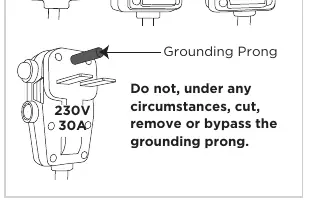
- Electrical Safety: The unit must be used in a properly grounded wall receptacle. Do not use extension cords or adapter plugs.
- Flammable Refrigerant: This unit uses R32 refrigerant. Servicing must be performed by qualified personnel. Keep ventilation openings clear.
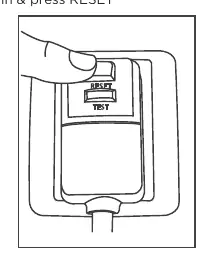
- Current Device: The power cord includes a current detection device. Always test it by pressing the TEST button, then the RESET button before use.
- General Safety: Do not block air intake or discharge. Do not use water to clean inside the unit.
Operating the Air Conditioner
The unit can be controlled via the touch pad or the remote control.
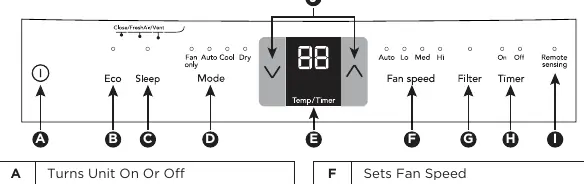
Modes and Features
- Cool Mode: The unit cools the room. You can adjust the temperature between 62°F (17°C) and 86°F (30°C).
- Auto Mode: The unit automatically selects the fan speed and cooling based on room temperature.
- Fan Only Mode: Circulates air without cooling.
- Dry Mode: Acts as a dehumidifier while cooling. Fan speed is fixed to Low.
- Sleep Feature: Automatically adjusts temperature settings for comfort during sleep.
- Timer: Allows you to set a delay for starting or stopping the unit (up to 24 hours).
- Remote Sensing: Allows the remote control to act as the thermostat (on some models).
Care and Cleaning
- Air Filter: Check at least once a month. Wash with warm water and mild detergent or vacuum. Ensure it is completely dry before replacing.
- Cabinet Cleaning: Dust with an oil-free cloth or wash with a cloth dampened in warm water and mild detergent. Do not use harsh cleaners.
- Winter Storage: Remove the unit from the window, cover with plastic, or return to the original carton.
Troubleshooting
If you encounter issues, check the following before calling for service:
- Unit will not operate: Check if the plug is disconnected, the current device tripped (press RESET), or the fuse/circuit breaker is blown.
- Air not cold enough: Ensure room temperature is above 60°F (16°C), check if the filter is dirty, or if the sensor is touching the cold coil.
- Water dripping inside: Ensure the unit is tilted slightly to the outside to allow proper drainage.
Manufacturer information
Frigidaire
Practical help
Common problems
Air conditioner will not operate
Check if the wall plug is connected, press the RESET button on the power cord, or check your home fuse/circuit breaker.
Air from unit does not feel cold enough
Ensure room temperature is above 60°F (16°C), clean the air filter, or ensure the temperature sensing element is not touching the cold coil.
Water dripping inside
The unit is likely installed incorrectly. Tilt the air conditioner slightly to the outside to allow water drainage.
Remote Sensing deactivating prematurely
Ensure the remote is within 20 feet and a 120° radius of the unit, and that the signal is not obstructed.
Before use
- Ensure the unit has been upright for at least one hour.
- Verify the electrical service is adequate for the model.
- Ensure the unit is properly grounded.
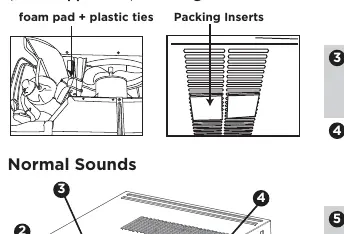
- Remove all packaging and inserts from side louvers.
- Remove plastic ties and foam pad securing the compressor.
- Test the power cord current device (Press TEST, then RESET).
Show more Show less
Specs in practice
- 62°F - 86°F (17°C - 30°C)
- The temperature range for cooling and dry modes.
Images and diagrams
- Control Panel: Displays buttons for Mode, Fan Speed, Timer, and Filter Reset.
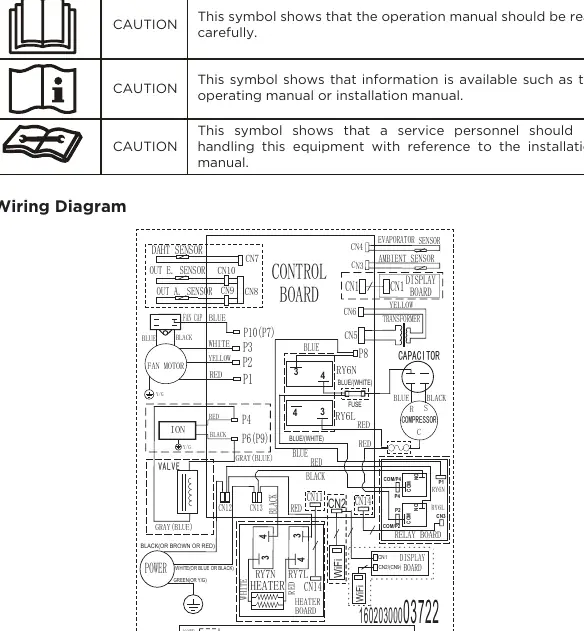
- Wiring Diagram: Shows internal electrical connections for service personnel.
- Power Cord: Shows the current device with TEST and RESET buttons.
Model compatibility
- Do not use extension cords or adapter plugs.
- Use only with properly grounded wall receptacles.
- Remote Sensing feature is available on some models only.

Manual page author
Emily Carter
User documentation editor