Electronics / Networking
FS Optical Transceiver Troubleshooting Manual
A comprehensive troubleshooting guide for FS 1G/10G/25G/40G/100G optical transceivers. This manual covers physical layer diagnostics, CLI commands for Cumulus and MLNX-OS systems, fault code interpretation, and solutions for common issues...
Quick answers from the manual
Quick answer
- This manual provides standardized troubleshooting procedures for FS optical transceivers on Cumulus and MLNX-OS systems, including CLI diagnostic commands, fault code interpretation, and solutions for common issues like link flapping, CRC errors, and heat dissipation. p. 2, 20, 28
Key actions
- Check DDM parameters p. 5, 6
- Run diagnostic commands p. 13, 20
- Clean fiber end faces p. 12, 34
Problems and fixes
Link flapping
Check physical layer, swap cables, verify port speed/FEC settings.
p. 28
CRC errors
Replace cable, check hardware, verify encoding compatibility.
p. 29Error codes
| Code | Meaning | Action | Pages |
|---|---|---|---|
| 2 | AN failure (Adaptive failure of speed/FEC or DME on both sides) | Check TX/RX power, clean connectors, ensure matching speed/FEC settings. | p. 22 |
| 15/52 | Bad signal integrity | Clean connectors, check TX/RX power, use PRBS testing. | p. 23 |
Maintenance and reset
- Reset the 'switchd' process (Cumulus) p. 19
Technical specifications
| Parameter | Value | Meaning | Pages |
|---|---|---|---|
| Operating Voltage | 3.135V ~ 3.465V | Standard power supply range for 100G modules. | p. 5 |
Where to find it in the PDF
- Physical Layer Troubleshooting p. 2, 12
- Fault Code Reference p. 22, 27
Table of contents
Manual images
Click an image to enlargeQuick Guide to Troubleshooting
This manual provides standardized procedures for diagnosing and resolving issues with FS optical transceivers. Before troubleshooting, ensure you have identified the system environment (Cumulus Linux or NVIDIA MLNX-OS) and have access to the command-line interface (CLI).
Physical Layer Diagnostics
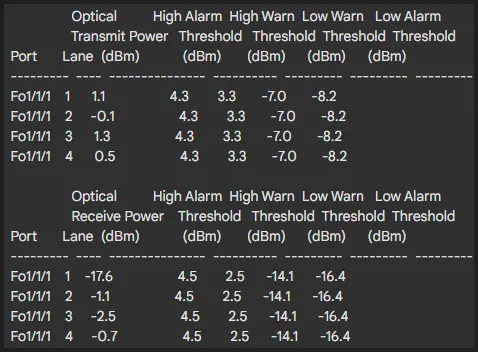
Physical layer issues are often the root cause of link failures. Key parameters to monitor include:
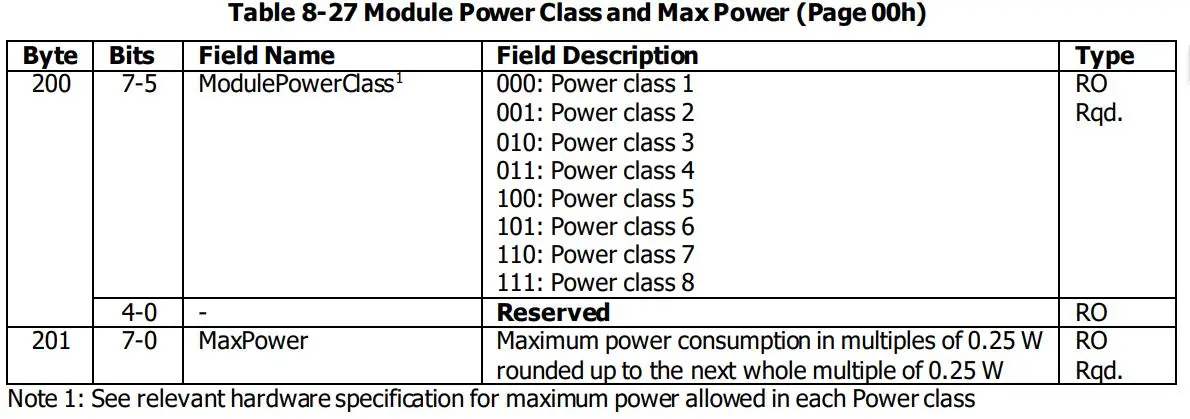
- DDM/DOM: Provides real-time data on temperature, voltage, and optical power. Use ethtool -m swp to view these metrics.
- FEC (Forward Error Correction): Essential for high-speed modules to ensure error-free transmission. Ensure FEC settings match on both ends of the link.
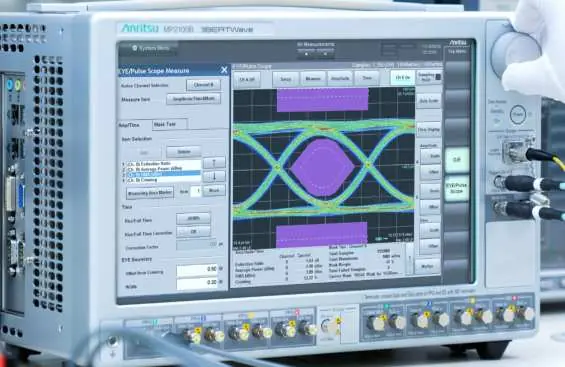
- Signal Integrity: Poor signal quality can lead to link instability. Check for high bit error rates (BER) and ensure fiber connectors are clean.
Troubleshooting Cumulus Systems
For devices running Cumulus Linux, use the following commands to gather information:
- l1-show swp[port]: Displays detailed port status, including link state, speed, FEC, and DDM information.
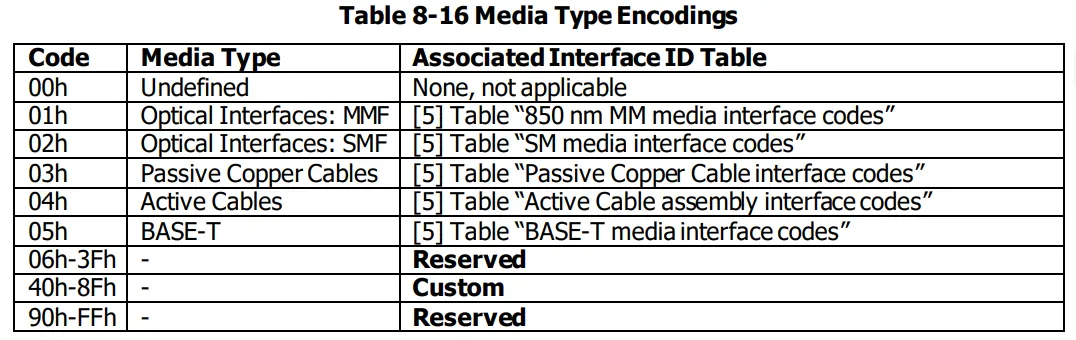
- ethtool -m swp[port]: Parses EEPROM content to retrieve configuration and operational metrics.
- ethtool -S swp[port] | grep Errors: Checks for physical link error counters.
Troubleshooting MLNX-OS (Infiniband) Systems
For NVIDIA InfiniBand systems, use these diagnostic commands:
- show interfaces ib link-diagnostics: Provides interface information, fault codes, and status for InfiniBand ports.
- show interfaces ib internal leaf link-diagnostics: Diagnostic information for internal leaf modules.
- show interfaces ib internal spine link-diagnostics: Diagnostic information for internal spine modules.
Common Issues and Solutions
Link Flapping
Flapping is often caused by physical layer issues, network/data layer routing oscillations, or faulty modules. Steps:
- Swap cables to rule out physical damage.
- Verify port speed and FEC settings match on both ends.
- Check DDM parameters for abnormal values.
- Test the module on a different port.
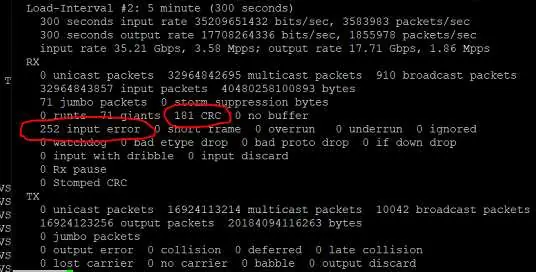
CRC Errors
CRC errors indicate data corruption during transmission. Steps:
- Inspect and clean fiber end faces.
- Replace the patch cable.
- If errors persist, replace the module to rule out hardware faults.
Abnormal Heat Dissipation
Overheating can cause performance degradation. Steps:
- Ensure adequate airflow (at least 30cm clearance).
- Check fan status and upgrade to high-speed fans if necessary.
- Reduce port density or use industrial-grade modules for extreme environments.
Manufacturer information
FS.com
Practical help
Common problems
Link flapping
Check physical layer, swap cables, verify port speed/FEC settings, and check DDM parameters.
CRC errors
Clean fiber end faces, replace patch cables, and verify encoding compatibility.
Unsupported PID
Check firmware compatibility, verify EEPROM PID field, and enable third-party module support.
High temperature
Improve airflow, check fan status, reduce port density, or use industrial-grade modules.
Before use
- Verify module compatibility with the switch Hardware Compatibility List (HCL).
- Inspect fiber connectors for dirt, wear, or damage.
- Ensure port speed and FEC settings are configured correctly on both ends.
- Check DDM/DOM parameters for power or temperature alarms.
- Ensure the switch firmware supports the module's PID.
Images and diagrams
- Eye diagrams illustrate signal integrity (NRZ vs PAM4).
- CLI output examples demonstrate how to read port status and error counters.
Model compatibility
- Third-party modules may require enabling specific configurations on the switch.
- Ensure FEC settings are consistent on both ends of the link.
- Some NVIDIA switches have specific port limitations for high-power modules.

Manual page author
Michael Turner
Technical manual editor
Reviews PDF manuals for structure, safety notes, and practical product details so readers can find the right information quickly.