Home Appliances / Refrigerators
Troubleshooting and Service Manual for Furrion Arctic 12V French Door Refrigerator FCR20DCAFA-SV
Quick guide for the Furrion Arctic 12V French Door Refrigerator (FCR20DCAFA-SV). Includes maintenance tips, troubleshooting common issues, replaceable parts list, and technical specifications.
Table of contents
Manual images
Click an image to enlargeQuick guide from the manual
This document provides essential service and troubleshooting information for the Furrion Arctic 12V French Door Refrigerator (Model FCR20DCAFA-SV). Always disconnect the power supply before performing any maintenance or service procedures. Wear appropriate safety equipment, such as eye protection, when working on the unit.
Safety and Refrigerant
This appliance uses R600a refrigerant, which is flammable. Do not use mechanical devices to defrost the unit or puncture the refrigerant tubing. If the refrigerant circuit is damaged, avoid open flames and ventilate the room thoroughly. Ensure ventilation openings in the appliance enclosure are kept clear of obstructions.
Maintenance and Cleaning
Regular maintenance is required to keep the appliance in good condition:
- Exterior: Wipe the digital and display panels with a clean, soft cloth. Clean doors and cabinet surfaces with a mild detergent and wipe dry. Do not use harsh chemicals like benzene, thinner, or abrasive cleansers.
- Interior: Clean regularly using a weak solution of baking soda. Rinse with warm water and a wrung-out sponge. Dry all surfaces and removable parts completely before switching the appliance back on.
- Door Seals: Keep seals clean to prevent sticking and tearing. Wash with mild detergent and warm water, then rinse and dry thoroughly.
Troubleshooting
Before calling for service, check the following common issues:
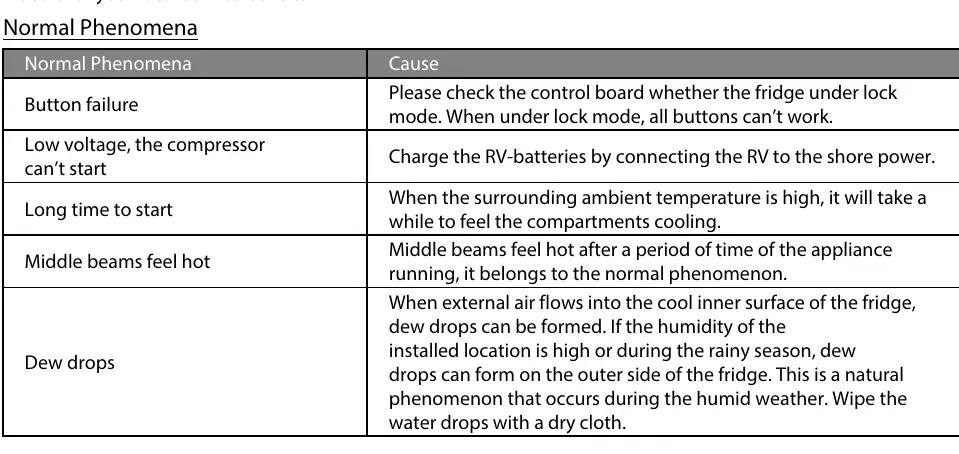
- Button failure: Check if the control board is in lock mode.
- Low voltage: If the compressor won't start, charge the RV batteries by connecting to shore power.
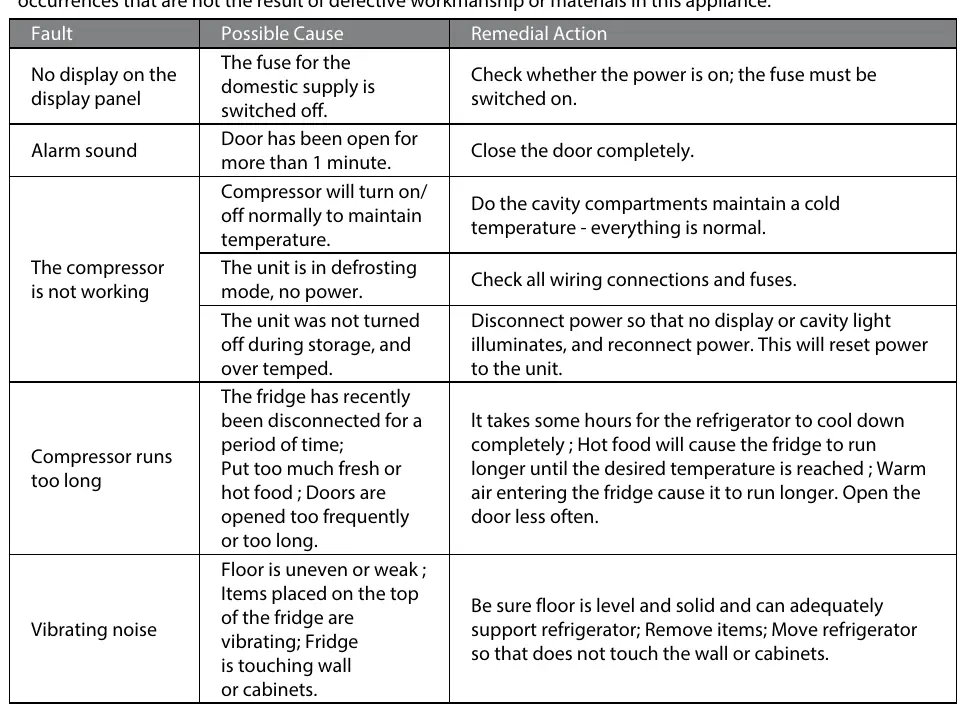
- No display: Check if the power is on and the fuse is switched on.
- Alarm sound: Ensure the door is closed completely.
- Vibrating noise: Ensure the floor is level and solid, and that the refrigerator is not touching walls or cabinets.
- Normal phenomena: Sounds like gurgling, compressor noise, or hot middle beams are often normal during operation.
Replaceable Parts
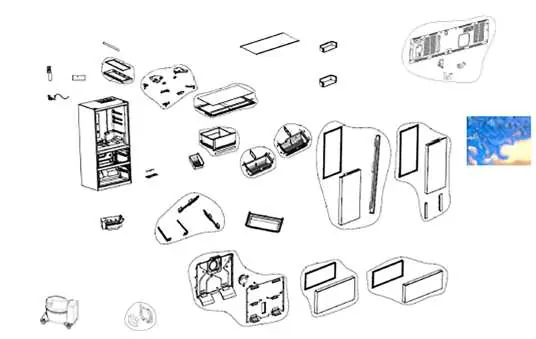
The manual includes a detailed parts list and diagram for components such as the compressor fan assembly, ice maker, door assemblies, and control panels. Repairs should only be performed by competent service engineers.
Specifications
- Rated Voltage: DC 12V
- Total Capacity: 19.6 cu.ft.
- Refrigerant: R600a
- Working Temperature Range: 50°F to 110°F (10°C to 43°C)
- Defrost: Automatic
Official resources from the manual
Manufacturer information
Furrion
Practical help
Common problems
No display on the display panel
Check whether the power is on and the fuse is switched on.
Alarm sound
Close the door completely.
Compressor is not working
Check all wiring connections and fuses. If the unit was in storage, disconnect power to reset the unit.
Vibrating noise
Ensure the floor is level and solid. Move the refrigerator so it does not touch the wall or cabinets.
Button failure
Check the control board to see if the fridge is in lock mode.
Before use
- Ensure the floor is level and solid.
- Verify the power supply is connected and fuses are on.
- Check that the door seals are clean and intact.
- Ensure ventilation openings are clear of obstructions.
- Verify the ice maker switch is turned on if using ice.
Specs in practice
- Rated Voltage
- DC 12V
- Total Capacity
- 19.6 cu.ft.
- Working Temperature
- 50°F to 110°F (10°C to 43°C)
Images and diagrams
- The parts diagram on page 5 identifies key components including the compressor fan, ice maker, door assemblies, and control panels for service identification.
Model compatibility
- Intended for household and similar applications, specifically RV use.

Manual page author
David Miller
Documentation analyst
Organizes user manual content into clear summaries, with attention to model details, product context, and everyday usability.