Home Appliances / Refrigerators
Troubleshooting and Service Manual for Furrion Everchill 10.7 cu. ft. 12V Refrigerator SRD-360WTG-E
Comprehensive troubleshooting and service guide for the Furrion Everchill 10.7 cu. ft. 12V Refrigerator (SRD-360WTG-E). Includes wiring diagrams, fault code explanations, maintenance tips, and step-by-step repair procedures.
Table of contents
Manual images
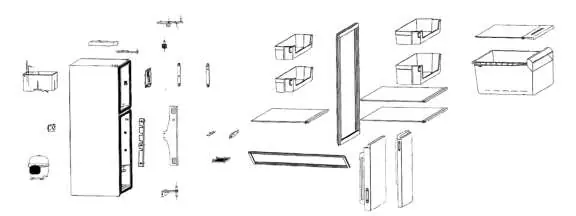
Click an image to enlargeQuick Troubleshooting Guide
This manual provides essential service information for the Furrion Everchill 10.7 cu. ft. 12V Refrigerator. If your unit is not functioning correctly, start by checking the 12V DC power source, fuse, and wiring connections. If the unit displays flashing lights on the temperature control panel, refer to the Fault Display section to identify the specific sensor or system error. Always disconnect power before performing any maintenance or repairs.
Safety and Power Requirements
Safety Warnings:
- This appliance is intended for use in recreational vehicles (RV).
- Do not connect the unit to an AC power supply; it is a Class III appliance requiring 12V DC safety extra low voltage.
- Always wear eye protection when performing service or maintenance.
- Do not remove the cover or back; there are no user-serviceable parts inside.
- Keep ventilation openings clear of obstructions.
- Do not use mechanical devices to accelerate defrosting.
Power Connections:
- Ensure the power source is disconnected before maintenance.
- Use appropriate wire gauges based on the distance from the power source (e.g., 14 AWG for 3'3", 6 AWG for 50').
- Connect the positive and negative terminals as indicated in the wiring diagram. If installed in an RV, connect the GND terminal directly to the RV chassis.
Maintenance and Cleaning
- Clean the refrigerator with a damp cloth. Avoid using bristle brushes, steel wool, or corrosive detergents.
- Regularly clear dust from the rear panel and side plates.
- Wipe the door gasket clean and ensure it is properly seated in the groove.
- If the unit will be unused for an extended period, take care of frozen foods and try to keep the door closed as much as possible.
Troubleshooting and Fault Codes
If the refrigerator is not cooling or not turning on, check the following:
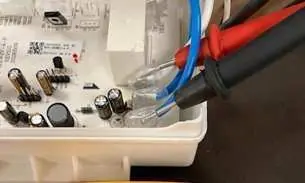
- Power Issues: Verify 12V DC voltage (12.5-13.6V) at the terminal block and compressor board. Check fuses and wiring connections.
- Cooling Issues: Ensure the 'Power Off' function is not active. Check the freezer fan operation and ensure door seals are tight.
- Fault Display Codes:
- Indicator 1 flashing: Refrigerator sensor fault.
- Indicator 2 flashing: Ambient temp. sensor fault.
- Indicator 3 flashing: Freezer defrosting sensor fault.
- Indicator 4 flashing: Undervoltage alarm.
- Indicator 5 flashing: Overvoltage.
- Indicators 1 & 3 flashing: Fan failure.
Repair Procedures
The manual provides detailed steps for:
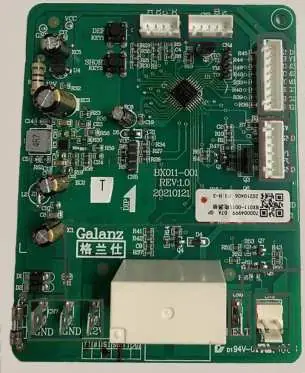
- Voltage Checks: Using a multimeter to verify power at the terminal block, connectors, and compressor board.
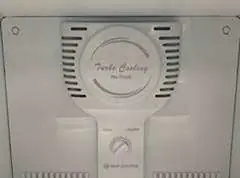
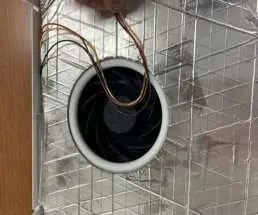
- Fan Replacement: Removing the fan assembly from the freezer compartment to check wiring and operation.
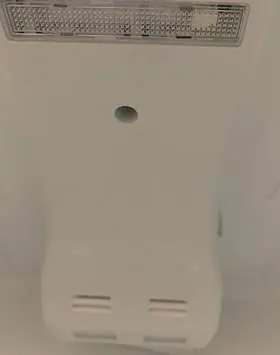
- Drain Tube Cleaning: Unclogging the drain tube if water leaks into the refrigerator compartment.
- Sensor Replacement: Accessing and replacing temperature sensors if fault codes persist.
Manufacturer information
Furrion
Practical help
Common problems
Refrigerator not turning on
Check 12V DC power source, verify fuse integrity, and ensure wiring connections at the terminal block are secure.
Refrigerator not cooling
Check compressor voltage (12.5-13.6V), ensure 'Power Off' function is not active, and check for refrigerant leaks (oily substance on copper lines).
Freezer freezing up
Check door seals for leaks using a flashlight, adjust the door if necessary, and ensure the freezer fan is operational.
Water leaking in refrigerator
Check for a blocked drain tube or wind channel drip tray and clear any obstructions.
Before use
- Ensure 12V DC power source is connected correctly
- Verify wire gauge meets length requirements
- Check for proper ventilation around the unit
- Ensure unit is stable and level
- Verify all electrical connections are tight
Specs in practice
- Rated Voltage
- DC 12V
- Rated Current
- 15A
- Defrost Power
- 120W
Images and diagrams
- Wiring diagram shows terminal block connections for positive, negative, and chassis ground.
- Fault display table links LED flash patterns to specific sensor or system faults.
- Main circuit board layout identifies connection points for thermistors, LED, fan, and power.
Model compatibility
- Intended for use in recreational vehicles (RV).
- Do not connect to AC power supply.

Manual page author
David Miller
Documentation analyst
Organizes user manual content into clear summaries, with attention to model details, product context, and everyday usability.