Electronics / Speakers & Soundbars
Furrion 2.4GPM Tank-less Gas Water Heater Troubleshooting and Service Guide
Comprehensive troubleshooting and service guide for Furrion 2.4GPM tank-less gas water heaters. Includes maintenance procedures, error code explanations, winterizing steps, and parts identification.
Quick answers from the manual
Quick answer
- To operate the Furrion 2.4GPM water heater, ensure the gas and water supplies are connected, the power switch is ON, and the wall controller is illuminated. The default temperature is 115°F (46°C). p. 5
Key actions
- Winterizing the water heater p. 6
- Cleaning the water inlet filter p. 8
First start
- Verify power switch is OFF, confirm steady water flow, ensure valves are shut, turn power switch ON, turn on gas supply, open hot water faucet. p. 5
Show 5 more answers Show less
Problems and fixes
E1: Flame sense during ignition
Confirm all gas valves are open, confirm adequate fuel in tanks, check regulator.
p. 14
E5: Air pressure
Remove exhaust obstruction or re-orient coach to avoid high winds.
p. 14
E6: Temperature surge
Reduce cold water mix ratio, confirm water tank is full, purge air from lines, check for filter blockage.
p. 14Error codes
| Code | Meaning | Action | Pages |
|---|---|---|---|
| E0 | Water outlet temperature system fault | Contact Furrion. | p. 14 |
| E3 | Over temperature mechanical sensor faulty | Let cold water flow 10~20S then restart. | p. 14 |
Maintenance and reset
- To reset the appliance, switch the power switch to OFF, wait 5 seconds, and switch it back ON. p. 14
Technical specifications
| Parameter | Value | Meaning | Pages |
|---|---|---|---|
| BTU/HR | 60,000 BTU | Heating capacity | p. 17 |
| Power Input | 12V DC < 3 Amp | Electrical requirement | p. 17 |
Where to find it in the PDF
- Troubleshooting and Service Manual p. 1
- Replaceable Parts List p. 10, 11, 12, 13
- Error Codes p. 14
Table of contents
Manual images
Click an image to enlargeQuick guide from the manual
This document provides essential service and troubleshooting information for the Furrion 2.4GPM Tank-less Gas Water Heater. Before operating, ensure the gas supply is connected, the water system is purged of air, and the power switch is in the ON position. The default factory temperature setting is 115°F (46°C).
Safety Instructions
DANGER: Exhaust gases are hot and contain carbon monoxide. Never use the appliance in enclosed spaces or tents. Keep air inlets and exhaust outlets free of obstructions. Do not store flammable materials near the appliance.
CAUTION: Always wear eye protection when performing service or maintenance. Never perform work while the appliance is operating, hot, or under pressure.
Testing
Before operation, perform the following tests:

- Gas Leak Testing: Ensure test pressures are below 40in-wc (100mbar). Use leak detection liquid on all connections. Do not use open flames.
- Water Leak Testing: Do not exceed 116PSI when pressure testing with compressed air. Verify all connections are secure and free of leaks.
Operation
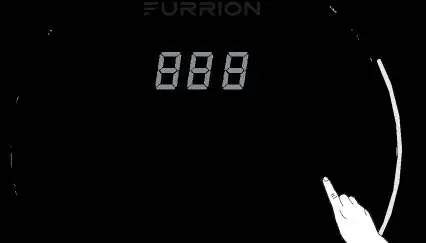
To start the unit, ensure the power switch is in the ON position and the wall controller is illuminated. If the controller is off, press the button on the controller. The display will show the current temperature setting.
Cleaning and Maintenance

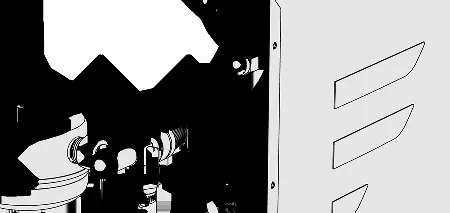
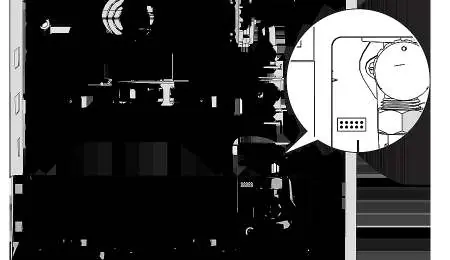
- Storage and Transit: Turn off the gas supply, turn off the main switch, and drain the water system by removing the filter cover and drain plug.
- Winterizing: In temperatures below 39°F (4°C), the system must be winterized. Use compressed air (max 50PSI) to blow out the system or use non-toxic antifreeze.
- Filter Cleaning: Periodically clean the inlet water filter screen by removing the baffle and unscrewing the filter cover counterclockwise.
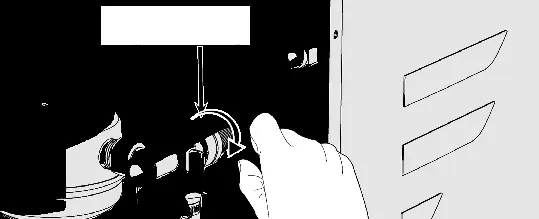
- Pressure Safety Valve: Operate the valve handle once a year to ensure it is effective. Check the drain hose for water to confirm it is working.
Troubleshooting
If the appliance malfunctions, an error code will appear on the wall controller. Try stopping and restarting the water flow or resetting the appliance by switching the power off for 5 seconds and back on. If issues persist, consult the error code table or contact a certified service technician.
Specifications
The unit operates on Propane (LP Gas) with an inlet pressure of 11-14 in-wc. Power input is 12V DC < 3 Amp. Water operating pressure is 7.2 PSI to 65 PSI. The temperature range is 95°F (35°C) to 124°F (51°C).
Manufacturer information
Furrion
Practical help
Common problems
Hot water takes longer to reach temperature
Check for cold water mixing into the hot water side (e.g., shower head valve partially closed). Check incoming water temperature.
No hot water at the tap
Check if gas supply is on, gas tank is empty, appliance is switched off, or fresh water supply is off.
Water escaping at pressure safety valve
Water pressure may be too high (max 65PSI). Install a water pressure regulator. If the valve is leaking due to debris, try flushing it by rotating the handle.
Power status LED is off
Check if the appliance is switched on. Check the standard 125V/10A fuse.
Before use
- Ensure gas supply is turned on.
- Verify water supply is connected and faucets are open to purge air.
- Check that the power switch is in the ON position.
- Ensure the wall controller is illuminated.
- Confirm no error codes are displayed.
Show more Show less
Specs in practice
- Inlet Pressure
- 11" WCI Min to 14" WCI Max (Propane/LP Gas).
- Water Operating Pressure
- 7.2 PSI - 65 PSI.
- Setting Temperature Range
- 95°F (35°C) ~ 124°F (51°C).
Images and diagrams
- Fig 1: Power switch location.
- Fig 2: Wall controller interface.
- Fig 3: Filter cover and drain plug location.
- Fig 4: Pressure safety valve handle.
- Fig 7: Filter cleaning procedure.
Model compatibility
- Requires 12V DC power.
- Requires Propane (LP Gas) supply.
- Water pressure must not exceed 65 PSI.
- Not for use in enclosed spaces or tents.

Manual page author
Emily Carter
User documentation editor