Automotive / Dash Cams
User Manual for Gator GHDVR82W Dash Cam
Quick guide for the Gator GHDVR82W Dash Cam. Learn how to install, pair with the app, use hand gesture controls, and troubleshoot common issues.
Table of contents
Manual images
Click an image to enlargeQuick guide from the manual
The Gator GHDVR82W is a Full HD 1080P WiFi dash cam designed for vehicle security. To get started, insert a Class 10 Micro SD card (up to 64GB), mount the device to your windscreen, and connect it to a 12V power source. The camera automatically starts recording when the vehicle ignition is turned on. You can pair the device with your smartphone via the Gator Dash Cam App to view footage and adjust settings.
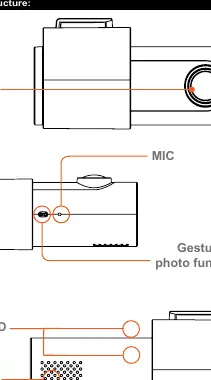
Product overview
The dash cam features a 152-degree wide-angle lens, G-sensor for accident detection, and a super capacitor for reliable operation in extreme temperatures. It supports loop recording, ensuring continuous footage by overwriting the oldest files when the memory card is full.
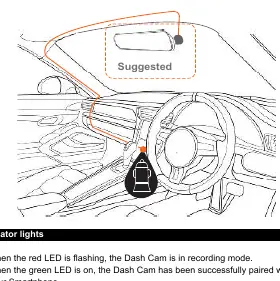
Installation of Dash Cam
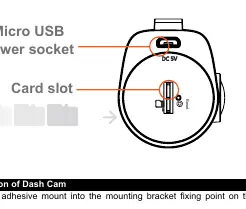
1. Insert the adhesive mount into the fixing point on the dash cam. 2. Clean the windscreen and fix the device, preferably near the rear-view mirror. Ensure the view is not obstructed and that approximately 1/4 of the vehicle's bonnet is visible from the bottom of the screen. 3. Insert a Micro SD card. 4. Connect the Mini USB power cable to the camera and the 12V adapter to your vehicle's power socket. 5. The camera will power on automatically when the ignition is turned on.
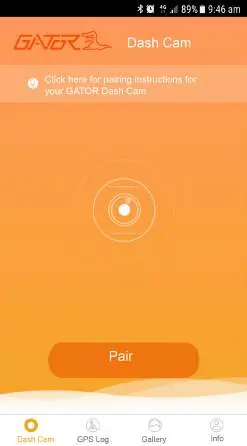
Pairing the Dash Cam to a Smartphone
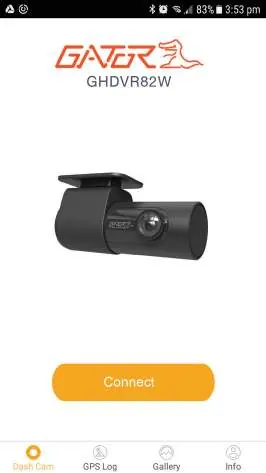
1. Download the Gator Dash Cam App from the App Store or Google Play. 2. In the app, press the Pair icon. 3. Go to your phone's WiFi settings and select the dash cam model. 4. Enter the default password 12345678. 5. Once connected, you can access the interface to view videos, photos, and settings.
Hand gesture photo function
The device includes a gesture sensor. Simply wave your hand in front of the sensor to trigger the camera to take a photo. You will hear a click sound when the photo is captured.
Troubleshooting
If the device is not recording, check if the Micro SD card has sufficient space. If the camera stops recording automatically, ensure you are using a high-speed Class 10 Micro SDHC card (not SDXC). If the image is fuzzy, clean the lens and remove the protective sticker. If the device is unresponsive, use a paper clip to press the reset button located near the SD card slot.
Specifications
- Resolution: 1920x1080 @ 30fps
- Lens: 152 Degree Wide Angle
- Memory: Micro SDHC (Class 10, up to 64GB)
- Power: DC 5V/1A
- WiFi: 2.4GHz 802.11 b/g/n
Practical help
Common problems
Cannot take pictures or record video
Check if there is enough space on the Micro SD card.
Stopping automatically while recording
Ensure you are using a high-speed Micro SDHC card (Class 10). SDXC cards are not compatible.
Fuzzy or dirty image
Clean the lens with a soft cloth and ensure the transparent protective sticker has been removed.
Device jammed or not responding
Press the reset button on the underside of the device using a paper clip.
Not turning on in the car
Verify that the cigarette lighter socket has power.
Before use
- Insert a Class 10 Micro SD card (up to 64GB)
- Clean the windscreen thoroughly before mounting
- Download the Gator Dash Cam App
- Remove the protective sticker from the lens
- Ensure the 12V power adapter is connected
Specs in practice
- Video Resolution
- 1920x1080 at 30 frames per second
- Loop Recording
- Automatically overwrites oldest files in 3-minute blocks when the card is full
- Super Capacitor
- Allows operation in extreme temperatures and saves the last file when power is disconnected
- Working Voltage
- DC 5V/1A
Images and diagrams
- Mounting: Place near the rear-view mirror; ensure 1/4 of the bonnet is visible for proper alignment.
- Reset: The reset hole is located on the underside of the unit, next to the Micro SD card slot.
Model compatibility
- GPS: Requires optional GPS7282W antenna.
- Memory Card: Supports Micro SDHC only (Class 10, up to 64GB). SDXC cards will not work.

Manual page author
David Miller
Documentation analyst
Organizes user manual content into clear summaries, with attention to model details, product context, and everyday usability.