Plumbing / Toilets Urinals
User Manual for Geberit AquaClean Tuma Comfort
Quick guide for the Geberit AquaClean Tuma Comfort shower toilet. Learn how to operate the remote control, adjust spray settings, save user profiles, and perform routine cleaning.
Table of contents
Manual images
Click an image to enlargeQuick guide from the manual
This document provides essential operating instructions for the Geberit AquaClean Tuma Comfort shower toilet. It covers basic operation, user settings, and maintenance. For advanced configuration and troubleshooting, please refer to the full user manual available via the Geberit Home app or the official Geberit website.
Safety information
To ensure safe operation, please observe the following precautions:
- Do not leave the WC seat ring during the shower procedure.
- Do not place loads or objects on the WC lid.
- Do not immerse the remote control in liquid.
- Do not operate the device without the plug for the Geberit AquaClean descaling agent.
Device overview
The system consists of the following main components:
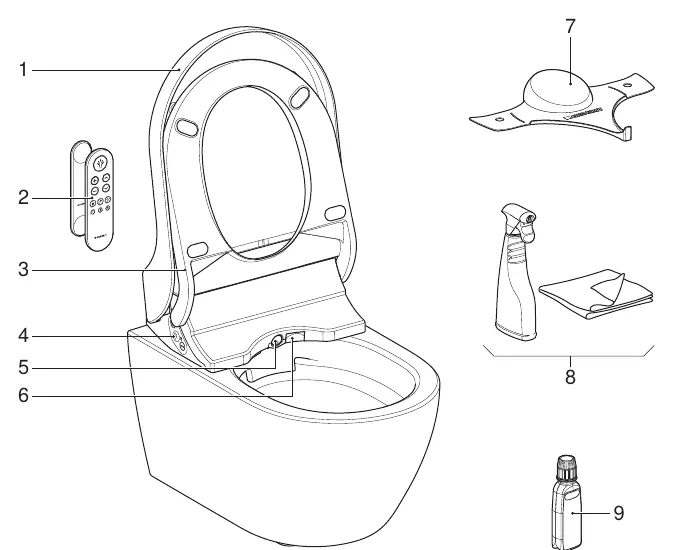
- WC lid and seat: Features user recognition and seat heating.
- Remote control: Used for daily operations and advanced settings.
- Lateral control panel: Located on the side of the toilet for basic control.
- Spray arm: Includes the spray nozzle and Lady shower nozzle.
- Consumables: Includes a ceramic honeycomb filter, cleaning set, and descaling agent.
Operating concept
The shower toilet can be operated via the remote control, the lateral control panel, or the Geberit Home App. Note that the remote control function is deactivated while the shower toilet is connected to the Geberit Home App.
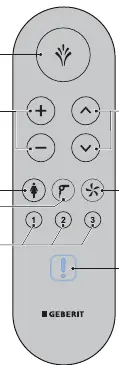
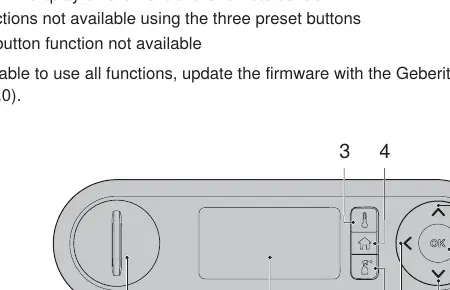
Remote control
The front of the remote control handles daily functions like starting the shower, adjusting intensity, and activating the dryer. The rear of the remote control provides access to advanced settings, including temperature presets and maintenance options.
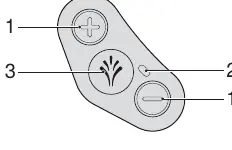
Lateral control panel
The lateral panel allows for quick access to basic functions, including starting the anal or Lady shower and adjusting spray intensity.
Using the shower functions
To use the shower functions, you must be seated on the WC seat ring.
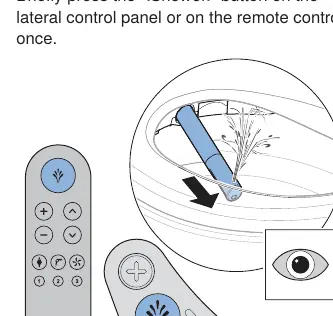
- Anal shower: Briefly press the Shower button on the lateral panel or remote control. The shower runs for 50 seconds.
- Lady shower: Press the Lady shower button on the remote control, or press and hold the Shower button on the lateral panel for 2 seconds.
- Dryer: The dryer starts automatically after the shower procedure or can be started manually by pressing the Dryer button.
Adjusting settings
You can customize your experience during the shower procedure:
- Spray intensity: Use the + and - buttons on the remote control or lateral panel to adjust intensity in 5 stages.
- Spray arm position: Use the arrow keys on the remote control to move the spray arm forwards or backwards in 5 stages.
- Oscillating motion: Press the up and down arrow keys on the remote control simultaneously to toggle the oscillating motion of the spray arm.
Saving user profiles
You can store personal settings for quick access:
- Enter your preferred settings.
- Press and hold one of the 3 user profile buttons on the remote control for more than 2 seconds.
- The device will beep, and the LED will light up green to confirm the settings are saved.
Alternatively, you can save personal profiles directly via the Geberit Home App.
Cleaning and maintenance
Regular cleaning is essential for hygiene and device longevity.
- Cleaning agents: Use only Geberit AquaClean cleaning agents. Avoid aggressive or scouring agents.
- Equipment: Use soft, fine-pored sponges, lint-free cloths, and a standard toilet brush.
- Descaling: Only use Geberit AquaClean descaling agents.
Manufacturer information
Geberit Group
Practical help
Common problems
Remote control not responding
Check if the device is connected to the Geberit Home App, as the remote control is deactivated during app connection.
Functions missing or limited
Ensure the firmware is updated to version 13.0 or higher via the Geberit Home App.
Shower procedure stops early
The shower procedure is timed (50 seconds). You can restart it by pressing the Shower button again.
Before use
- Ensure you are sitting on the WC seat ring.
- Verify the power switch is turned on.
- Check that the water supply is connected.
- Download the Geberit Home app for advanced configuration.
- Ensure the descaling agent plug is in place.
Specs in practice
- Spray intensity
- Adjustable in 5 stages.
- Spray arm position
- Adjustable in 5 stages.
- Dryer duration
- Runs for 5 minutes.
Images and diagrams
- The remote control front handles daily operations like shower start/stop and intensity.
- The remote control rear provides access to temperature and maintenance presets.
- The lateral control panel offers basic shower start/stop and intensity adjustment.
Model compatibility
- Remote control functions are deactivated when the device is connected to the Geberit Home App.
- Requires Geberit Home App for firmware updates and advanced settings.

Manual page author
Michael Turner
Technical manual editor
Reviews PDF manuals for structure, safety notes, and practical product details so readers can find the right information quickly.