Health / Medical Devices
Electric Pedal Exerciser GIMA TD001-P8
Quick guide for the GIMA TD001-P8 electric pedal exerciser. Includes assembly instructions, operation modes, safety warnings, and technical specifications for home use.
Table of contents
Manual images
Click an image to enlargeQuick Guide
The GIMA TD001-P8 is an electric pedal exerciser designed for home use. Key operational points include:
- Automatic Shut-off: The device has a default working time of 30 minutes and will turn off automatically.
- Pedal Assembly: The right pedal must be screwed in clockwise, and the left pedal counter-clockwise.
- Power: Ensure the adaptor is connected and the red button near the connector is pressed to power on.
- Modes: Features manual mode (screen displays -HA-) and automatic modes (P1, P2, P3).
Safety Warnings
Read all instructions before use. This product is for domestic use only and is not a toy. Keep away from children and pets. Do not wear loose clothing or jewelry that could get caught in the machine. If you experience pain or dizziness, stop exercising immediately and consult a physician. Consult a doctor before use if you have health conditions such as heart problems, are recovering from surgery, or are pregnant.
Parts List
Ensure all parts are present before assembly:
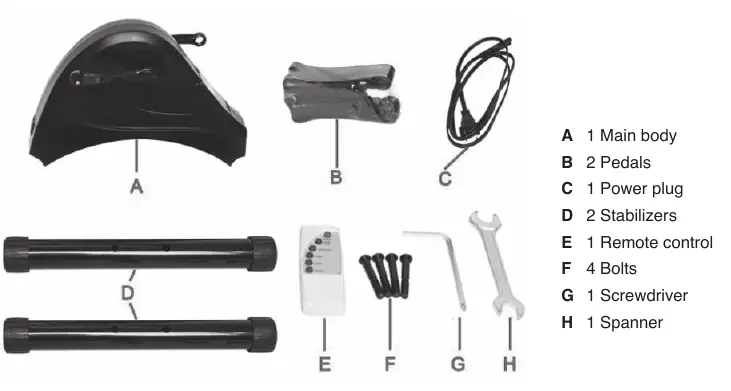
- Main body
- 2 Pedals
- Power plug
- 2 Stabilizers
- Remote control
- 4 Bolts
- Screwdriver
- Spanner
Assembly
Assembly takes approximately two minutes:
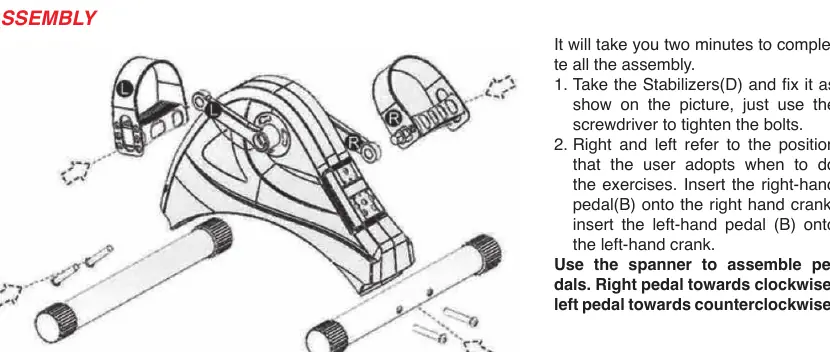
- Attach the stabilizers (D) to the main body using the provided bolts and screwdriver.
- Insert the right-hand pedal (B) onto the right-hand crank and the left-hand pedal (B) onto the left-hand crank.
- Use the spanner to tighten the pedals. Remember: right pedal clockwise, left pedal counter-clockwise.
Connecting Power and Operation
Connect the adaptor to the power socket. Press the red button located near the connector to turn the unit on. Use the remote control or the display panel to operate:
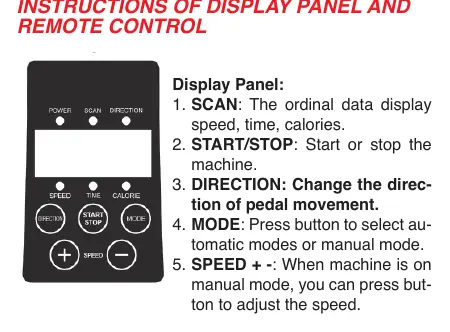
- MODE: Select between automatic (P1, P2, P3) and manual (-HA-) modes.
- START/STOP: Begin or end the exercise session.
- DIRECTION: Change the rotation direction of the pedals.
- SPEED: Adjust speed levels from 1 to 6 (only in manual mode).
- SCAN: Cycles through speed, time, and calories on the display.
Note: The remote control requires 2 AAA batteries.
Exercising
The device can be used for leg exercises while sitting or lying down, and for arm exercises:
- Legs (Sitting): Use a sturdy chair and place the machine at a comfortable distance.
- Legs (Lying): Ensure your lower back (lumbar region) is supported, preferably with a small cushion.
- Arms: Place the machine on a table or surface at a comfortable distance and use your arms on the pedals.
Technical Specifications
- Rated Voltage: 24V
- Power: 80W
- Max. Bearing Weight: 40kg
- Default Working Time: 30 minutes
- Weight (G.W./N.W.): 4.8/4.2 kg
Manufacturer information
Gima S.p.A.
Practical help
Common problems
Machine does not turn on
Ensure the adaptor is plugged into the wall and the red button near the connector is pressed.
Pedals are difficult to install or loose
Ensure the right pedal is tightened clockwise and the left pedal is tightened counter-clockwise.
Device stops during exercise
The device has a default 30-minute timer and will automatically turn off after this period.
Before use
- Check that the wall socket matches the plug configuration.
- Ensure the device is placed on a stable, sturdy surface.
- Remove loose clothing and jewelry.
- Insert 2 AAA batteries into the remote control.
- Consult a physician if you have pre-existing health conditions.
Specs in practice
- Rated Voltage
- 24V power requirement.
- Max. Bearing Weight
- The device supports up to 40kg.
Images and diagrams
- Assembly diagram shows the correct orientation for stabilizers and pedals.
- Display panel diagram identifies buttons for Scan, Start/Stop, Direction, Mode, and Speed.
- Exercise diagrams illustrate correct posture for sitting, lying, and arm exercises.
Model compatibility
- Intended for domestic use only.
- Not suitable for use as a toy.

Manual page author
Michael Turner
Technical manual editor
Reviews PDF manuals for structure, safety notes, and practical product details so readers can find the right information quickly.