Lighting / Fixtures
User Manual for Globo Lighting 21024G Table Lamp
Comprehensive user guide for the Globo Lighting 21024G, 21024W, and 21024S table lamps. Learn how to operate the touch controls, charge the battery, mount the lamp, and adjust light modes.
PDF source: Deutsch · summary: English
Quick answers from the manual
Quick answer
- The Globo Lighting 21024 series is a rechargeable LED table lamp with touch controls, three light modes (3000K, 2700K, 1800K), and a continuous dimmer. It supports magnetic or screw mounting and charges via USB. p. 1
Key actions
- Turn on/off p. 1
- Change light mode p. 1
- Charge the lamp p. 1
First start
- Charge the battery using the included USB cable and a 5V 1A power source until the indicator turns green. p. 1
Show 2 more answers Show less
Technical specifications
| Parameter | Value | Meaning | Pages |
|---|---|---|---|
| Battery | 2x 1800mAh 3.7V Li-ion | Power source | p. 1 |
| Power | 3W | LED power | p. 1 |
Where to find it in the PDF
- Operation and Installation p. 1
- Light Source Disclaimer p. 2
Table of contents
Manual images
Click an image to enlargeQuick Guide
The Globo Lighting 21024 series is a rechargeable LED table lamp. It features touch-sensitive controls for power, dimming, and color temperature adjustment. The lamp is designed for indoor use and includes a memory function for your preferred settings.
Installation and Mounting
The lamp offers two mounting versions depending on your needs:
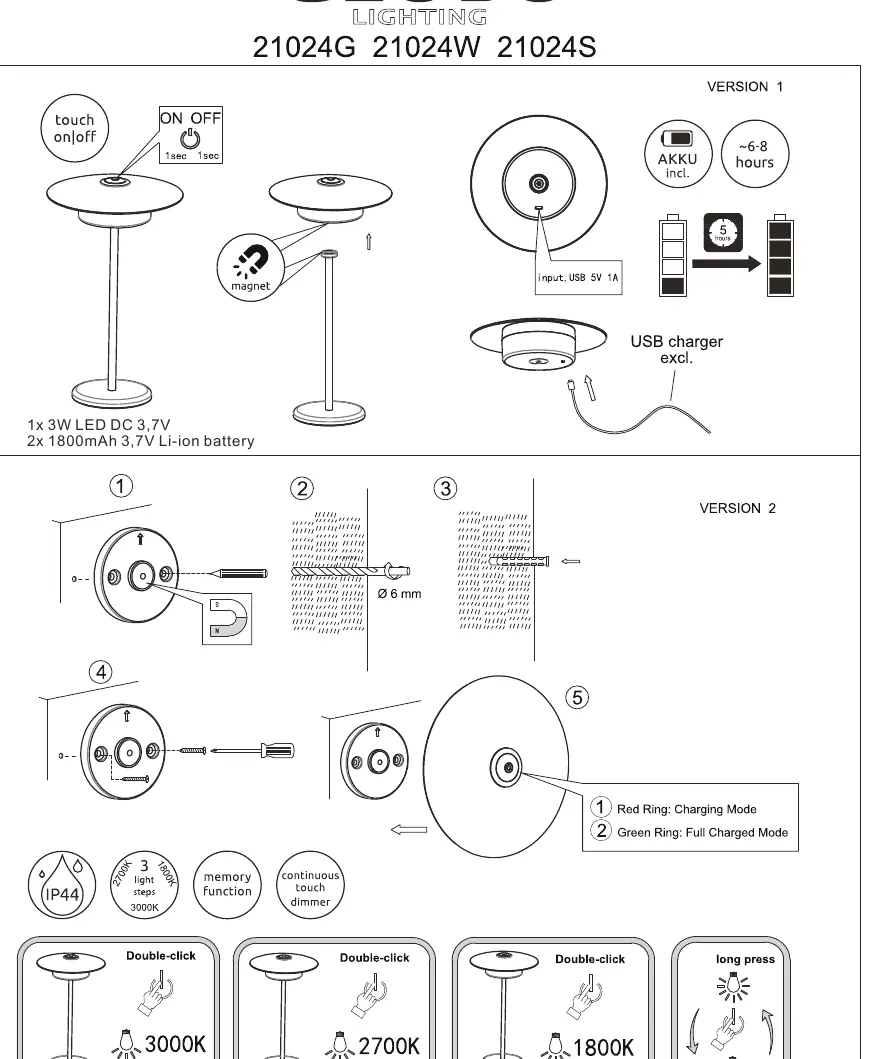
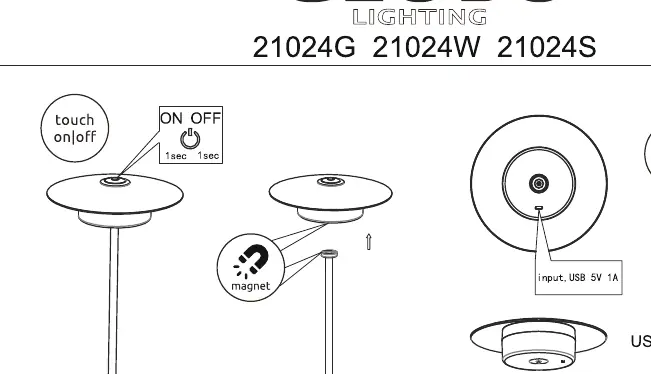
- Version 1 (Magnetic): Uses a magnetic base for easy attachment to compatible surfaces.
- Version 2 (Screw): Requires drilling a 6mm hole to secure the base with a screw.
Operation
The lamp is controlled via a touch-sensitive interface:
- Power On/Off: Touch the control area for 1 second.
- Light Modes: Double-click to cycle through three color temperatures: 3000K, 2700K, and 1800K.
- Dimming: Use the continuous touch dimmer to adjust brightness.
- Memory Function: The lamp remembers the last used setting.
Charging
The lamp is powered by two 1800mAh 3.7V Li-ion batteries. To charge:
- Connect the provided USB cable to the lamp's input port (5V 1A).
- Red Ring: Indicates the lamp is currently charging.
- Green Ring: Indicates the battery is fully charged.
- Note: A USB charger is not included in the package.
Important Information
The light source in this product is non-replaceable. Because of its construction, it is permanently fixed to the surrounding product design. If the light source fails, the entire unit must be replaced. This product is rated IP44.
Manufacturer information
Globo Lighting
Practical help
Common problems
Lamp does not turn on
Ensure the battery is charged. Connect the USB cable to a 5V 1A power source and check for the red charging indicator.
Light source failure
The LED light source is non-replaceable. If it stops working, the entire lamp unit must be replaced.
Before use
- Charge the battery fully before the first use.
- Ensure you have a 5V 1A USB power source available.
- Decide on the mounting method (Magnetic or Screw) before installation.
- If using the screw method, ensure you have a 6mm drill bit.
Show more Show less
Specs in practice
- 2x 1800mAh 3.7V Li-ion
- The capacity and type of the rechargeable batteries inside the lamp.
Images and diagrams
- Version 1: Magnetic mounting setup.
- Version 2: Screw mounting setup requiring a 6mm hole.
- Charging indicators: Red ring for charging, Green ring for full charge.
Model compatibility
- The lamp requires a 5V 1A USB power source (not included).
- The light source is not interchangeable.

Manual page author
David Miller
Documentation analyst