Lighting / Fixtures
User Manual for Globo Lighting 21009S/21009W Table and Wall Lamp
Quick guide for the Globo Lighting 21009S and 21009W lamp. Learn how to operate the touch controls, adjust brightness and color temperature, charge the battery, and mount the lamp as a wall light.
PDF source: Deutsch · summary: English
Quick answers from the manual
Quick answer
- The Globo Lighting 21009S/21009W is a rechargeable LED lamp that functions as both a table and wall lamp. It is operated via touch controls for brightness and color temperature and requires a 5V USB charger for battery charging. p. 1
Key actions
- Charge the battery p. 1
- Adjust light mode p. 1
First start
- Charge the lamp fully before first use. p. 1
Show 3 more answers Show less
Maintenance and reset
- The LED light source is non-replaceable. p. 2, 3
Technical specifications
| Parameter | Value | Meaning | Pages |
|---|---|---|---|
| Battery | 3.7V 1800mAh Li-ion | Rechargeable battery included. | p. 1 |
| Power | MAX 2.5W | Maximum power consumption. | p. 1 |
Where to find it in the PDF
- Operation and Charging Guide p. 1
- Safety and Light Source Disclaimer p. 2, 3
Table of contents
Quick guide from the manual
The Globo Lighting 21009S/21009W is a versatile LED lamp designed for use as either a table lamp or a wall-mounted light. It features a built-in rechargeable battery and touch-sensitive controls for adjusting light intensity and color temperature.
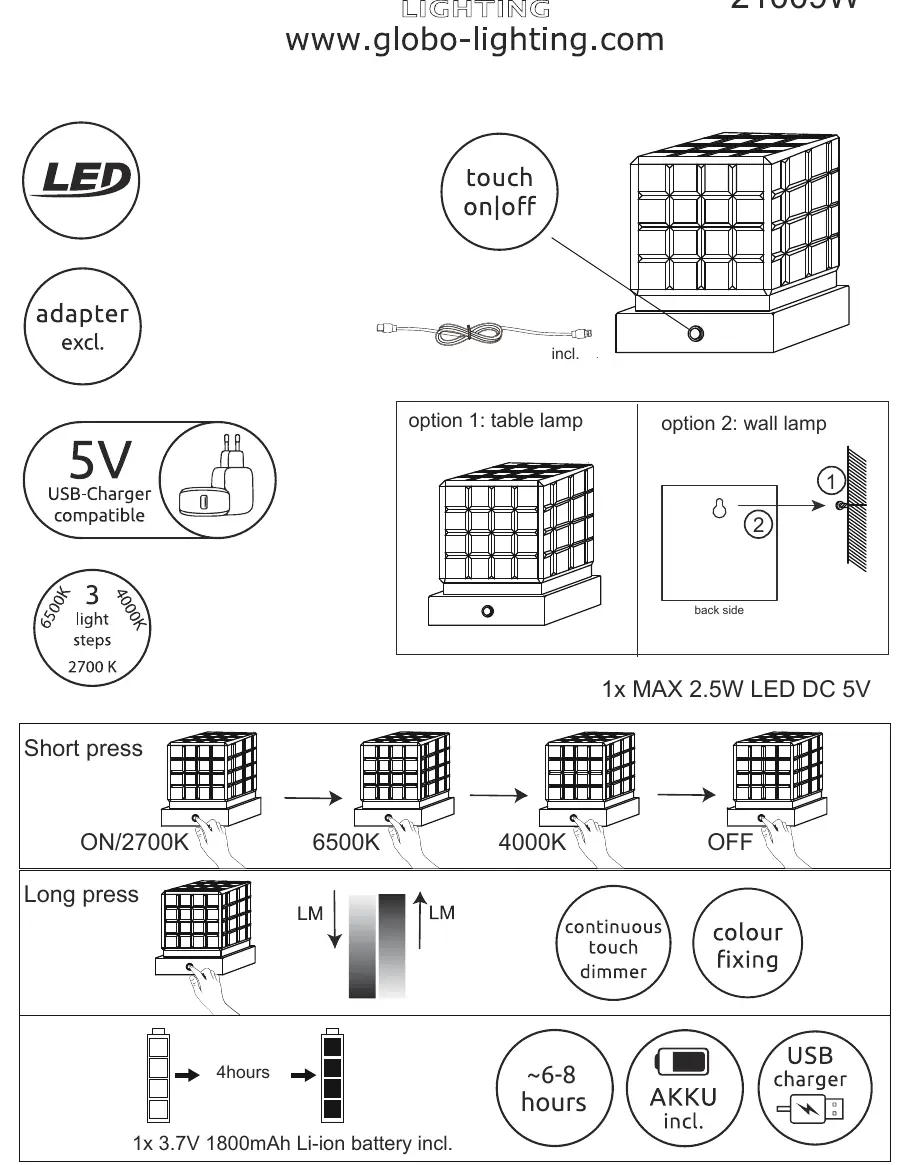
Operation
The lamp is controlled via a touch sensor located on the base:
- Short press: Cycles through the light modes in the following order: ON/2700K (Warm) -> 6500K (Cool) -> 4000K (Neutral) -> OFF.
- Long press: Activates the continuous touch dimmer and color fixing function.
Charging
The device includes a 3.7V 1800mAh Li-ion battery. To charge the lamp:
- Use a 5V USB charger (not included).
- Connect the USB cable to the port on the lamp.
- Charging time is approximately 6-8 hours.
Mounting
The lamp can be used in two configurations:
- Table lamp: Place the lamp on a flat surface.
- Wall lamp: Use the mounting hole located on the back side of the lamp to hang it on a wall.
Safety and Maintenance
The LED light source in this product is integrated and cannot be replaced. Do not attempt to disassemble the lamp to change the light source, as it is permanently fixed to the product design.
Manufacturer information
Globo Lighting
Practical help
Common problems
Lamp does not turn on
Ensure the battery is charged. Connect to a 5V USB power source for 6-8 hours.
Light source failure
The LED is integrated and non-replaceable. If the light fails, the unit cannot be repaired by the user.
Before use
- Charge the battery fully before first use (approx. 6-8 hours).
- Ensure you have a 5V USB charger available (not included).
- Determine if you will use the lamp as a table light or wall-mounted light.
Show more Show less
Specs in practice
- 3.7V 1800mAh Li-ion
- Capacity of the built-in rechargeable battery.
- 2700K / 4000K / 6500K
- Adjustable color temperatures ranging from warm white to cool daylight.
Images and diagrams
- Short press cycles through light modes: ON/2700K -> 6500K -> 4000K -> OFF.
- Long press activates continuous touch dimmer and color fixing.
- Wall mounting requires using the hole on the back side of the lamp.
Model compatibility
- Requires a 5V USB charger (not included).

Manual page author
Emily Carter
User documentation editor