Electronics / Video Transmission
HDMI 1.4 CAT Extender with Loopout 100m User Guide
Quick guide for the Gofanco HDMI 1.4 CAT Extender with Loopout 100m. Learn how to install, connect, and configure your HDMI extender for 4K transmission over CAT6/7 cables.
Table of contents
Manual images
Click an image to enlargeQuick guide from the manual
The Gofanco HDMI 1.4 CAT Extender with Loopout 100m allows you to extend HDMI signals up to 328ft (100m) at 4K or 1080p resolution using CAT6/7 cabling. Key features include Power over Cable (PoC), which powers the receiver from the transmitter, bi-directional IR control, and an HDMI loop-out port on the transmitter for local monitoring.
Package Contents
- 1x HDMI 1.4 CAT Extender (1 Transmitter & 1 Receiver)
- 1x IR Blaster cable
- 1x IR Receiver cable
- 1x Power adapter (12VDC/1A)
- User's guide
Installation Requirements
- HDMI source device (e.g., computer, DVD player, gaming console)
- HDMI display device (e.g., monitor, HDTV, projector)
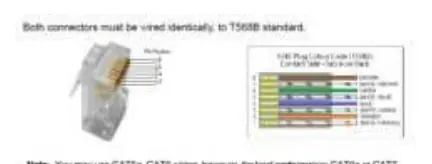
- UTP/STP CAT6/7 cable wired to the IEEE-T568B standard
Hardware Installation
- Power off all devices, including the HDMI source and display.
- Connect the HDMI source to the Transmitter's HDMI In port using an HDMI cable.
- Optional: Connect a local display to the Transmitter's HDMI Out port.
- Optional: Connect the IR Blaster and IR Receiver cables. Ensure the IR eye faces the device's IR window.
- Connect a CAT6/7 cable between the Transmitter's RJ45 Out and the Receiver's RJ45 In.
- Connect the HDMI display to the Receiver's HDMI Out port.
- Plug the included power adapter into the Transmitter's power jack.
- Power on all connected devices.
Product Layout
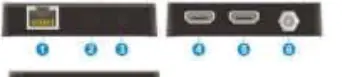
Transmitter (TX)
- RJ45 Out: Connects to the Receiver via CAT cable. Supports PoC.
- IR In/Out: Ports for IR Receiver and IR Blaster cables.
- HDMI In/Out: Input for source, output for local monitoring.
- Power Jack: Input for the 12V power adapter.
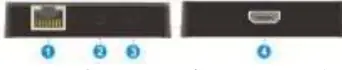
Receiver (RX)
- RJ45 In: Connects to the Transmitter via CAT cable.
- IR In/Out: Ports for IR control.
- HDMI Out: Connects to the remote display.
EDID Management
The device includes EDID management to ensure compatibility:
- EDID Bypass: Use a sharp object to press the button to learn EDID from the remote display.
- EDID Copy Tx/3s: Press and hold for 3 seconds to copy EDID from the local display.
- Default: To restore, press and hold the button while power cycling the unit, then release 6 seconds after power is restored.
Safety Notices
- Do not expose the unit to rain, heavy moisture, or liquid.
- Keep the product in a well-ventilated location to prevent overheating.
- Do not open the enclosure or attempt repairs without professional guidance.
- Use only the included DC12V power adapter.
Practical help
Common problems
No signal on display
Check that all HDMI cables are securely connected and that the CAT6/7 cable is wired correctly to the T568B standard.
Device overheating
Ensure the unit is placed in a well-ventilated area and not enclosed in a tight space.
Cable damage
Do not plug or unplug HDMI or IR cables while the device is powered on and in use.
Before use
- Power off all devices before starting installation.
- Ensure CAT6/7 cable follows the IEEE-T568B wiring standard.
- Verify that the HDMI source and display are compatible with the extender's resolution limits.
- Use only the provided 12VDC/1A power adapter.
Specs in practice
- PoC (Power over Cable)
- The transmitter powers the receiver through the CAT cable, so you only need to plug in one power adapter.
- HDMI Loop-out
- Allows you to connect a local monitor to the transmitter to view the signal being sent to the remote display.
Images and diagrams
- Source Device IR Control: Shows the IR Receiver at the display location and the IR Blaster at the source location.
- Display Device IR Control: Shows the IR Receiver at the source location and the IR Blaster at the display location.
Model compatibility
- Supports up to 4K @30Hz YUV 4:4:4 and 1080p @60Hz YUV 4:4:4.
- Requires CAT6/7 cable for optimal performance up to 100m.

Manual page author
Emily Carter
User documentation editor
Prepares concise manual descriptions and highlights the most useful setup, operation, and maintenance information for readers.