Electronics / Video Transmission
User Manual for BZBGEAR BG-STREAM-DE Encoder/Decoder
Quick guide for the BZBGEAR BG-STREAM-DE 1-Channel SDI/HDMI Encoder/Decoder/Recorder. Learn about device controls, connection setup, Web UI access, and troubleshooting.
Table of contents
Manual images
Click an image to enlargeQuick guide from the manual
The BZBGEAR BG-STREAM-DE is a 1-channel SDI/HDMI encoder, decoder, and recorder. It supports high-speed recording via USB 3.0 and offers versatile streaming protocols including NDI, Dante AV-H, RTSP, RTMP, HLS, SRT, and TS. The device is designed for professional audiovisual environments, providing intuitive front-panel controls and a comprehensive Web UI for configuration.
Safety Precautions
- Avoid heavy pressure, strong vibration, or immersion during transportation, storage, and installation.
- Do not expose the device to any liquid, gas, or solids that may corrode the shell.
- Do not expose the product to rain or moisture.
- Do not open the case; installation and maintenance should only be carried out by qualified technicians.
- Ensure the device is used within specified temperature, humidity, and power supply limits.
Device Overview
The device features a front panel with a power switch, a USB 3.0 port for storage, and control buttons for Record, Stream, and Source selection. The rear panel contains the following interfaces:
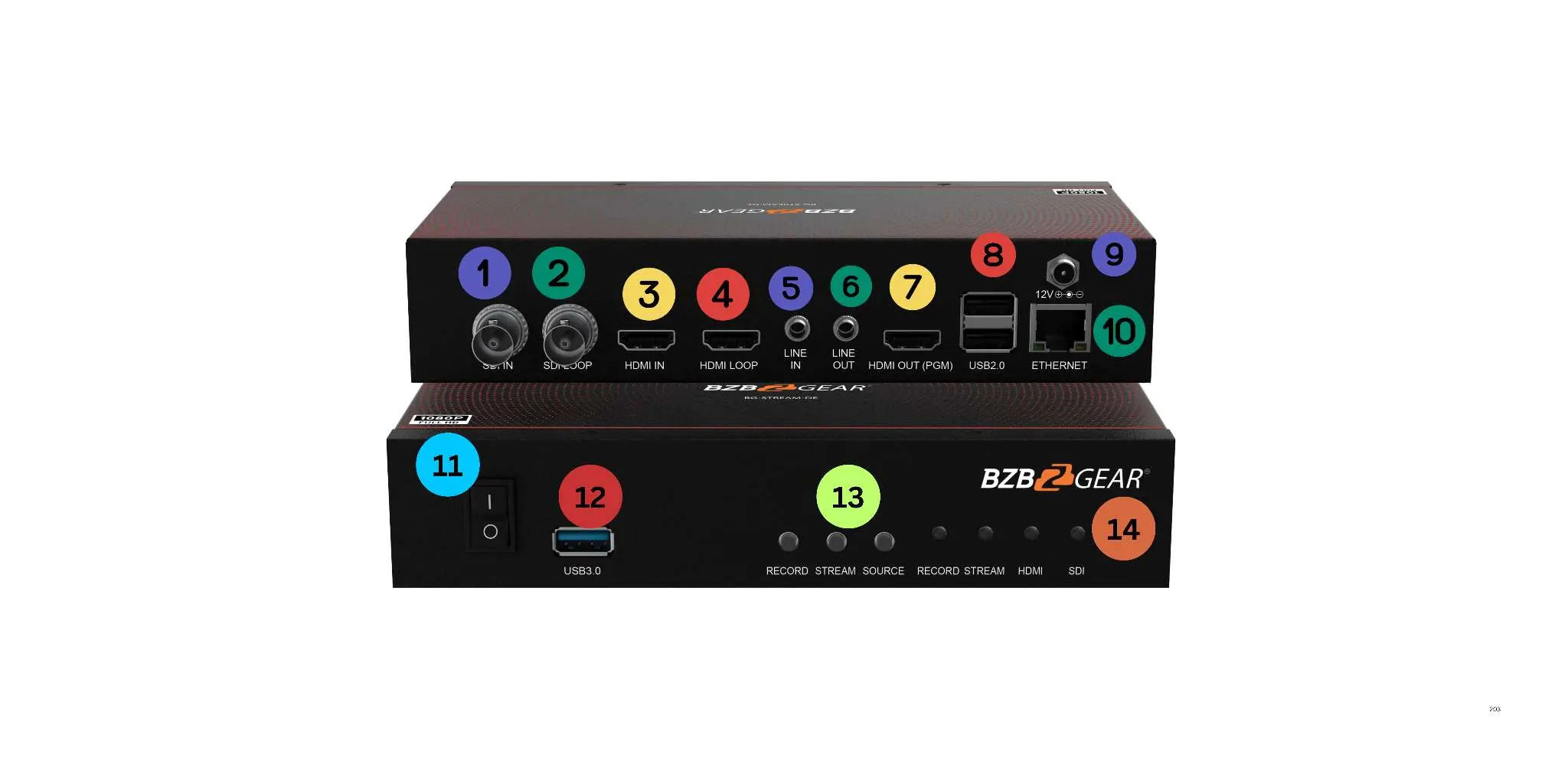
- SDI In/Loop: Input for SDI source and output for SDI loop.
- HDMI In/Loop: Input for HDMI source and output for HDMI loop.
- Line In/Out: 3.5mm analog audio input and output.
- HDMI Out (PGM): HDMI Program Output (Current Livestream Output).
- USB 2.0: For keyboard and mouse usage.
- Ethernet: Connects the unit to the network for streaming and Web UI access.
- DC In: 12V power input.
Connection Setup
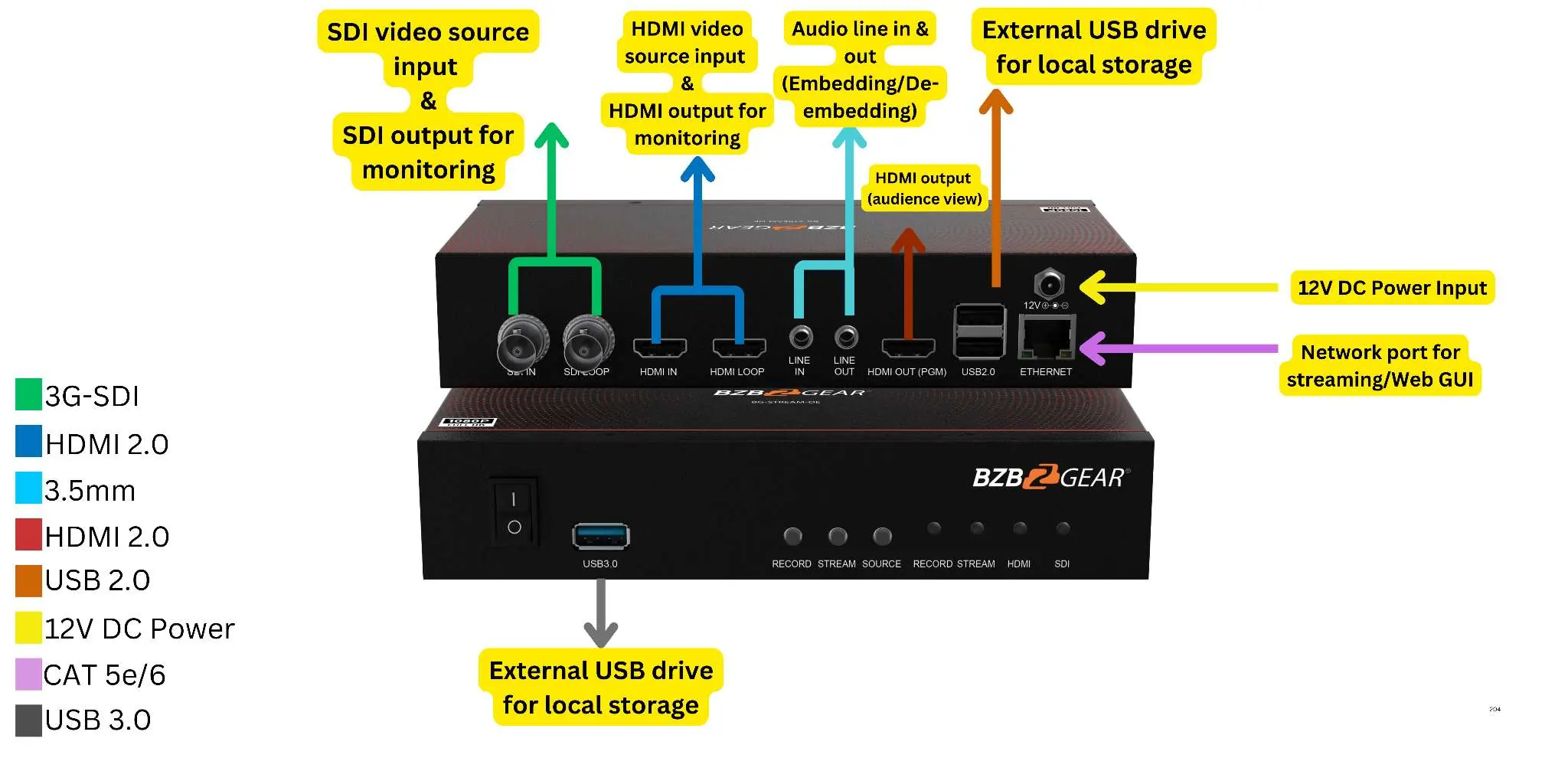
To set up the device, connect your video sources (SDI or HDMI) to the respective input ports. Connect the output to your monitoring display via the HDMI Out (PGM) port. Connect the device to your network using the Ethernet port for streaming and control. Use the USB 3.0 port to connect an external drive for local storage.
Web UI Access
To configure the device, use an IP Finder tool to locate the device's IP address on your network. Enter this IP address into a web browser to access the control interface. Use the following default credentials to log in:
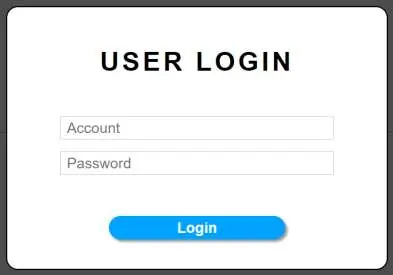
- Username: admin
- Password: 0000
Troubleshooting
If you encounter issues, refer to the following solutions:
- No Power / All LED off: Check if the power supply is connected correctly and the voltage is within recommended specifications.
- No sound or sound issues: Verify that HDMI cables are connected correctly. Ensure the audio format is supported by the display and that the source device is configured to output the correct audio format.
- No picture or picture flickers: Check HDMI and category cable connections. Ensure cables are undamaged; using CAT6 or better cables is recommended.
Technical Specifications
- Max FPS: 1920x1080p@60/50fps
- Recording Formats: MP4, TS, MOV
- Network: 10/100/1000Mbps Ethernet, DHCP Client support
- Audio Support: AAC input audio stream
- Dimensions: 8.0in x 3.9in x 1.6in (203mm x 100mm x 41mm)
Practical help
Common problems
No Power / All LED off
Check if the power supply is connected correctly and the output voltage is within recommended specifications.
No sound or sound issues
Check if HDMI cables are connected correctly. Ensure the audio format is supported by the display and that the source device is set to the correct audio output.
No picture or picture flickers
Check if HDMI and category cable connections are correct and undamaged. Change to another good working HDMI or CAT6 cable.
Before use
- Ensure the 12V DC power supply is connected.
- Verify that your video source (SDI or HDMI) is active.
- Connect the device to a network via Ethernet for Web UI access.
- Use a CAT6 or better cable for network connections.
- Connect a USB 3.0 drive if local recording is required.
Specs in practice
- Recording Formats
- Supports MP4, TS, and MOV file formats.
Images and diagrams
- Front Panel: Includes power switch, USB 3.0 port, and control buttons for Record, Stream, and Source.
- Rear Panel: Includes SDI/HDMI I/O, Line audio I/O, USB 2.0, Ethernet, and 12V DC power input.
Model compatibility
- Supports NDI, Dante AV-H, RTSP, RTMP, HLS, SRT, and TS streaming protocols.
- NDI and Dante AV-H support require separate licenses.

Manual page author
Emily Carter
User documentation editor
Prepares concise manual descriptions and highlights the most useful setup, operation, and maintenance information for readers.