Electronics / Video Transmission
User Manual for SWIT CREW-V Wireless Video Transmission System
Quick guide for the SWIT CREW-V wireless video transmission system. Learn how to pair transmitters and receivers, connect via SDI/HDMI, use UVC for streaming, and troubleshoot signal issues.
Table of contents
Manual images
Click an image to enlargeQuick guide from the manual
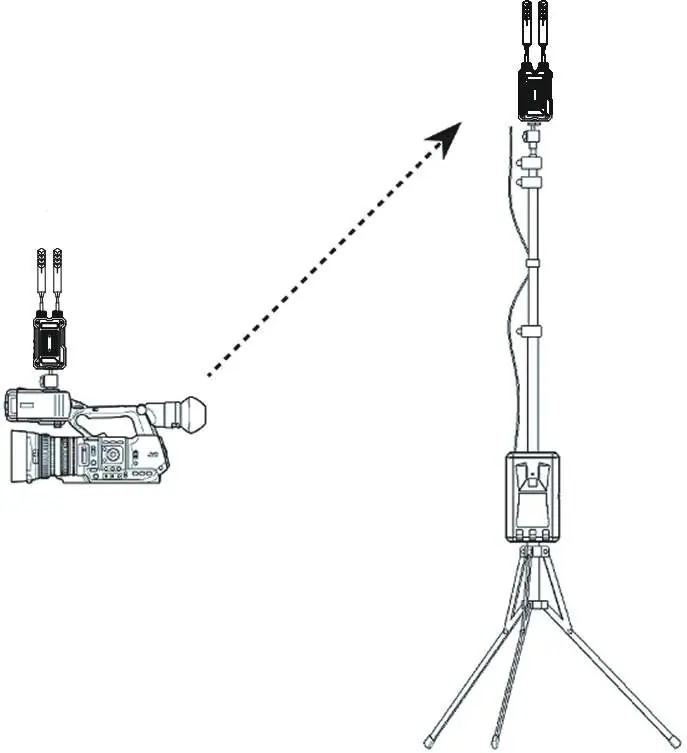
The SWIT CREW-V is a wireless video transmission system supporting SDI and HDMI. It features auto-pairing, 128-bit encryption, and UVC support for direct streaming to computers. For optimal performance, ensure antennas are vertical and the receiver is positioned as high as possible. The system supports up to 1080p 50/60Hz transmission.
Device Overview
The system consists of a transmitter and receiver. Key interfaces include:
- Antenna: High-gain antennas for wireless transmission.
- LCD Display: Shows signal format, channel, quality mode, and fan status.
- Five-direction switch: Used to navigate the menu (up, down, left, right, vertical press to confirm).
- Power: Supports 7V-17V DC input via LEMO 0B 302 connectors or battery plates (compatible with Sony L-series NP-F770/970).
- USB-C: Used for system upgrades and UVC output.
Pairing Procedure
- Power on both the transmitter and receiver.
- On the transmitter, toggle the five-direction switch to the right to access the PAIR menu.
- Select START and press the switch vertically to confirm. The transmitter will prompt "Ready to pair?".
- On the receiver, navigate to the PAIR menu and confirm.
- Wait for the pairing process to complete. The transmitter will display the number of connected receivers, and the receiver will show a success message.
Connection and Setup
Connect the SDI/HDMI output from your camera to the transmitter's input. Connect the receiver's SDI/HDMI output to your monitor or switcher. The system automatically detects the video interface, prioritizing SDI if both are connected. Ensure all devices are powered on and antennas are straight.
UVC Streaming
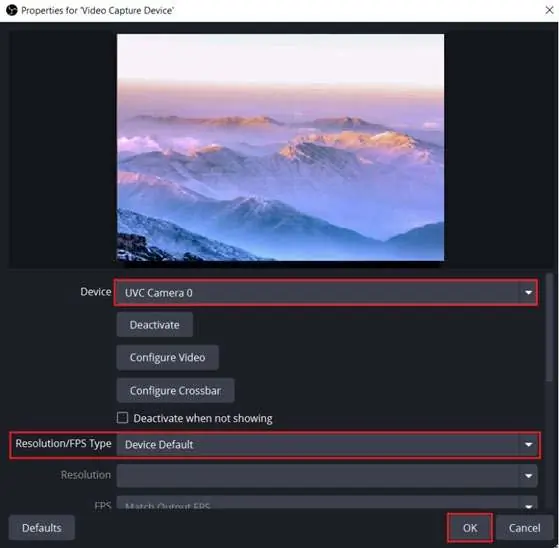
The receiver can output video directly to a computer via USB-C for streaming applications like OBS:
- Connect the receiver to the computer using a USB-C cable.
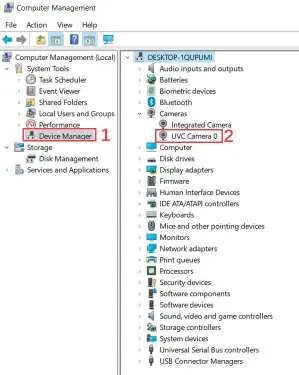
- Open Device Manager on your computer to confirm the device is recognized as a UVC Camera.
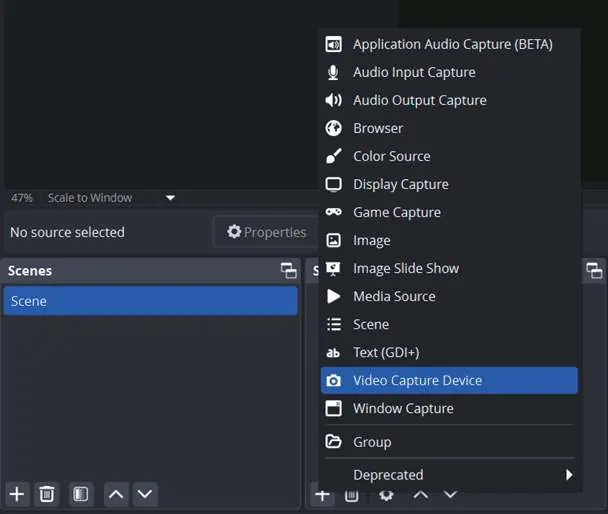
- In OBS, add a new source, select Video Capture Device, and choose the UVC Camera from the device list.
System Upgrade
To update firmware, download the package to the root directory of a USB flash drive. Connect the drive to the transmitter or receiver via an OTG adapter. Navigate to the VER menu, select START, and follow the on-screen prompts. Restart the device after the upgrade is complete.
Troubleshooting
If you experience issues, check the following:
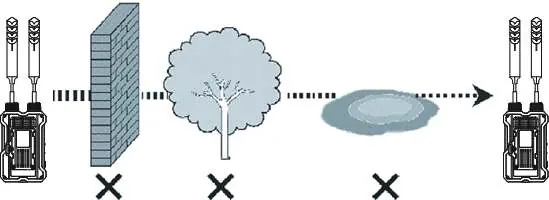
- No display: Verify power connections, ensure antennas are tightened, check video cable integrity, and confirm the camera's output format is supported.
- Poor video quality: Ensure the transmitter and receiver are within range, minimize environmental interference (walls, trees, water), and reboot the devices if necessary.
Practical help
Common problems
No display on receiver
Check power connections, ensure antennas are properly installed, verify video cable connection, and confirm the camera output format is supported.
Poor video quality
Check for environmental interference, ensure the transmitter is within effective range, and try rebooting the devices.
Before use
- Ensure antennas are installed and screwed tightly.
- Check power source (DC 7V-17V or compatible battery).
- Verify video signal input (SDI or HDMI).
- Set antennas vertically for best transmission.
- Position the receiver as high as possible.
Specs in practice
- Transmission Distance
- 1.2km (line of sight) or up to 3km when using the CREW MAX panel antenna receiver.
- Input Voltage
- 7V-17V DC via LEMO connector or battery plate.
Images and diagrams
- Pairing: Navigate to PAIR menu using the five-direction switch, select START, and confirm.
- UVC Setup: Connect receiver to PC via USB-C, verify in Device Manager, and add as Video Capture Device in OBS.
Model compatibility
- Supports up to 1080p 50/60Hz video.
- Compatible with Sony L-series NP-F770/970 batteries.
- Transmitter supports SDI and HDMI inputs.

Manual page author
Michael Turner
Technical manual editor
Reviews PDF manuals for structure, safety notes, and practical product details so readers can find the right information quickly.