Electronics / Video Transmission
User Manual for SIIG 04-1377B 4K HDMI KVM Extender
Quick guide for the SIIG 04-1377B 4K 60Hz HDMI KVM Extender. Learn how to connect your transmitter and receiver, set up touch screens, and configure EDID settings.
Table of contents
Manual images
Click an image to enlargeQuick guide from the manual
The SIIG 04-1377B is a 4K 60Hz HDR HDMI KVM Extender designed to transmit high-quality video and USB signals over Cat6/6a/7 network cables up to 70 meters. This device supports KVM functionality, allowing you to control a PC remotely using a keyboard, mouse, or touch screen.
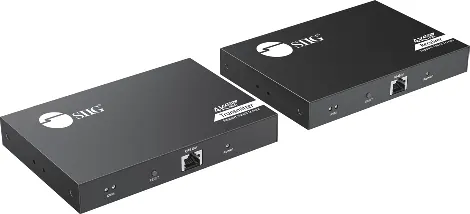
Package Contents
- Transmitter (TX) and Receiver (RX) units
- 2x Power adapters (DC 5V/2A)
- USB 2.0 Type-A to A cable
- Mounting kits
- User Manual
Device Layout
Transmitter (TX)


- Power Jack: DC 5V/2A input.
- HDMI Output: Loop-out for local display.
- HDMI Input: Connect to the HDMI source (PC).
- USB Port: Connect to the PC for KVM functionality.
- KVM Light: Left LED indicates USB connection; Right LED flashes during transmission.
- Reset Button: Restarts the device.
- RJ-45: Connect to the Receiver via Cat6 cable.
- Power/Signal LED: Flashes when no HDMI signal; solid blue when connected.
Receiver (RX)
- Power Jack: DC 5V/2A input.
- Toslink Output: For audio extraction.
- HDMI Output: Connect to the remote display.
- USB Port: For keyboard, mouse, or touch screen connection.
- KVM Light: Indicates active keyboard/mouse connection.
- Reset Button: Restarts the device.
- RJ-45: Connect to the Transmitter via Cat6 cable.
- Power/Signal LED: Flashes when no HDMI signal; solid blue when connected.
Installation and Application
The extender supports two primary configurations:

- Touch Screen Connection: Connect the PC to the Transmitter (HDMI IN). Connect the Receiver (HDMI OUT) to the display and the USB port to the touch screen.
- Mouse and Keyboard Connection: Connect the PC to the Transmitter (HDMI IN). Connect the Receiver (HDMI OUT) to the display and the USB port to the keyboard/mouse.
EDID Learning
The extender features auto-learning for the connected display's EDID. If you connect two displays, the device will default to the lower resolution of the two. If you change displays, press the reset button on the device to trigger a re-learning process.
Technical Features
- Supports HDMI 4K@60Hz 4:4:4 8bits and HDR 4K@60Hz 4:2:0 10bits.
- Compatible with HDCP 2.2 & 1.4.
- Supports audio extraction via Toslink on the Receiver.
- Includes Lightning, Surge, and ESD protection.
Support
For further technical support or information, visit the official website at http://www.siig.com/support.
Official resources from the manual
Manufacturer information
SIIG, Inc.
Practical help
Common problems
No HDMI signal on the display
Check if the Power/Signal LED is flashing. If it is, ensure the HDMI source is properly connected and active.
Incorrect resolution when using two displays
The device defaults to the lower resolution of the two connected displays. Press the reset button to force the device to re-learn the EDID after changing displays.
Before use
- Ensure you have Cat6/6a/7 network cables for the connection between TX and RX.
- Verify both the Transmitter and Receiver are powered using the included 5V/2A adapters.
- Connect the USB cable to the PC if you intend to use the KVM functionality (keyboard/mouse/touchscreen).
- Ensure the HDMI source is connected to the Transmitter's HDMI IN port.
Specs in practice
- 4K@60Hz 4:4:4
- Supports high-quality, uncompressed video transmission.
- EDID Learning
- Automatically detects the display's capabilities to optimize output resolution.
- Toslink Output
- Allows for digital audio extraction from the Receiver unit.
Images and diagrams
- Transmitter (TX): Connects to the PC (HDMI IN) and the local display (HDMI OUT loop-out).
- Receiver (RX): Connects to the remote display (HDMI OUT) and peripherals (USB).
Model compatibility
- Supports Capacitive and Resistive touch screens.
- USB 2.0 port is for keyboard, mouse, and touch screen use only.

Manual page author
Michael Turner
Technical manual editor
Reviews PDF manuals for structure, safety notes, and practical product details so readers can find the right information quickly.