Electronics / Video Transmission
SIIG 04-137A 1x8 HDMI Splitter Over Cat6 Extender User Manual
Quick guide for the SIIG 04-137A 1x8 HDMI Splitter Over Cat6 Extender. Includes setup instructions, EDID settings, RS-232 commands, and port layout details for both transmitter and receiver units.
Table of contents
Manual images
Click an image to enlargeQuick guide from the manual
The SIIG 04-137A is a 1x8 HDMI splitter over Cat6 extender designed to distribute HDMI signals to multiple displays over long distances. It supports 4K@60Hz resolution, HDR, and HDCP 2.2. The system consists of one transmitter (TX) and eight receivers (RX), connected via Cat6/7 cables.
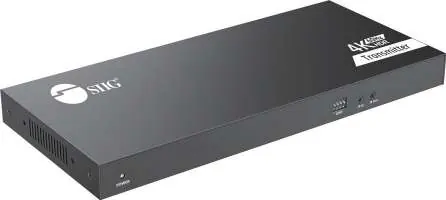
Package Contents
- 1x Transmitter
- 8x Receivers
- 1x Power adapter DC 12V/2A (for TX)
- 8x Power adapter DC 5V/2A (for RX)
- 1x IR blaster cable
- 8x IR Receiver cables
- Terminal block
- Mount kits
- User Manual
Transmitter (TX) Layout
The transmitter unit features the following controls and ports:
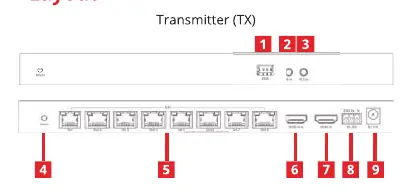
- EDID switch: Used to configure EDID settings (refer to the EDID table).
- IR in: Connects to the IR receiver extension cable.
- IR out: Connects to the IR blaster extension cable.
- Reset BUTTON: Press to restart the device.
- RJ-45: Connects to the Receiver units using Cat6 cables.
- HDMI LOOP-OUT: Connects to a local HDMI display.
- HDMI INPUT: Connects to the HDMI source device.
- RS-232: Used for RS-232 command control.
- POWER JACK: DC 12V/2A input.
Receiver (RX) Layout
Each receiver unit features the following controls and ports:
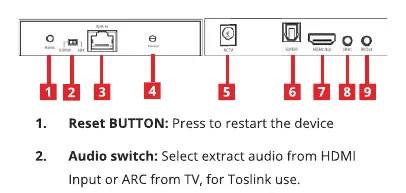
- Reset BUTTON: Press to restart the device.
- Audio switch: Selects audio extraction from HDMI Input or ARC from TV for Toslink use.
- RJ-45: Connects to the Transmitter unit via Cat6 cable.
- Power/Signal LED: Flashes when no HDMI signal is detected; remains solid when signal is transmitted.
- POWER JACK: DC 5V/2A input.
- Toslink Output: For audio extraction or ARC use.
- HDMI OUTPUT: Connects to the HDMI display.
- IR in/out: Ports for IR extension cables.
EDID Settings
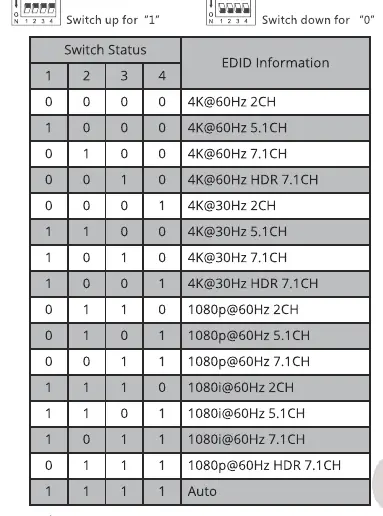
The EDID switch on the transmitter allows you to configure the output resolution and audio format. Switch up represents "1" and switch down represents "0". Refer to the EDID settings table in the manual to match the desired output (e.g., 4K@60Hz 2CH, 1080p@60Hz HDR 7.1CH, or Auto mode).
RS-232 Settings
The device supports RS-232 control with the following parameters: Baud rate 9600, Data bits 8, Stop bits 1, Parity 0. Commands include:
- ES XX On/n: Turn on output port (XX = 01, 02, or All).
- ES XX Off/n: Turn off output port (XX = 01, 02, or All).
- Reset/n: Restart the device.
- Recover/n: Restore factory settings.
- Baud xx /n: Set baud rate (9600, 19200, 38400, 57600, 115200).
Support
For more information or technical support, please visit http://www.siig.com/support.
Official resources from the manual
Manufacturer information
SIIG, Inc.
Practical help
Common problems
No signal on display
Ensure the Power/Signal LED on the receiver is solid. If it is flashing, check the HDMI cable connections and the Cat6 link between the transmitter and receiver.
Remote control not working
Ensure the IR blaster is positioned correctly near the source device and the IR receiver is within the effective range of the remote.
Audio not outputting via Toslink
Check the Audio switch on the receiver unit to ensure it is set to the correct mode (HDMI Input or ARC).
Before use
- Verify all 8 receivers are present in the package.
- Ensure you have high-quality Cat6 or Cat7 cables for the connection.
- Confirm the power adapter for the transmitter is 12V/2A.
- Confirm the power adapters for the receivers are 5V/2A.
- Check that the source device supports the desired resolution (up to 4K@60Hz).
Images and diagrams
- The Transmitter (TX) layout shows the EDID DIP switches, IR ports, RJ-45 output, HDMI loop-out, HDMI input, RS-232 port, and power jack.
- The Receiver (RX) layout shows the reset button, audio switch, RJ-45 input, power/signal LED, power jack, Toslink output, HDMI output, and IR ports.
Model compatibility
- Requires Cat6/7 cabling for signal transmission.
- Supports HDCP 2.2 content protection.
- Supports PCM2, 5.1/7.1, Dolby, and DTS 5.1 audio formats.

Manual page author
David Miller
Documentation analyst
Organizes user manual content into clear summaries, with attention to model details, product context, and everyday usability.