Lighting / Fixtures
Installation Guide for Golden Lighting 0316-FM Flush Mount Ceiling Light
A comprehensive installation guide for the Golden Lighting 0316-FM flush mount ceiling light. Includes step-by-step wiring instructions, mounting procedures, and safety guidelines for a successful installation.
Table of contents
Manual images
Click an image to enlargeQuick Guide for Installation
This guide provides the necessary steps to install your Golden Lighting 0316-FM flush mount ceiling light. Please ensure all installation work is performed by an accredited professional.
Safety Information
- Always shut off the power supply at the fuse or circuit breaker before beginning installation.
- Do not exceed the maximum recommended wattage for light bulbs.
- Ensure the fixture is properly grounded.
Parts Identification
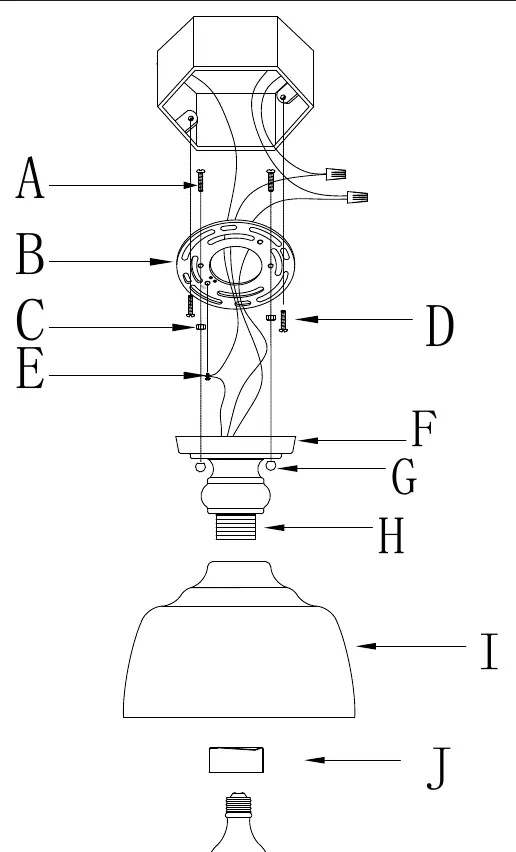
The fixture includes a mounting strap (B), canopy (F), mounting screws (A & D), deco nuts (G), metal shade (I), and socket cover (J). Refer to the assembly diagram for the correct placement of these components.
Wiring Instructions
Proper wiring is essential for safety. Identify the wires as follows:
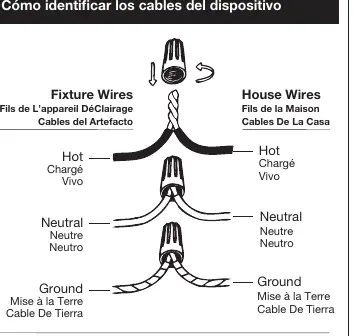
- Hot Wire: Smooth, black, or transparent with black inner thread.
- Neutral Wire: Ribbed, white, or transparent with white inner thread.
- Ground Wire: Copper, bare metal, green, or transparent with green inner thread.
Connect the fixture wires to the corresponding house wires from the junction box. Twist the ends of the wire pairs together and secure them with wire connectors, ensuring all twists are in the same direction. If there is no house ground wire, wrap the fixture ground wire around the ground screw (E) on the mounting strap.
Installation Steps
Preparation
- Remove the new fixture from the carton and locate the yellow parts bag.
- Shut off power at the circuit breaker and remove the old fixture and mounting strap.
- Attach the mounting strap (B) to the junction box using mounting screws (D).
- Ensure mounting screws (A) are positioned in the strap so they will protrude through the canopy (F).
Assembly and Finishing
- Have an assistant support the fixture's weight while you complete the wiring connections.
- Tuck the connected wires into the junction box.
- Lift the canopy (F) over the mounting strap so the mounting screws (A) protrude through the holes.
- Thread the deco nuts (G) onto the mounting screws until the canopy is secure against the ceiling.
- Lift the metal shade (I) to the socket threads (H) and secure it using the socket cover (J).
- Install the light bulbs and restore power to test the fixture.
Manufacturer information
Golden Lighting
Practical help
Common problems
Fixture is loose against the ceiling
Ensure the deco nuts (G) are tightened securely onto the mounting screws (A).
No house ground wire available
Locate the ground screw (E) on the mounting strap and wrap the fixture's ground wire around it, then tighten.
Difficulty identifying wires
Use the wire identification guide: Hot is smooth/black, Neutral is ribbed/white, and Ground is green/copper/bare.
Before use
- Shut off power at the circuit breaker.
- Ensure you have an assistant to support the fixture's weight.
- Verify the junction box is secure.
- Identify all parts (A-J) from the parts bag.
- Ensure you have the correct light bulbs (not provided).
Specs in practice
- Neutral Wire
- Completes the circuit; identified by ribbed texture, white color, or white inner thread.
Images and diagrams
- The wiring diagram illustrates how to connect house wires to fixture wires using wire connectors.
- The assembly diagram shows the vertical sequence of parts from the ceiling junction box down to the light bulb.
Model compatibility
- Requires professional installation.
- Do not exceed the maximum wattage specified for the fixture.

Manual page author
Emily Carter
User documentation editor
Prepares concise manual descriptions and highlights the most useful setup, operation, and maintenance information for readers.