Lighting / Fixtures
Installation Guide for Golden Lighting 1084-SF Semi-Flush Mount Light
Quick installation guide for the Golden Lighting 1084-SF semi-flush mount light. Includes wiring diagrams, assembly steps, and safety precautions for a secure setup.
Table of contents
Manual images
Click an image to enlargeQuick Guide from the Manual
This guide provides instructions for installing the Golden Lighting 1084-SF semi-flush mount light. All installation work should be performed by an accredited professional. Ensure the power supply is shut off at the fuse or circuit breaker before beginning any work.
Preparing for Installation
Carefully remove the fixture from the carton and locate the yellow bag containing all parts. Remove the old fixture and the old mounting strap from the wall or ceiling.
Assembly and Installation
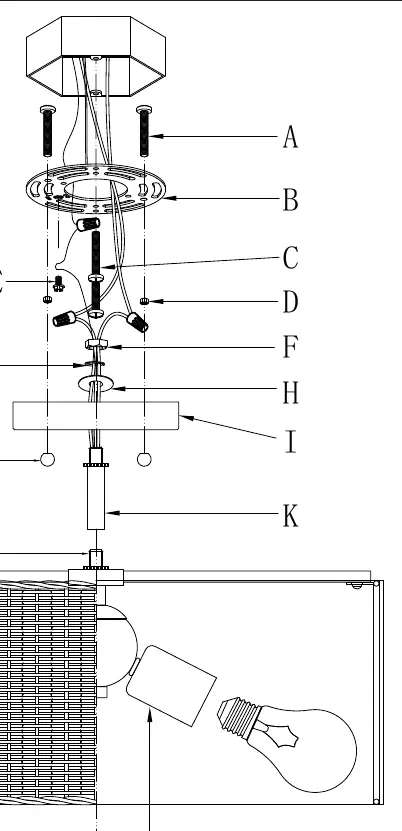
- Take the mounting strap (B) and attach it to the junction box using mounting screws (C). Tighten securely.
- Feed the fixture wires from the post (L) through the rod (K) and the canopy (I). Pull the wires until taut.
- Thread the rod (K) onto the post (L) and secure it.
- Thread the washers (H and G) and nut (F) onto the wires as shown in the diagram. Lock the threaded rod (K) to the canopy (I) using these components.
- Have an assistant support the fixture's weight while you complete the wiring.
- Connect the fixture wires to the power supply wires from the junction box (see Wiring Instructions below).
- Push the canopy (I) up to the ceiling over the mounting strap (B) so that the mounting screws (A) protrude through the holes in the canopy.
- Thread the decorative nuts (J) onto the exposed threads of the mounting screws (A) to secure the canopy (I) snugly against the ceiling.
- Install light bulbs (not provided) into the sockets (M) according to the fixture's specifications. Do not exceed the maximum recommended wattage.
Wiring Instructions
Refer to the wiring diagram to connect the fixture wires to the house power supply wires:
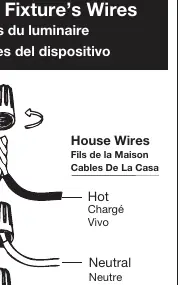
- Hot: Connect the smooth, black, or transparent wire with black inner thread to the house Hot wire.
- Neutral: Connect the ribbed, white, or transparent wire with white inner thread to the house Neutral wire.
- Ground: Connect the copper, bare metal, green, or transparent wire with green inner thread to the house Ground wire.
Twist the ends of the wire pairs together and secure with a wire connector. Ensure all twists are in the same direction. If there is no house ground wire, locate the ground screw (E) on the mounting strap and wrap the fixture's ground wire around it, then tighten.
Important Safety Notes
- Always shut off power at the circuit breaker before starting.
- Use only specified bulbs and do not exceed the maximum wattage.
- If you need replacement parts, contact the place of purchase.
Manufacturer information
Golden Lighting
Practical help
Common problems
Fixture is loose against the ceiling
Ensure decorative nuts (J) are tightly threaded onto the mounting screws (A) until the canopy is snug.
No house ground wire available
Locate the ground screw (E) on the mounting strap and wrap the fixture's ground wire around it, then tighten with a screwdriver.
Before use
- Shut off power at the circuit breaker
- Verify all parts are present in the yellow bag
- Have an assistant support the fixture weight during wiring
- Ensure bulbs do not exceed maximum wattage
- Check that all wire connections are secure and twisted in the same direction
Specs in practice
- Neutral Wire
- Ribbed, white, or transparent wire with white inner thread
Images and diagrams
- The wiring diagram illustrates how to correctly match fixture wires to house wires using connectors.
- The assembly diagram shows the vertical sequence of parts from the mounting strap (B) down to the fixture body (M).
Model compatibility
- Requires professional installation
- Use only specified bulbs
- Do not exceed maximum wattage

Manual page author
David Miller
Documentation analyst
Organizes user manual content into clear summaries, with attention to model details, product context, and everyday usability.