Home Appliances / Ice Makers
User Manual for Gorenje IMD 1200W Ice Maker
Comprehensive user manual for the Gorenje IMD 1200W ice maker. Includes safety guidelines, operating instructions, troubleshooting for common errors like 'ADD WATER' or 'ICE FULL', and maintenance tips for optimal performance.
Table of contents
Quick Guide
To ensure optimal performance of your Gorenje IMD 1200W ice maker, please observe the following operating conditions:
- Ambient Temperature: The unit should be used in an environment between 10°C and 32°C.
- Water Temperature: Use water with a temperature between 8°C and 25°C.
- Ventilation: Ensure at least 15 cm of free space around the sides of the appliance to allow for proper heat dissipation.
- Initial Setup: If the unit has been moved from a cold environment, allow it to reach room temperature for a few hours before first use.
Safety Instructions
For your safety and to prevent fire or electric shock, please adhere to the following:
- Always connect the appliance to a properly grounded outlet.
- Do not use extension cords unless absolutely necessary; if used, ensure they have a grounding conductor and are rated for the appliance's power.
- Do not submerge the unit, power cord, or plug in water or any other liquid.
- Unplug the appliance before cleaning, maintenance, or when not in use.
- Do not operate the appliance if the power cord or plug is damaged.
- Keep the appliance away from heat sources, gas burners, or electric heaters.
- Do not use the appliance outdoors.
- This appliance is intended for personal use only.
Description of the Appliance
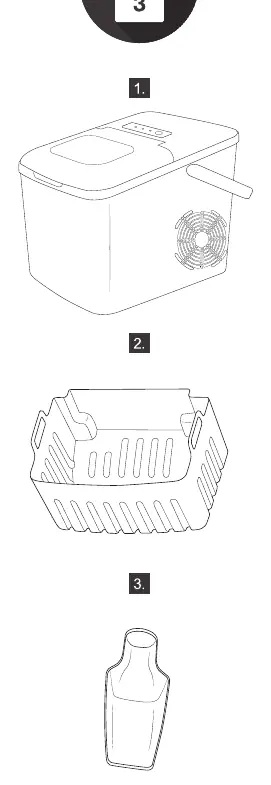
The Gorenje IMD 1200W ice maker consists of the main housing, a removable ice basket, and an ice scoop. Ensure all parts are present before initial operation.
Operation and Usage
Follow these steps for daily operation:
- Place the unit on a flat, stable surface.
- Fill the reservoir with potable water only.
- Plug the unit into a grounded power outlet.
- Press the ON/OFF button to start the ice-making cycle.
- If the unit is moved, wait at least 2 hours before turning it back on to allow the refrigerant to settle.
Troubleshooting
If you encounter issues, check the following:
- ADD WATER indicator is on: The water level is low or the filter is clogged. Refill the water reservoir and press the ON/OFF button to restart.
- ICE FULL indicator is on: The ice basket is full or the infrared sensor is blocked. Remove the ice from the basket and clean the sensor area.
- Ice cubes sticking together: The ice-making cycle may be too long. Stop the cycle and restart the unit.
- No ice production: Check if the ambient temperature is too high (above 32°C) or if the water temperature is too high. Ensure proper ventilation around the unit.
Maintenance and Environment
Regular maintenance ensures the longevity of your appliance:
- Clean the unit regularly. Always unplug the device before cleaning.
- Do not use flammable liquids to clean the appliance.
- When disposing of the appliance, follow local regulations as it contains flammable refrigerant and blowing gas.
- For service or repairs, contact an authorized Gorenje service center or visit www.gorenje.com.
Official resources from the manual
Manufacturer information
Gorenje
Practical help
Common problems
ADD WATER light is on
Water level is low or filter is clogged. Refill water and press ON/OFF to restart.
ICE FULL light is on
Ice basket is full or infrared sensor is blocked. Remove ice and clean the sensor.
Ice cubes stick together
Ice cycle is too long. Stop the cycle and restart the unit.
Unit runs but produces no ice
Ambient temperature or water temperature is too high. Ensure ambient temp is 10-32°C and water temp is 8-25°C.
Before use
- Verify that the local voltage matches the rating plate.
- Place the unit on a flat, stable surface.
- Allow the unit to reach room temperature if moved from a cold environment.
- Use only potable water.
- Ensure 15cm of clearance around the sides for ventilation.
Specs in practice
- Ambient Temperature
- Optimal operating range is 10°C to 32°C.
- Water Temperature
- Optimal water temperature is 8°C to 25°C.
Images and diagrams
- The appliance includes a main unit, a removable ice basket, and an ice scoop.
Model compatibility
- For indoor use only.
- Not suitable for outdoor operation.

Manual page author
Michael Turner
Technical manual editor
Reviews PDF manuals for structure, safety notes, and practical product details so readers can find the right information quickly.